# 2 Symbols, Fundamental Rules, and Comparison Operators

# 2.1 Start Event e Timer Start Event

**START EVENT**

It represents the unique point from which each individual process begins. This means that only one can be present in each process, as the flow starts from a single point.  
Note: It must always be followed by a control task, as this represents the task where the conditions are entered that, if met, will trigger the process.

[![image.png](https://usermanual.vtenext.com/uploads/images/gallery/2025-05/scaled-1680-/DJuimage.png)](https://usermanual.vtenext.com/uploads/images/gallery/2025-05/DJuimage.png)

**Timer Start Event**

**[![symbology_start_event_timer.PNG](https://usermanual.vtenext.com/uploads/images/gallery/2022-03/scaled-1680-/symbology-start-event-timer.PNG)](https://usermanual.vtenext.com/uploads/images/gallery/2022-03/symbology-start-event-timer.PNG)**

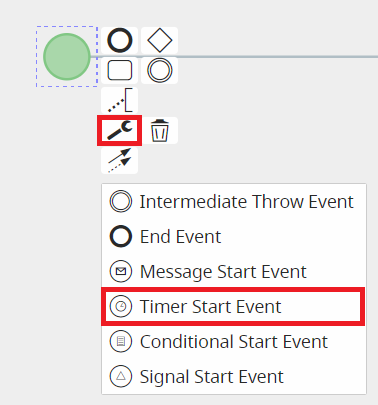
A particular type of timer is the **"Timer Start Event"**, which is applied to the Start Event to allow a specific process to begin at a predefined time interval.  
It can be selected in diagram editing mode by first clicking on the Start Event, then on the wrench icon that appears among the selectable options, and finally choosing the **"Timer Start Event"** option.  
Note: This type of start event must be followed by an **action task**, as it only allows actions to be executed.

Other types of Start Events are currently **not implemented**.

**IMPORTANT NOTE:** As of version 24.08, they have been completely removed.

[![image.png](https://usermanual.vtenext.com/uploads/images/gallery/2025-05/scaled-1680-/IHiimage.png)](https://usermanual.vtenext.com/uploads/images/gallery/2025-05/IHiimage.png)
# 2.2 End Event

**END EVENT**

It represents the endpoint of a process.  
Unlike the Start Event, it can be used more than once within a single process, since the flow may end at multiple points.

[![image.png](https://usermanual.vtenext.com/uploads/images/gallery/2025-05/scaled-1680-/OFaimage.png)](https://usermanual.vtenext.com/uploads/images/gallery/2025-05/OFaimage.png)

# 2.3 Intermediate / Boundary Event Timer

**INTERMEDIATE/BOUNDARY EVENT TIMER**

It represents an element widely used for managing the timing of task and process execution.

[![image.png](https://usermanual.vtenext.com/uploads/images/gallery/2025-05/scaled-1680-/FrNimage.png)](https://usermanual.vtenext.com/uploads/images/gallery/2025-05/FrNimage.png)

It can be quickly selected from the menu on the left while in diagram editing mode.

[![image.png](https://usermanual.vtenext.com/uploads/images/gallery/2025-05/scaled-1680-/fgkimage.png)](https://usermanual.vtenext.com/uploads/images/gallery/2025-05/fgkimage.png)

There are two groups of timers, which differ based on the actions to be performed and the tasks/elements involved:

1\) Intermediate Event Timer

2\) Boundary Event Timer

**1) INTERMEDIATE EVENT TIMER**

The first group consists of various types of "Intermediate Events" and is used between two tasks/elements.  
They can be selected in diagram editing mode by first clicking on the task or element from which the flow should then continue to the timer, and then clicking on the icon showing two circles, called **"Intermediate/Boundary Event Timer."**

[![image.png](https://usermanual.vtenext.com/uploads/images/gallery/2025-05/scaled-1680-/2W1image.png)](https://usermanual.vtenext.com/uploads/images/gallery/2025-05/2W1image.png)
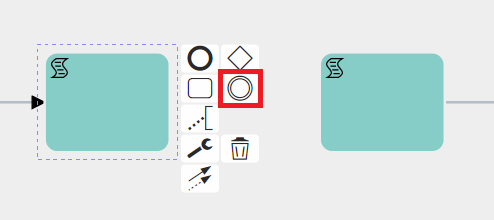
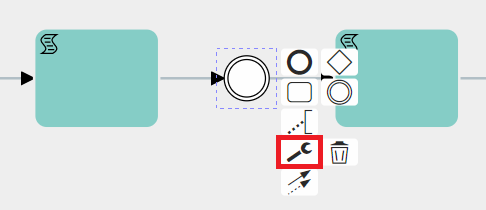
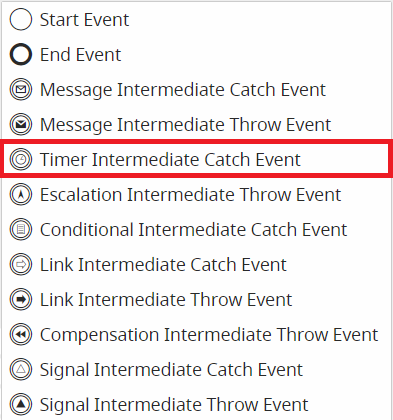
At this point, you need to select the timer just mentioned, click on the wrench icon, and then choose one of the available options.

[![image.png](https://usermanual.vtenext.com/uploads/images/gallery/2025-05/scaled-1680-/gk0image.png)](https://usermanual.vtenext.com/uploads/images/gallery/2025-05/gk0image.png)
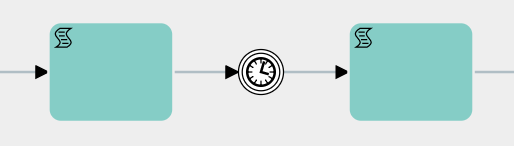
**Timer Intermediate Catch Event**

This is a type of timer used to wait for a specific period of time before moving on to the next task/element.

[![image.png](https://usermanual.vtenext.com/uploads/images/gallery/2025-05/scaled-1680-/5Hgimage.png)](https://usermanual.vtenext.com/uploads/images/gallery/2025-05/5Hgimage.png)
[![image.png](https://usermanual.vtenext.com/uploads/images/gallery/2025-05/scaled-1680-/vBrimage.png)](https://usermanual.vtenext.com/uploads/images/gallery/2025-05/vBrimage.png)
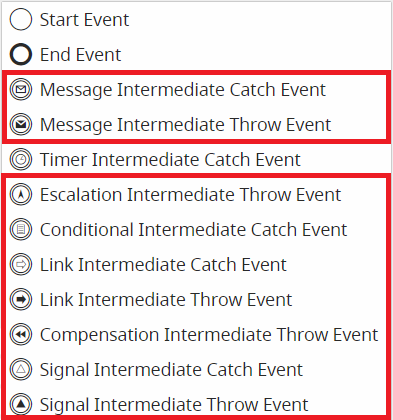
The other selectable types of Intermediate Events are currently not implemented.

**IMPORTANT NOTE:** As of version 24.08, they have been completely removed.

[![image.png](https://usermanual.vtenext.com/uploads/images/gallery/2025-05/scaled-1680-/ibrimage.png)](https://usermanual.vtenext.com/uploads/images/gallery/2025-05/ibrimage.png)
During the configuration phase, by clicking on the **Timer Intermediate Catch Event** symbol, a dedicated interface opens where you can enter the waiting time and the date to be used as a reference.

[![image.png](https://usermanual.vtenext.com/uploads/images/gallery/2025-05/scaled-1680-/rQjimage.png)](https://usermanual.vtenext.com/uploads/images/gallery/2025-05/rQjimage.png)

Inside the first picklist starting from the left, it is possible to indicate whether to wait for the indicated timing BEFORE or AFTER the reference date.

Instead, in the next picklist, three values ​​are made available:

\- **Now** -&gt; as the reference date it will take the date-time (timestamp) of the precise moment in which the process is positioned on the timer.

\- **Date** -&gt; allows you to insert a static date-time

[![image.png](https://usermanual.vtenext.com/uploads/images/gallery/2025-05/scaled-1680-/oNLimage.png)](https://usermanual.vtenext.com/uploads/images/gallery/2025-05/oNLimage.png)

**Other** -&gt; allows you to insert dynamic values, therefore taken from the date fields of the modules involved in the process.

[![image.png](https://usermanual.vtenext.com/uploads/images/gallery/2025-05/scaled-1680-/DKDimage.png)](https://usermanual.vtenext.com/uploads/images/gallery/2025-05/DKDimage.png)

**<span data-end="69" data-start="45">2) </span>BOUNDARY EVENT TIMER**

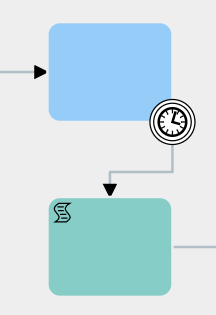
The second group consists of various types of **Boundary Events**, which are used on control tasks and are triggered when a task remains idle for a specific period of time.

They can be selected in diagram editing mode by first clicking on the task or element from which the flow should then continue to the timer, and then clicking on the icon showing two circles, called **"Intermediate/Boundary Event."**

At this point, you need to select the timer just mentioned and drag it onto one of the edges of the relevant control task.

[![symbology_boundary_event_timer_2.PNG](https://usermanual.vtenext.com/uploads/images/gallery/2022-03/scaled-1680-/symbology-boundary-event-timer-2.PNG)](https://usermanual.vtenext.com/uploads/images/gallery/2022-03/symbology-boundary-event-timer-2.PNG) [![symbology_boundary_event_timer_4.PNG](https://usermanual.vtenext.com/uploads/images/gallery/2022-03/scaled-1680-/symbology-boundary-event-timer-4.PNG)](https://usermanual.vtenext.com/uploads/images/gallery/2022-03/symbology-boundary-event-timer-4.PNG)
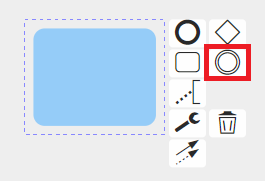

(Note: If you simply click on the icon, an “Intermediate Event” will be created and linked to the task with an arrow. If you want to use that timer as a Boundary Event, you just need to delete the arrow and place the timer directly on the relevant task.)

Once this is done, you need to select the timer, click on the wrench icon, and then choose one of the available options.

[![symbology_boundary_event_timer_5.PNG](https://usermanual.vtenext.com/uploads/images/gallery/2022-03/scaled-1680-/symbology-boundary-event-timer-5.PNG)](https://usermanual.vtenext.com/uploads/images/gallery/2022-03/symbology-boundary-event-timer-5.PNG)
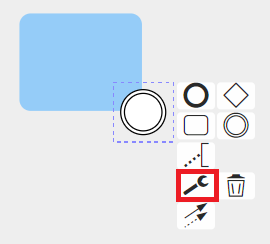
[![symbology_boundary_event_timer_3.PNG](https://usermanual.vtenext.com/uploads/images/gallery/2022-03/scaled-1680-/symbology-boundary-event-timer-3.PNG)](https://usermanual.vtenext.com/uploads/images/gallery/2022-03/symbology-boundary-event-timer-3.PNG)
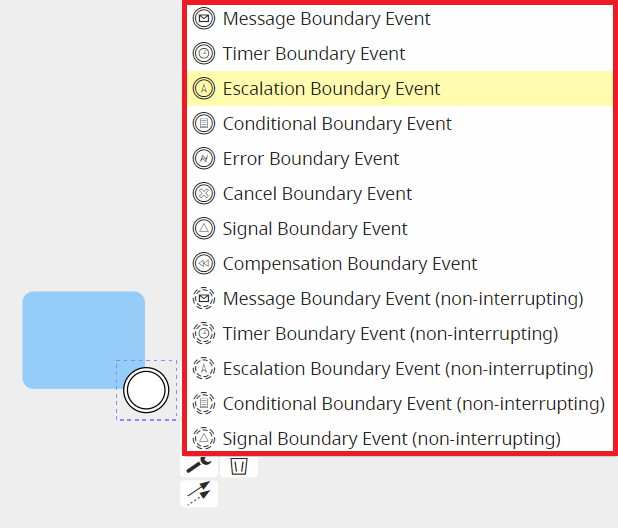
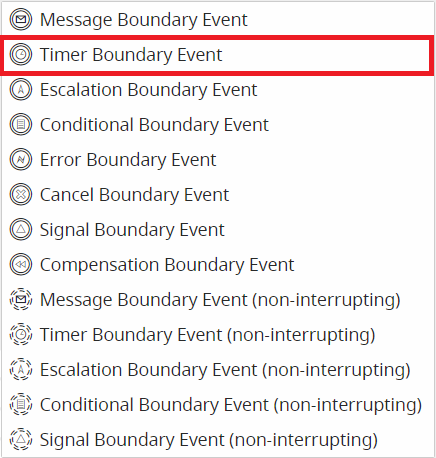
**Timer Boundary Event**

Allows the execution of the tasks/elements connected to the timer based on how long the process remains idle on the control task where the timer is placed.

**[![symbology_timer_boundary_event_3.PNG](https://usermanual.vtenext.com/uploads/images/gallery/2022-03/scaled-1680-/symbology-timer-boundary-event-3.PNG)  
  ](https://usermanual.vtenext.com/uploads/images/gallery/2022-03/symbology-timer-boundary-event-3.PNG)[![symbology_timer_boundary_event.PNG](https://usermanual.vtenext.com/uploads/images/gallery/2022-03/scaled-1680-/symbology-timer-boundary-event.PNG)](https://usermanual.vtenext.com/uploads/images/gallery/2022-03/symbology-timer-boundary-event.PNG)**

The time interval is predefined during the timer’s configuration.  
They can only be used on control tasks.

[![image.png](https://usermanual.vtenext.com/uploads/images/gallery/2025-05/scaled-1680-/W0aimage.png)](https://usermanual.vtenext.com/uploads/images/gallery/2025-05/W0aimage.png)
The other types of selectable Boundary Events are not currently implemented.

**IMPORTANT NOTE:** As of version 24.08, they have been completely removed.

During configuration, clicking on the Timer Boundary Event icon opens the dedicated interface where you can enter the waiting times.

[![image.png](https://usermanual.vtenext.com/uploads/images/gallery/2025-05/scaled-1680-/F27image.png)](https://usermanual.vtenext.com/uploads/images/gallery/2025-05/F27image.png)

As of version 25.02, it is possible to specify a reference date on which to base the waiting times.  
The configuration of this section is the same as for the intermediate timer, so in the first picklist from the left, you can indicate whether to wait the specified amount of time **BEFORE** or **AFTER** the reference date.

In the next picklist, three values are available:

\- **Now** → the reference date will be the date-time (timestamp) of the exact moment when the process reaches the timer.

[![image.png](https://usermanual.vtenext.com/uploads/images/gallery/2025-05/scaled-1680-/RMNimage.png)](https://usermanual.vtenext.com/uploads/images/gallery/2025-05/RMNimage.png)

\- **Date** → allows you to enter a static date-time value.

[![image.png](https://usermanual.vtenext.com/uploads/images/gallery/2025-05/scaled-1680-/y7uimage.png)](https://usermanual.vtenext.com/uploads/images/gallery/2025-05/y7uimage.png)

\- **Other** -&gt; allows you to insert dynamic values, therefore taken from the date fields of the modules involved in the process.

[![image.png](https://usermanual.vtenext.com/uploads/images/gallery/2025-05/scaled-1680-/Th5image.png)](https://usermanual.vtenext.com/uploads/images/gallery/2025-05/Th5image.png)

# 2.4 Exclusive e Parallel Gateway

**Exclusive Gateway**

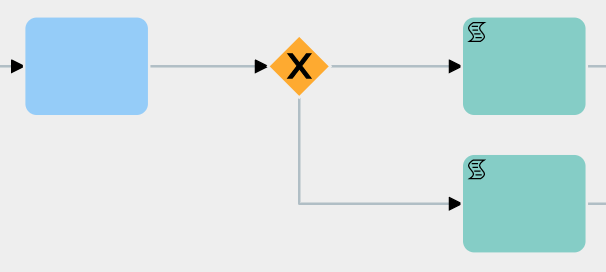
Allows the process flow to split into multiple different branches.  
It must be preceded by a control task in which the parameters are defined to determine which branch of the Gateway will be followed.

[![image.png](https://usermanual.vtenext.com/uploads/images/gallery/2025-05/scaled-1680-/0p7image.png)](https://usermanual.vtenext.com/uploads/images/gallery/2025-05/0p7image.png)
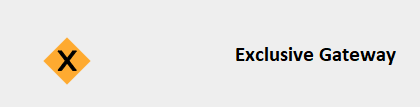
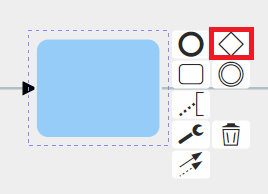
To use it, in diagram editing mode, you need to click on the control task and then select the diamond-shaped symbol called “Gateway.”

[![image.png](https://usermanual.vtenext.com/uploads/images/gallery/2025-05/scaled-1680-/w0fimage.png)](https://usermanual.vtenext.com/uploads/images/gallery/2025-05/w0fimage.png)
Here is an example of an applied Exclusive Gateway.

[![image.png](https://usermanual.vtenext.com/uploads/images/gallery/2025-05/scaled-1680-/ttjimage.png)](https://usermanual.vtenext.com/uploads/images/gallery/2025-05/ttjimage.png)
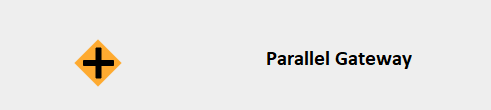
Like all other symbols, it can also be selected from the quick menu on the right.

**Parallel Gateway**

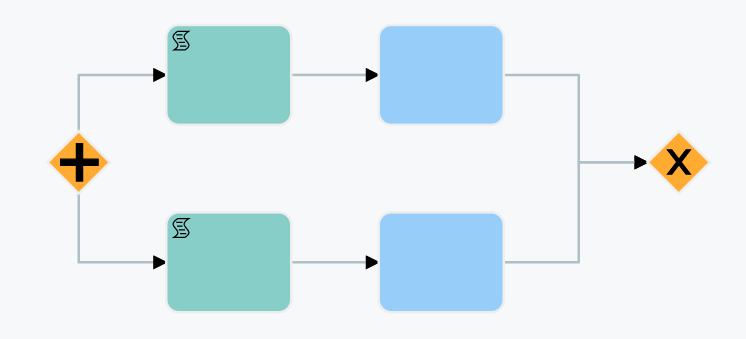
It performs the same function as the Exclusive Gateway, with the only difference being that all branches are executed in parallel. At the end of the branches, an Exclusive Gateway must be present to act as the closing Gateway for the parallel flow. Before the closing Gateway, as many control tasks must be configured as there are branches involved.

This type of structure allows you to choose whether to proceed with the flow upon completion of certain specific branches of the Gateway or wait for all existing branches to be completed.

**Note:**

\- Parallel Gateways cannot be used within other Parallel Gateways. - Multiple Parallel Gateways cannot share a single closing Exclusive Gateway.

[![image.png](https://usermanual.vtenext.com/uploads/images/gallery/2025-05/scaled-1680-/40Ximage.png)](https://usermanual.vtenext.com/uploads/images/gallery/2025-05/40Ximage.png)
To use it, while in diagram editing mode, you need to click on the task and then select the diamond-shaped symbol called “Gateway.”

[![image.png](https://usermanual.vtenext.com/uploads/images/gallery/2025-05/scaled-1680-/IjTimage.png)](https://usermanual.vtenext.com/uploads/images/gallery/2025-05/IjTimage.png)
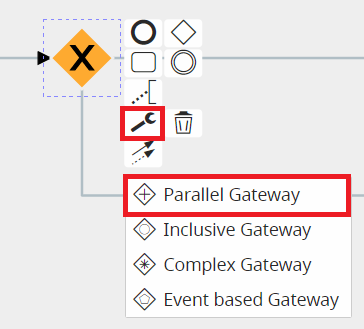
Here is an example of an applied Parallel Gateway.

[![image.png](https://usermanual.vtenext.com/uploads/images/gallery/2025-05/scaled-1680-/Hn8image.png)](https://usermanual.vtenext.com/uploads/images/gallery/2025-05/Hn8image.png)
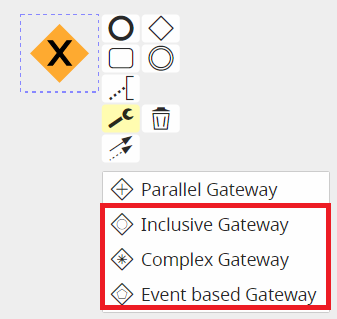
The types of Gateways listed below are not currently implemented.

**NOTE:** As of version 24.08, they have been completely removed.

[![image.png](https://usermanual.vtenext.com/uploads/images/gallery/2025-05/scaled-1680-/kzZimage.png)](https://usermanual.vtenext.com/uploads/images/gallery/2025-05/kzZimage.png)
# 2.5 Conditional Task and Action Task

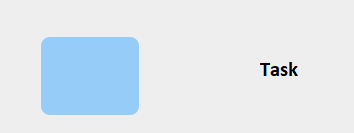
**<span class="--l sentence_highlight">CONDITIONAL TASK</span>**

<span class="--l sentence_highlight">Represents the element used to perform creation and control actions within the flow of a process.</span><span class="--r sentence_highlight">  
</span>

[![symbology-task.png](https://usermanual.vtenext.com/uploads/images/gallery/2025-05/scaled-1680-/symbology-task.png)](https://usermanual.vtenext.com/uploads/images/gallery/2025-05/symbology-task.png)

**<span class="--l sentence_highlight">ACTION TASK</span>**

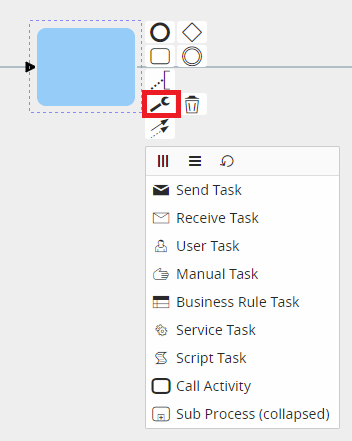
<span class="--l sentence_highlight">To define the type of task, Vtenext provides symbols that can be used to indicate the action performed by each task.</span><span class="--r sentence_highlight">  
</span>

<span class="--l --r sentence_highlight">These symbols can be selected during the diagram editing mode by pressing on the task and then later on the wrench that appears among the various selectable options.</span>

[![symbology-icons-list.png](https://usermanual.vtenext.com/uploads/images/gallery/2025-05/scaled-1680-/symbology-icons-list.png)](https://usermanual.vtenext.com/uploads/images/gallery/2025-05/symbology-icons-list.png)

[![symbology-icons-list-2.png](https://usermanual.vtenext.com/uploads/images/gallery/2025-05/scaled-1680-/symbology-icons-list-2.png)](https://usermanual.vtenext.com/uploads/images/gallery/2025-05/symbology-icons-list-2.png)
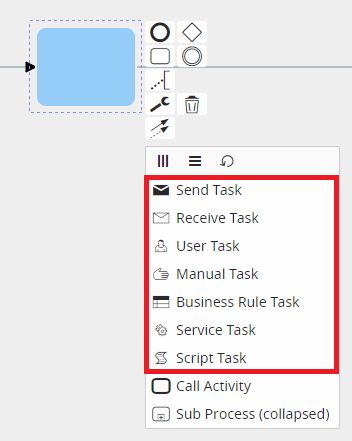
<span class="--l --r sentence_highlight">It is important to point out that these symbols do not go to affect the behavior of individual tasks, as their purpose is simply to show an initial visual reference that can facilitate the interpretation of individual tasks. </span><span class="--l sentence_highlight"><span class="--l --r hover:bg-blue-100 hover:dark:bg-blue-600">Thus</span><span class="--l --r hover:bg-blue-100 hover:dark:bg-blue-600">,</span> <span class="--l --r hover:bg-blue-100 hover:dark:bg-blue-600">it</span> <span class="--l --r hover:bg-blue-100 hover:dark:bg-blue-600">will</span> <span class="--l --r hover:bg-blue-100 hover:dark:bg-blue-600">be</span> <span class="--l --r hover:bg-blue-100 hover:dark:bg-blue-600">at</span> <span class="--l --r hover:bg-blue-100 hover:dark:bg-blue-600">the</span> <span class="--l --r hover:bg-blue-100 hover:dark:bg-blue-600">user's</span> <span class="--l --r hover:bg-blue-100 hover:dark:bg-blue-600">discretion</span> <span class="--l --r hover:bg-blue-100 hover:dark:bg-blue-600">to</span> <span class="--l --r hover:bg-blue-100 hover:dark:bg-blue-600">select</span> <span class="--l --r hover:bg-blue-100 hover:dark:bg-blue-600">the</span> <span class="--l --r hover:bg-blue-100 hover:dark:bg-blue-600">symbol</span> <span class="--l --r hover:bg-blue-100 hover:dark:bg-blue-600">most</span> <span class="--l --r hover:bg-blue-100 hover:dark:bg-blue-600">appropriate</span> <span class="--l --r hover:bg-blue-100 hover:dark:bg-blue-600">to</span> <span class="--l --r hover:bg-blue-100 hover:dark:bg-blue-600">the</span> <span class="--l --r hover:bg-blue-100 hover:dark:bg-blue-600">action</span> <span class="--l --r hover:bg-blue-100 hover:dark:bg-blue-600">performed</span> <span class="--l --r hover:bg-blue-100 hover:dark:bg-blue-600">by</span> <span class="--l --r hover:bg-blue-100 hover:dark:bg-blue-600">any</span> <span class="--l --r hover:bg-blue-100 hover:dark:bg-blue-600">given</span> <span class="--l --r hover:bg-blue-100 hover:dark:bg-blue-600">task</span><span class="--l --r hover:bg-blue-100 hover:dark:bg-blue-600">.</span></span>

<span class="--l sentence_highlight">Once selected, each symbol will be placed at the top left of the task and will be visible during process configuration.</span>

<span class="--l sentence_highlight">Below is an example for each selectable type:</span>

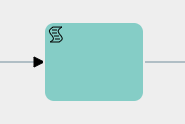
**<span class="--l --r sentence_highlight">Script Task</span>**

[![symbology-icons-list-script.png](https://usermanual.vtenext.com/uploads/images/gallery/2025-05/scaled-1680-/symbology-icons-list-script.png)](https://usermanual.vtenext.com/uploads/images/gallery/2025-05/symbology-icons-list-script.png)

<span class="--l sentence_highlight">It is advisable to use it to indicate the creation and updating of tasks.</span>

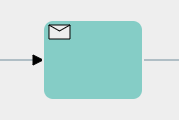
**<span class="--l --r sentence_highlight">Send Task</span>**

[![symbology-icons-list-send-email.png](https://usermanual.vtenext.com/uploads/images/gallery/2025-05/scaled-1680-/symbology-icons-list-send-email.png)](https://usermanual.vtenext.com/uploads/images/gallery/2025-05/symbology-icons-list-send-email.png)

<span class="--l sentence_highlight">It is advisable to use it to indicate the sending of emails and notifications.</span>

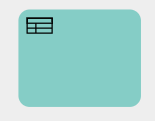
**<span class="--l --r sentence_highlight">Receive Task</span>**

[![symbology-icons-list-receive-email.png](https://usermanual.vtenext.com/uploads/images/gallery/2025-05/scaled-1680-/symbology-icons-list-receive-email.png)](https://usermanual.vtenext.com/uploads/images/gallery/2025-05/symbology-icons-list-receive-email.png)

<span class="--l sentence_highlight">There is no particular recommended use.</span>

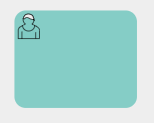
**<span class="--l --r sentence_highlight">User Task</span>**

[![symbology-icons-list-user-task.png](https://usermanual.vtenext.com/uploads/images/gallery/2025-05/scaled-1680-/symbology-icons-list-user-task.png)](https://usermanual.vtenext.com/uploads/images/gallery/2025-05/symbology-icons-list-user-task.png)

<span class="--l sentence_highlight">It is advisable to use it to indicate a task in charge of the user.</span>

**<span class="--l --r sentence_highlight">Manual Task</span>**

[![symbology-icons-list-manual-task.png](https://usermanual.vtenext.com/uploads/images/gallery/2025-05/scaled-1680-/symbology-icons-list-manual-task.png)](https://usermanual.vtenext.com/uploads/images/gallery/2025-05/symbology-icons-list-manual-task.png)

<span class="--l sentence_highlight">It is advisable to use it to indicate a task in charge of the user (process helper).</span>

**<span class="--l --r sentence_highlight">Business Rule Task</span>**

[![symbology-icons-list-business-rule-task.png](https://usermanual.vtenext.com/uploads/images/gallery/2025-05/scaled-1680-/symbology-icons-list-business-rule-task.png)](https://usermanual.vtenext.com/uploads/images/gallery/2025-05/symbology-icons-list-business-rule-task.png)

<span class="--l sentence_highlight">There is no particular recommended use.</span>

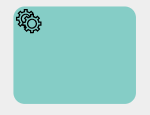
**<span class="--l --r sentence_highlight">Service Task</span>**

[![UhLsymbology-icons-list-service-task.png](https://usermanual.vtenext.com/uploads/images/gallery/2025-05/scaled-1680-/uhlsymbology-icons-list-service-task.png)](https://usermanual.vtenext.com/uploads/images/gallery/2025-05/uhlsymbology-icons-list-service-task.png)

<span class="--l sentence_highlight">It is advisable to use it to indicate the calling of external Webservices or SDKs.</span>

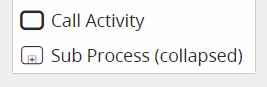
<span class="--l --r sentence_highlight"><span class="--l --r hover:bg-blue-100 hover:dark:bg-blue-600">On</span> <span class="--l --r hover:bg-blue-100 hover:dark:bg-blue-600">the</span> <span class="--l --r hover:bg-blue-100 hover:dark:bg-blue-600">other</span> <span class="--l --r hover:bg-blue-100 hover:dark:bg-blue-600">hand</span><span class="--l --r hover:bg-blue-100 hover:dark:bg-blue-600">,</span> <span class="--l --r hover:bg-blue-100 hover:dark:bg-blue-600">the</span> <span class="--l --r hover:bg-blue-100 hover:dark:bg-blue-600">only</span> <span class="--l --r hover:bg-blue-100 hover:dark:bg-blue-600">two</span> <span class="--l --r hover:bg-blue-100 hover:dark:bg-blue-600">symbols</span> <span class="--l --r hover:bg-blue-100 hover:dark:bg-blue-600">that</span> <span class="--l --r hover:bg-blue-100 hover:dark:bg-blue-600">allow</span> <span class="--l --r hover:bg-blue-100 hover:dark:bg-blue-600">a</span> <span class="--l --r hover:bg-blue-100 hover:dark:bg-blue-600">given</span> <span class="--l --r hover:bg-blue-100 hover:dark:bg-blue-600">action</span> <span class="--l --r hover:bg-blue-100 hover:dark:bg-blue-600">to</span> <span class="--l --r hover:bg-blue-100 hover:dark:bg-blue-600">take</span> <span class="--l --r hover:bg-blue-100 hover:dark:bg-blue-600">place</span> <span class="--l --r hover:bg-blue-100 hover:dark:bg-blue-600">and</span> <span class="--l --r hover:bg-blue-100 hover:dark:bg-blue-600">thus</span> <span class="--l --r hover:bg-blue-100 hover:dark:bg-blue-600">condition</span> <span class="--l --r hover:bg-blue-100 hover:dark:bg-blue-600">the</span> <span class="--l --r hover:bg-blue-100 hover:dark:bg-blue-600">behavior</span> <span class="--l --r hover:bg-blue-100 hover:dark:bg-blue-600">of</span> <span class="--l --r hover:bg-blue-100 hover:dark:bg-blue-600">a</span> <span class="--l --r hover:bg-blue-100 hover:dark:bg-blue-600">given</span> <span class="--l --r hover:bg-blue-100 hover:dark:bg-blue-600">task</span> <span class="--l --r hover:bg-blue-100 hover:dark:bg-blue-600">are</span> <span class="--l --r hover:bg-blue-100 hover:dark:bg-blue-600">the</span> <span class="--l --r hover:bg-blue-100 hover:dark:bg-blue-600">“</span><span class="--l --r hover:bg-blue-100 hover:dark:bg-blue-600">Call</span> <span class="--l --r hover:bg-blue-100 hover:dark:bg-blue-600">Activity</span><span class="--l --r hover:bg-blue-100 hover:dark:bg-blue-600">”</span> <span class="--l --r hover:bg-blue-100 hover:dark:bg-blue-600">a</span></span><span class="--l --r sentence_highlight"><span class="--l --r hover:bg-blue-100 hover:dark:bg-blue-600">nd</span> <span class="--l --r hover:bg-blue-100 hover:dark:bg-blue-600">the</span> <span class="--l --r hover:bg-blue-100 hover:dark:bg-blue-600">“</span><span class="--l --r hover:bg-blue-100 hover:dark:bg-blue-600">Sub</span> <span class="--l --r hover:bg-blue-100 hover:dark:bg-blue-600">Process</span><span class="--l --r hover:bg-blue-100 hover:dark:bg-blue-600">.</span><span class="--l --r hover:bg-blue-100 hover:dark:bg-blue-600">”</span></span>

[![symbology-icons-list-sub-process.png](https://usermanual.vtenext.com/uploads/images/gallery/2025-05/scaled-1680-/kOusymbology-icons-list-sub-process.png)](https://usermanual.vtenext.com/uploads/images/gallery/2025-05/kOusymbology-icons-list-sub-process.png)

**<span class="--l sentence_highlight"><span class="--l --r hover:bg-blue-100 hover:dark:bg-blue-600">Call</span> <span class="--l --r hover:bg-blue-100 hover:dark:bg-blue-600">Activity</span></span>**

<span class="--l sentence_highlight">This symbol allows you to perform an action that is not currently implemented.</span>

<span class="--l sentence_highlight">PLEASE NOTE: As of version 24.08 it has been completely removed.</span>

**<span class="--l sentence_highlight">Sub Process (collapsed)</span>**

<span class="--l sentence_highlight">This symbol allows you to call and use a sub process.</span>

# 2.6 CONNECTORS (CONNECTIONG OBJECT)

**<span class="--l sentence_highlight">CONNECTORS (CONNECTIONG OBJECT)</span>**

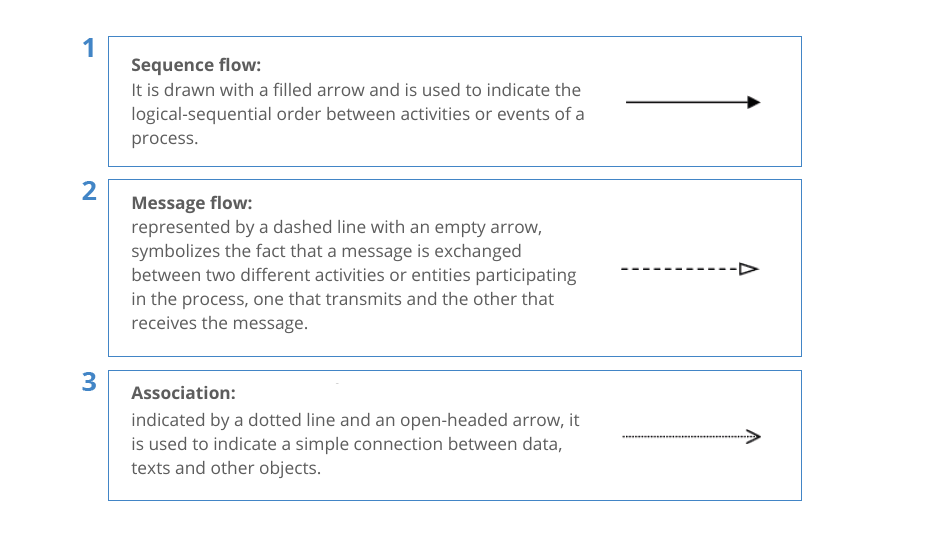
<span class="--l --r sentence_highlight">If the flow elements (events, activities or branches) in a process are “what actually happens,” they must be logically connected to each other. </span><span class="--l --r sentence_highlight">This is what connectors are for.</span>

[![image.png](https://usermanual.vtenext.com/uploads/images/gallery/2025-05/scaled-1680-/5rrimage.png)](https://usermanual.vtenext.com/uploads/images/gallery/2025-05/5rrimage.png)

Connectors must always have flow direction.

# 2.7 Basic rules

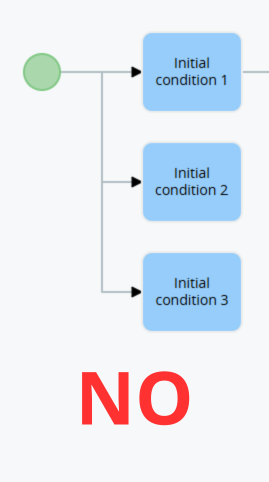
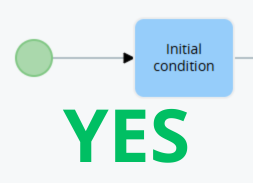
<span class="--l sentence_highlight">**1** - Upon process creation, the system automatically inserts a Start Event (see Chapter 2.1 for details), which is the element that represents the unique point from which each individual process begins.</span><span class="--r sentence_highlight">  
</span>

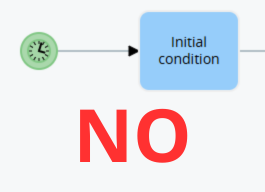
<span class="--l --r sentence_highlight">There can **only** be **one** in each individual process, since, the flow starts from a single point. </span><span class="--l --r sentence_highlight">(Figure 1 and 2)</span>

[![image.png](https://usermanual.vtenext.com/uploads/images/gallery/2025-05/scaled-1680-/JQKimage.png)](https://usermanual.vtenext.com/uploads/images/gallery/2025-05/JQKimage.png)

<span class="--l --r hover:bg-blue-100 hover:dark:bg-blue-600">Figure</span> <span class="--l --r hover:bg-blue-100 hover:dark:bg-blue-600">1</span>

[![image.png](https://usermanual.vtenext.com/uploads/images/gallery/2025-05/scaled-1680-/NMcimage.png)](https://usermanual.vtenext.com/uploads/images/gallery/2025-05/NMcimage.png)

<span class="--l --r hover:bg-blue-100 hover:dark:bg-blue-600">Figure</span> 2

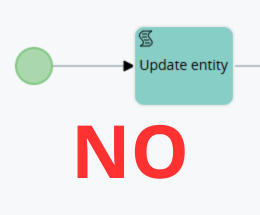
<span class="--l --r lmt_write_context_menu_highlight lmt_write_context_menu_interacted_sentence_highlight"><span class="--l --r hover:bg-blue-50 hover:dark:bg-gray-600 lmt__write_highlight_sentence py-[3px]">**2** - Only a **Conditional Task** can be attached to the Start Event (see Chapter 2.1 for details).</span></span> <span class="--l --r lmt_write_context_menu_highlight lmt_write_context_menu_interacted_sentence_highlight"><span class="--l --r hover:bg-blue-50 hover:dark:bg-gray-600 lmt__write_highlight_sentence py-[3px]">A Conditional Task is a control task in which the triggering conditions of the process can be defined.</span></span> <span class="--l --r lmt_write_context_menu_highlight lmt_write_context_menu_interacted_sentence_highlight"><span class="--l --r hover:bg-blue-50 hover:dark:bg-gray-600 lmt__write_highlight_sentence py-[3px]">(<span class="--l --r"><span class="--l --r border-b-2 border-green-100 dark:border-green-500 dark:text-green-300 lmt__write_highlight relative text-green-600"><span class="--l --r hover:dark:text-blue-300 hover:text-blue-500 lmt__words_highlight">Figures</span></span> <span class="--l --r hover:dark:text-blue-300 hover:text-blue-500 lmt__words_highlight">3</span> <span class="--l --r hover:dark:text-blue-300 hover:text-blue-500 lmt__words_highlight">and</span> <span class="--l --r hover:dark:text-blue-300 hover:text-blue-500 lmt__words_highlight">4</span><span class="--l --r border-b-2 border-green-100 dark:border-green-500 dark:text-green-300 lmt__write_highlight relative text-green-600">).</span></span></span></span>

[![image.png](https://usermanual.vtenext.com/uploads/images/gallery/2025-05/scaled-1680-/z2Mimage.png)](https://usermanual.vtenext.com/uploads/images/gallery/2025-05/z2Mimage.png)

<span class="--l --r hover:bg-blue-100 hover:dark:bg-blue-600">Figure</span> 3

[![image.png](https://usermanual.vtenext.com/uploads/images/gallery/2025-05/scaled-1680-/NMcimage.png)](https://usermanual.vtenext.com/uploads/images/gallery/2025-05/NMcimage.png)

<span class="--l --r hover:bg-blue-100 hover:dark:bg-blue-600">Figure</span> 4

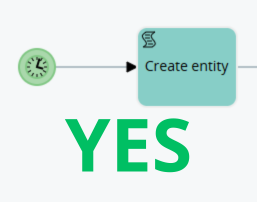
<span class="--l --r sentence_highlight">The same logic applies to the Timer Start Event, the only difference being that **only a task of any type except Conditional Task** can be attached. </span><span class="--l --r sentence_highlight">(Figure 5 and 6)</span>

[![image.png](https://usermanual.vtenext.com/uploads/images/gallery/2025-05/scaled-1680-/Yssimage.png)](https://usermanual.vtenext.com/uploads/images/gallery/2025-05/Yssimage.png)

<span class="--l --r hover:bg-blue-100 hover:dark:bg-blue-600">Figure</span> 5

[![image.png](https://usermanual.vtenext.com/uploads/images/gallery/2025-05/scaled-1680-/2wfimage.png)](https://usermanual.vtenext.com/uploads/images/gallery/2025-05/2wfimage.png)

<span class="--l --r hover:bg-blue-100 hover:dark:bg-blue-600">Figure</span> 6

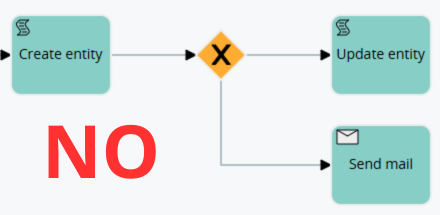
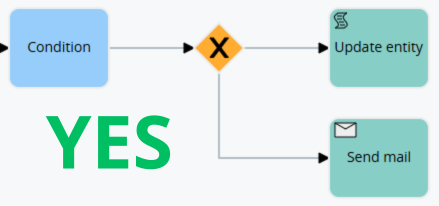
<span class="--l --r sentence_highlight">**<span class="--l --r hover:bg-blue-100 hover:dark:bg-blue-600">3</span>** <span class="--l --r hover:bg-blue-100 hover:dark:bg-blue-600">-</span> <span class="--l --r hover:bg-blue-100 hover:dark:bg-blue-600">Before</span> <span class="--l --r hover:bg-blue-100 hover:dark:bg-blue-600">an</span> <span class="--l --r hover:bg-blue-100 hover:dark:bg-blue-600">Exclusive</span> <span class="--l --r hover:bg-blue-100 hover:dark:bg-blue-600">Gateway</span> <span class="--l --r hover:bg-blue-100 hover:dark:bg-blue-600">there</span> <span class="--l --r hover:bg-blue-100 hover:dark:bg-blue-600">must</span> <span class="--l --r hover:bg-blue-100 hover:dark:bg-blue-600">always</span> <span class="--l --r hover:bg-blue-100 hover:dark:bg-blue-600">be</span> <span class="--l --r hover:bg-blue-100 hover:dark:bg-blue-600">a</span> **<span class="--l --r hover:bg-blue-100 hover:dark:bg-blue-600">Conditional</span> <span class="--l --r hover:bg-blue-100 hover:dark:bg-blue-600">Task</span>** <span class="--l --r hover:bg-blue-100 hover:dark:bg-blue-600">that</span> <span class="--l --r hover:bg-blue-100 hover:dark:bg-blue-600">allows</span> <span class="--l --r hover:bg-blue-100 hover:dark:bg-blue-600">you</span> <span class="--l --r hover:bg-blue-100 hover:dark:bg-blue-600">to</span> <span class="--l --r hover:bg-blue-100 hover:dark:bg-blue-600">define</span> <span class="--l --r hover:bg-blue-100 hover:dark:bg-blue-600">sets</span> <span class="--l --r hover:bg-blue-100 hover:dark:bg-blue-600">of</span> <span class="--l --r hover:bg-blue-100 hover:dark:bg-blue-600">conditions</span> <span class="--l --r hover:bg-blue-100 hover:dark:bg-blue-600">on</span> <span class="--l --r hover:bg-blue-100 hover:dark:bg-blue-600">the</span> <span class="--l --r hover:bg-blue-100 hover:dark:bg-blue-600">basis</span> <span class="--l --r hover:bg-blue-100 hover:dark:bg-blue-600">of</span> <span class="--l --r hover:bg-blue-100 hover:dark:bg-blue-600">which</span> <span class="--l --r hover:bg-blue-100 hover:dark:bg-blue-600">the</span> <span class="--l --r hover:bg-blue-100 hover:dark:bg-blue-600">process</span> <span class="--l --r hover:bg-blue-100 hover:dark:bg-blue-600">will</span> <span class="--l --r hover:bg-blue-100 hover:dark:bg-blue-600">split</span> <span class="--l --r hover:bg-blue-100 hover:dark:bg-blue-600">into</span> <span class="--l --r hover:bg-blue-100 hover:dark:bg-blue-600">multiple</span> <span class="--l --r hover:bg-blue-100 hover:dark:bg-blue-600">branches</span><span class="--l --r hover:bg-blue-100 hover:dark:bg-blue-600">.</span> </span><span class="--l --r sentence_highlight">(Figure 7 and 8)</span>

[![image.png](https://usermanual.vtenext.com/uploads/images/gallery/2025-05/scaled-1680-/W1Aimage.png)](https://usermanual.vtenext.com/uploads/images/gallery/2025-05/W1Aimage.png)

<span class="--l --r hover:bg-blue-100 hover:dark:bg-blue-600">Figure</span> 7

[![image.png](https://usermanual.vtenext.com/uploads/images/gallery/2025-05/scaled-1680-/Y4Zimage.png)](https://usermanual.vtenext.com/uploads/images/gallery/2025-05/Y4Zimage.png)

<span class="--l --r hover:bg-blue-100 hover:dark:bg-blue-600">Figure</span> 8

# 2.8 Comparison Operators: Description and Use in Conditional Tasks.

<span class="--l sentence_highlight">The system provides several comparison operators that can be used within Conditional Tasks, which are the types of tasks that allow you to perform checks on the fields of the dynamic forms/forms involved within the process.</span>

<span class="--l --r sentence_highlight">WARNING! </span><span class="--l sentence_highlight">-&gt; the system is “Case Sensitive,” so the same values with different upper or lower case are treated as if they were different.</span><span class="--r sentence_highlight">  
</span>

<span class="--l sentence_highlight">Example: “VTENEXT” and “vtenext” are seen by the system as different values.</span>

<span class="--l --r sentence_highlight">- “**equals**” -&gt; allows checking whether the contents of a field are equal to a static value specified within the condition. </span><span class="--l --r sentence_highlight">(Figure 1)</span>

[![image.png](https://usermanual.vtenext.com/uploads/images/gallery/2025-05/scaled-1680-/X8Simage.png)](https://usermanual.vtenext.com/uploads/images/gallery/2025-05/X8Simage.png)

<span class="--l sentence_highlight">Figure 1</span>

<span class="--l --r sentence_highlight">PLEASE NOTE: the system does not allow you to compare multiple values at the same time on the same row, so in case you need to perform a multipl</span><span class="--l --r sentence_highlight">e check you will have to create separate conditions (Figure 2 and 3)</span>

[![image.png](https://usermanual.vtenext.com/uploads/images/gallery/2025-05/scaled-1680-/inZimage.png)](https://usermanual.vtenext.com/uploads/images/gallery/2025-05/inZimage.png)

<span class="--l --r sentence_highlight"><span class="--l sentence_highlight">Figure 2</span></span>

[![image.png](https://usermanual.vtenext.com/uploads/images/gallery/2025-05/scaled-1680-/A4Cimage.png)](https://usermanual.vtenext.com/uploads/images/gallery/2025-05/A4Cimage.png)

<span class="--l sentence_highlight">Figure 3</span>

<span class="--l sentence_highlight"><span class="--l --r sentence_highlight">- “**different**”-&gt;allows to check whether the contents of a field are NOT equal to a static value specified within the condition. </span>(Figure 4)</span>

[![image.png](https://usermanual.vtenext.com/uploads/images/gallery/2025-05/scaled-1680-/K2Zimage.png)](https://usermanual.vtenext.com/uploads/images/gallery/2025-05/K2Zimage.png)

<span class="--l sentence_highlight">Figure 4</span>

<span class="--l --r sentence_highlight">- “**contains**” -&gt; allows checking whether the static value specified within the condition is present within a field, regardless of where it is located. </span><span class="--l sentence_highlight">(Figure 5)</span>

<span class="--l --r sentence_highlight">  
</span>

<span class="--l sentence_highlight">Taking the example given in Figure 5 as a reference, in case we have a company named “demo\_vtenext”, the condition will be verified, since, this tringa contains “vte”.</span>

[![image.png](https://usermanual.vtenext.com/uploads/images/gallery/2025-05/scaled-1680-/WZYimage.png)](https://usermanual.vtenext.com/uploads/images/gallery/2025-05/WZYimage.png)

<span class="--l sentence_highlight">Figure 5</span>

<span class="--l sentence_highlight">In contrast to the “equal” operator, the system allows multiple values to be compared simultaneously on the same row (Figure 6)</span>

[![image.png](https://usermanual.vtenext.com/uploads/images/gallery/2025-05/scaled-1680-/5meimage.png)](https://usermanual.vtenext.com/uploads/images/gallery/2025-05/5meimage.png)

<span class="--l sentence_highlight">Figure 6</span>

<span class="--l --r sentence_highlight">- “**does not contain**” -&gt; allows checking whether the static value specified within the condition is NOT present within a field, regardless of where it is located. </span><span class="--l --r sentence_highlight">(Figure 7)</span>

[![image.png](https://usermanual.vtenext.com/uploads/images/gallery/2025-05/scaled-1680-/TV1image.png)](https://usermanual.vtenext.com/uploads/images/gallery/2025-05/TV1image.png)

<span class="--l sentence_highlight">Figure 7</span>

<span class="--l --r sentence_highlight">  
</span>

<span class="--l sentence_highlight">As with the “contains” operator, multiple values can be compared at the same time on the same row (which should be entered separated with a comma).</span>

<span class="--l --r sentence_highlight">- “**starts for**” -&gt; allows you to check whether the contents of a field begin with the static value specified within the condition. </span><span class="--l --r sentence_highlight">(Figure 8)</span>

[![image.png](https://usermanual.vtenext.com/uploads/images/gallery/2025-05/scaled-1680-/lImimage.png)](https://usermanual.vtenext.com/uploads/images/gallery/2025-05/lImimage.png)

<span class="--l sentence_highlight">Figure 8</span>

<span class="--l --r sentence_highlight">  
</span>

<span class="--l sentence_highlight">PLEASE NOTE: the system does not allow you to compare multiple values at the same time on the same row, so in case you need to perform a multiple check you will have to create separate conditions (take Figure 2 and 3 as reference)</span>

<span class="--l --r sentence_highlight">- “**ends with**” -&gt;allows you to check whether the contents of a field ends with the static value specifie</span><span class="--l --r sentence_highlight">d within the condition. </span><span class="--l sentence_highlight">(Figure 9)</span>

[![image.png](https://usermanual.vtenext.com/uploads/images/gallery/2025-05/scaled-1680-/w9Limage.png)](https://usermanual.vtenext.com/uploads/images/gallery/2025-05/w9Limage.png)

<span class="--l sentence_highlight"><span class="--l --r hover:bg-blue-100 hover:dark:bg-blue-600">Figure</span> <span class="--l --r hover:bg-blue-100 hover:dark:bg-blue-600">9</span></span>

<span class="--l --r sentence_highlight">  
</span>

<span class="--l sentence_highlight">PLEASE NOTE: the system does not allow you to compare multiple values at the same time on the same row, so in case you need to perform a multiple check you will have to create separate conditions (take Figure 2 and 3 as reference)</span>

<span class="--l sentence_highlight">- “**has changed to**” -&gt; allows you to check whether the contents of the field has precisely changed to the value specified within the condition (Figure 10)</span>

[![image.png](https://usermanual.vtenext.com/uploads/images/gallery/2025-05/scaled-1680-/H5jimage.png)](https://usermanual.vtenext.com/uploads/images/gallery/2025-05/H5jimage.png)

<span class="--l sentence_highlight">Figure 10</span>

<span class="--l --r sentence_highlight"><span class="--l --r hover:bg-blue-100 hover:dark:bg-blue-600">For</span> <span class="--l --r hover:bg-blue-100 hover:dark:bg-blue-600">all</span> <span class="--l --r hover:bg-blue-100 hover:dark:bg-blue-600">those</span> <span class="--l --r hover:bg-blue-100 hover:dark:bg-blue-600">types</span> <span class="--l --r hover:bg-blue-100 hover:dark:bg-blue-600">of</span> <span class="--l --r hover:bg-blue-100 hover:dark:bg-blue-600">fields</span> <span class="--l --r hover:bg-blue-100 hover:dark:bg-blue-600">that</span> <span class="--l --r hover:bg-blue-100 hover:dark:bg-blue-600">might</span> <span class="--l --r hover:bg-blue-100 hover:dark:bg-blue-600">have</span> <span class="--l --r hover:bg-blue-100 hover:dark:bg-blue-600">an</span> <span class="--l --r hover:bg-blue-100 hover:dark:bg-blue-600">undefined</span> <span class="--l --r hover:bg-blue-100 hover:dark:bg-blue-600">value</span> <span class="--l --r hover:bg-blue-100 hover:dark:bg-blue-600">(</span><span class="--l --r hover:bg-blue-100 hover:dark:bg-blue-600">text</span><span class="--l --r hover:bg-blue-100 hover:dark:bg-blue-600">,</span> <span class="--l --r hover:bg-blue-100 hover:dark:bg-blue-600">number</span><span class="--l --r hover:bg-blue-100 hover:dark:bg-blue-600">,</span> <span class="--l --r hover:bg-blue-100 hover:dark:bg-blue-600">date</span><span class="--l --r hover:bg-blue-100 hover:dark:bg-blue-600">,</span> <span class="--l --r hover:bg-blue-100 hover:dark:bg-blue-600">related</span> <span class="--l --r hover:bg-blue-100 hover:dark:bg-blue-600">to</span><span class="--l --r hover:bg-blue-100 hover:dark:bg-blue-600">,</span> <span class="--l --r hover:bg-blue-100 hover:dark:bg-blue-600">etc</span><span class="--l --r hover:bg-blue-100 hover:dark:bg-blue-600">.</span><span class="--l --r hover:bg-blue-100 hover:dark:bg-blue-600">)</span><span class="--l --r hover:bg-blue-100 hover:dark:bg-blue-600">,</span> <span class="--l --r hover:bg-blue-100 hover:dark:bg-blue-600">by</span> <span class="--l --r hover:bg-blue-100 hover:dark:bg-blue-600">combining</span> <span class="--l --r hover:bg-blue-100 hover:dark:bg-blue-600">the</span> <span class="--l --r hover:bg-blue-100 hover:dark:bg-blue-600">“</span><span class="--l --r hover:bg-blue-100 hover:dark:bg-blue-600">has</span> <span class="--l --r hover:bg-blue-100 hover:dark:bg-blue-600">changed</span> <span class="--l --r hover:bg-blue-100 hover:dark:bg-blue-600">to</span><span class="--l --r hover:bg-blue-100 hover:dark:bg-blue-600">”</span> <span class="--l --r hover:bg-blue-100 hover:dark:bg-blue-600">operator</span> <span class="--l --r hover:bg-blue-100 hover:dark:bg-blue-600">with</span> <span class="--l --r hover:bg-blue-100 hover:dark:bg-blue-600">the</span> <span class="--l --r hover:bg-blue-100 hover:dark:bg-blue-600">“</span><span class="--l --r hover:bg-blue-100 hover:dark:bg-blue-600">different</span><span class="--l --r hover:bg-blue-100 hover:dark:bg-blue-600">”</span> <span class="--l --r hover:bg-blue-100 hover:dark:bg-blue-600">operator</span><span class="--l --r hover:bg-blue-100 hover:dark:bg-blue-600">,</span> <span class="--l --r hover:bg-blue-100 hover:dark:bg-blue-600">it</span> <span class="--l --r hover:bg-blue-100 hover:dark:bg-blue-600">is</span> <span class="--l --r hover:bg-blue-100 hover:dark:bg-blue-600">possible</span> <span class="--l --r hover:bg-blue-100 hover:dark:bg-blue-600">to</span> <span class="--l --r hover:bg-blue-100 hover:dark:bg-blue-600">configure</span> <span class="--l --r hover:bg-blue-100 hover:dark:bg-blue-600">a</span> <span class="--l --r hover:bg-blue-100 hover:dark:bg-blue-600">condition</span> <span class="--l --r hover:bg-blue-100 hover:dark:bg-blue-600">to</span> <span class="--l --r hover:bg-blue-100 hover:dark:bg-blue-600">capture</span> <span class="--l --r hover:bg-blue-100 hover:dark:bg-blue-600">a</span> <span class="--l --r hover:bg-blue-100 hover:dark:bg-blue-600">change</span> <span class="--l --r hover:bg-blue-100 hover:dark:bg-blue-600">in</span> <span class="--l --r hover:bg-blue-100 hover:dark:bg-blue-600">the</span> <span class="--l --r hover:bg-blue-100 hover:dark:bg-blue-600">content</span> <span class="--l --r hover:bg-blue-100 hover:dark:bg-blue-600">of</span> <span class="--l --r hover:bg-blue-100 hover:dark:bg-blue-600">a</span> <span class="--l --r hover:bg-blue-100 hover:dark:bg-blue-600">field</span> <span class="--l --r hover:bg-blue-100 hover:dark:bg-blue-600">to</span> <span class="--l --r hover:bg-blue-100 hover:dark:bg-blue-600">a</span> <span class="--l --r hover:bg-blue-100 hover:dark:bg-blue-600">consistent</span> <span class="--l --r hover:bg-blue-100 hover:dark:bg-blue-600">value</span> <span class="--l --r hover:bg-blue-100 hover:dark:bg-blue-600">that</span> <span class="--l --r hover:bg-blue-100 hover:dark:bg-blue-600">you</span> <span class="--l --r hover:bg-blue-100 hover:dark:bg-blue-600">are</span> <span class="--l --r hover:bg-blue-100 hover:dark:bg-blue-600">not</span> <span class="--l --r hover:bg-blue-100 hover:dark:bg-blue-600">aware</span> <span class="--l --r hover:bg-blue-100 hover:dark:bg-blue-600">of</span><span class="--l --r hover:bg-blue-100 hover:dark:bg-blue-600">.</span> </span><span class="--l sentence_highlight">(Figure 11)</span><span class="--r sentence_highlight">  
</span>

[![image.png](https://usermanual.vtenext.com/uploads/images/gallery/2025-05/scaled-1680-/fFLimage.png)](https://usermanual.vtenext.com/uploads/images/gallery/2025-05/fFLimage.png)

<span class="--l sentence_highlight">Figure 11</span>

<span class="--l --r sentence_highlight">  
</span>

<span class="--l sentence_highlight">The example shown in Figure 11 translates into the following sentence, “Expected closing date has changed to a value I cannot define but, at the same time, that value is different from empty, so it will necessarily be a consistent value.”</span>

<span class="--l --r sentence_highlight">  
</span>

<span class="--l sentence_highlight">- “**has changed from**” -&gt; allows you to check whether the contents of the field has changed from one value to another, both of which are specified within the condition (Figure 12)</span>

<span class="--l --r sentence_highlight">  
</span>

<span class="--l sentence_highlight">The first slot should specify the value that the field had before the change, while the second slot should specify the new value that was entered.</span>

[![image.png](https://usermanual.vtenext.com/uploads/images/gallery/2025-05/scaled-1680-/gsKimage.png)](https://usermanual.vtenext.com/uploads/images/gallery/2025-05/gsKimage.png)

<span class="--l sentence_highlight">Figure 12</span>

<span class="--l --r sentence_highlight">- “**greater than**” -&gt; allows you to check whether the content of a number/currency field present is greater than an entered static value specified within the condition. </span><span class="--l --r sentence_highlight">(Figure 13)</span>

[![image.png](https://usermanual.vtenext.com/uploads/images/gallery/2025-05/scaled-1680-/lrcimage.png)](https://usermanual.vtenext.com/uploads/images/gallery/2025-05/lrcimage.png)

<span class="--l sentence_highlight">Figure 13</span>

<span class="--l --r sentence_highlight">- “**greater than or equal**” -&gt; allows checking whether the content of a number/currency field present is greater than or equal to an entered static value specified within the condition. </span><span class="--l sentence_highlight">(Figure 14)</span>

[![image.png](https://usermanual.vtenext.com/uploads/images/gallery/2025-05/scaled-1680-/Tcqimage.png)](https://usermanual.vtenext.com/uploads/images/gallery/2025-05/Tcqimage.png)

<span class="--l sentence_highlight">Figure 14</span>

<span class="--l --r sentence_highlight">- “**less than**” -&gt; allows you to check whether the content of a number/currency field present is less than an entered static value specified within the condition. </span><span class="--l --r sentence_highlight">(Figure 15)</span>

[![image.png](https://usermanual.vtenext.com/uploads/images/gallery/2025-05/scaled-1680-/LKPimage.png)](https://usermanual.vtenext.com/uploads/images/gallery/2025-05/LKPimage.png)

<span class="--l sentence_highlight"><span class="--l --r hover:bg-blue-100 hover:dark:bg-blue-600">Figure</span> <span class="--l --r hover:bg-blue-100 hover:dark:bg-blue-600">15</span></span>

<span class="--l --r sentence_highlight">  
</span>

<span class="--l --r sentence_highlight">- “**less than or equal**” -&gt; allows checking whether the content of a number/currency field present is less than or equal to an entered static value specified within the condition. </span><span class="--l sentence_highlight">(Figure 16)</span><span class="--r sentence_highlight">  
</span>

[![image.png](https://usermanual.vtenext.com/uploads/images/gallery/2025-05/scaled-1680-/0uEimage.png)](https://usermanual.vtenext.com/uploads/images/gallery/2025-05/0uEimage.png)

<span class="--l sentence_highlight"><span class="--l --r hover:bg-blue-100 hover:dark:bg-blue-600">Figure</span> <span class="--l --r hover:bg-blue-100 hover:dark:bg-blue-600">16</span></span>

# 2.9 Comparison operators: Rules of use in initial condition tasks

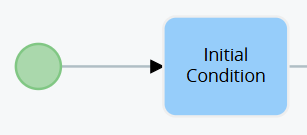
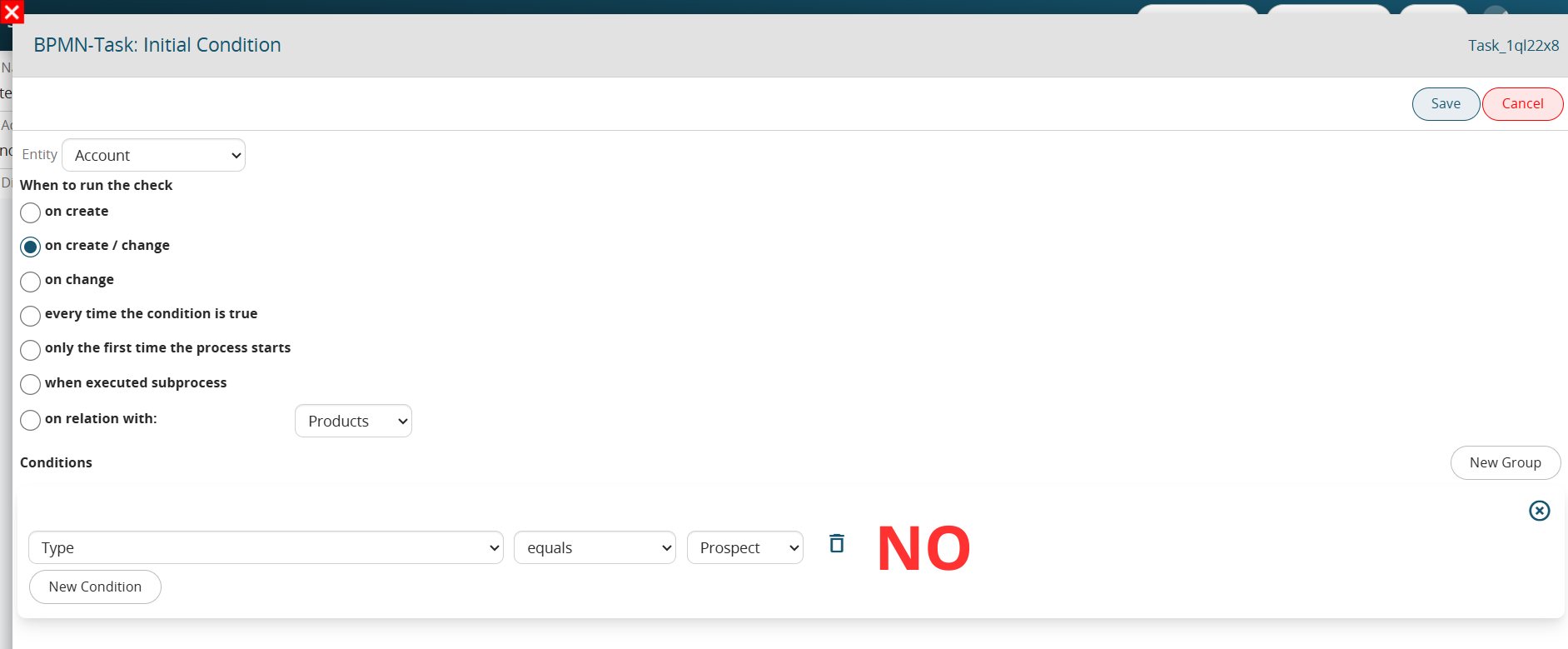
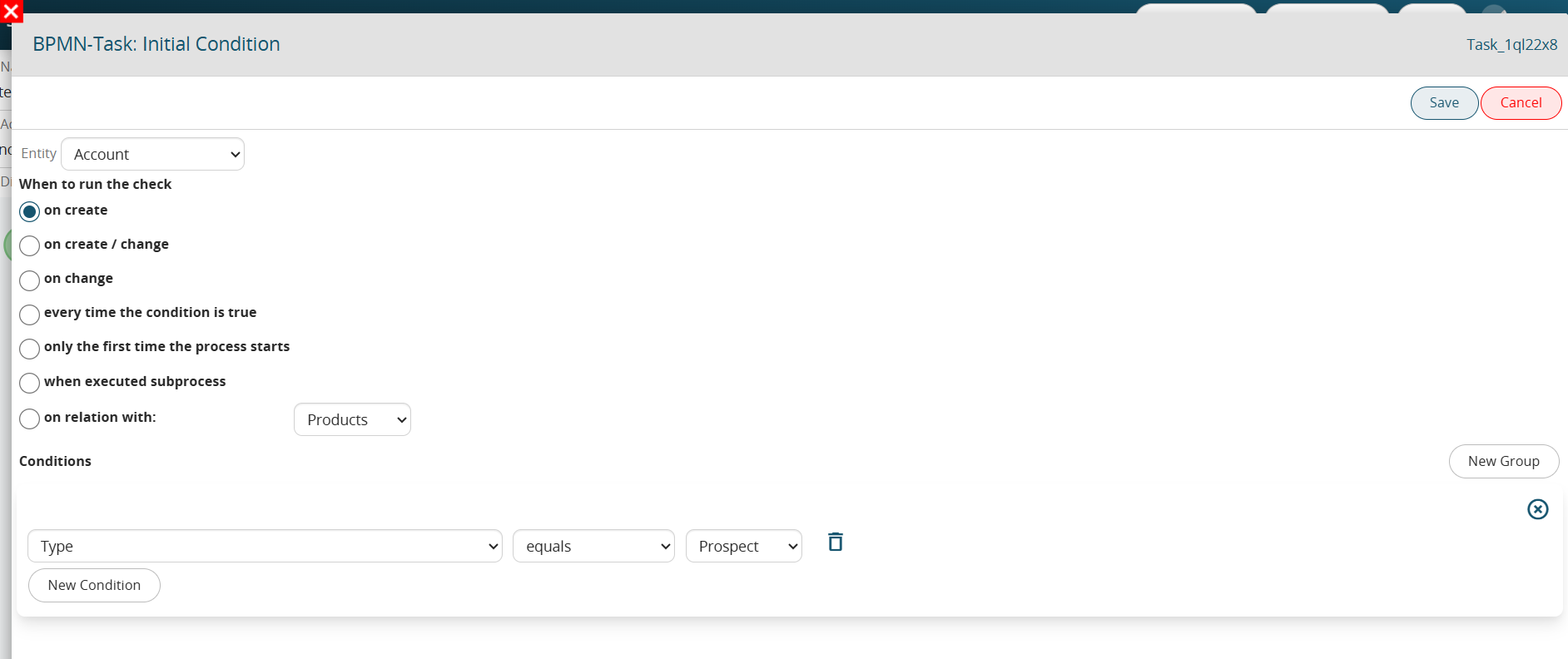
<span class="--l --r sentence_highlight">Some comparison operators should be used carefully within the “Initial Condition” Tasks, i.e., those Conditional Tasks directly associated with the Start Event within which conditions are defined that allow the process to be triggered or not. </span><span class="--l --r sentence_highlight"><span class="--l --r hover:bg-blue-100 hover:dark:bg-blue-600">(</span><span class="--l --r hover:bg-blue-100 hover:dark:bg-blue-600">Figures</span> <span class="--l --r hover:bg-blue-100 hover:dark:bg-blue-600">1</span> <span class="--l --r hover:bg-blue-100 hover:dark:bg-blue-600">and</span> <span class="--l --r hover:bg-blue-100 hover:dark:bg-blue-600">2</span><span class="--l --r hover:bg-blue-100 hover:dark:bg-blue-600">)</span><span class="--l --r hover:bg-blue-100 hover:dark:bg-blue-600">.</span></span>

[![image.png](https://usermanual.vtenext.com/uploads/images/gallery/2025-05/scaled-1680-/GJ9image.png)](https://usermanual.vtenext.com/uploads/images/gallery/2025-05/GJ9image.png)

Figure 1

[![image.png](https://usermanual.vtenext.com/uploads/images/gallery/2025-05/scaled-1680-/ABaimage.png)](https://usermanual.vtenext.com/uploads/images/gallery/2025-05/ABaimage.png)
<span class="--l sentence_highlight">Figure 2 (click on the image for a higher graphic resolution)</span>

<span class="--l --r sentence_highlight">  
</span>

<span class="--l --r sentence_highlight">Specifically, in the case where the “**edit**” phase is involved in the condition (thus selecting one of the following: “upon editing” </span><span class="--l sentence_highlight"><span class="--l --r hover:bg-blue-100 hover:dark:bg-blue-600">,</span> <span class="--l --r hover:bg-blue-100 hover:dark:bg-blue-600">“</span><span class="--l --r hover:bg-blue-100 hover:dark:bg-blue-600">upon</span> <span class="--l --r hover:bg-blue-100 hover:dark:bg-blue-600">creation</span> <span class="--l --r hover:bg-blue-100 hover:dark:bg-blue-600">and</span> <span class="--l --r hover:bg-blue-100 hover:dark:bg-blue-600">modification</span><span class="--l --r hover:bg-blue-100 hover:dark:bg-blue-600">”</span><span class="--l --r hover:bg-blue-100 hover:dark:bg-blue-600">,</span> <span class="--l --r hover:bg-blue-100 hover:dark:bg-blue-600">“</span><span class="--l --r hover:bg-blue-100 hover:dark:bg-blue-600">whenever</span> <span class="--l --r hover:bg-blue-100 hover:dark:bg-blue-600">the</span> <span class="--l --r hover:bg-blue-100 hover:dark:bg-blue-600">condition</span> <span class="--l --r hover:bg-blue-100 hover:dark:bg-blue-600">turns</span> <span class="--l --r hover:bg-blue-100 hover:dark:bg-blue-600">out</span> <span class="--l --r hover:bg-blue-100 hover:dark:bg-blue-600">to</span> <span class="--l --r hover:bg-blue-100 hover:dark:bg-blue-600">be</span> <span class="--l --r hover:bg-blue-100 hover:dark:bg-blue-600">true</span><span class="--l --r hover:bg-blue-100 hover:dark:bg-blue-600">”</span><span class="--l --r hover:bg-blue-100 hover:dark:bg-blue-600">)</span><span class="--l --r hover:bg-blue-100 hover:dark:bg-blue-600">,</span> <span class="--l --r hover:bg-blue-100 hover:dark:bg-blue-600">the</span> <span class="--l --r hover:bg-blue-100 hover:dark:bg-blue-600">comparison</span> <span class="--l --r hover:bg-blue-100 hover:dark:bg-blue-600">operators</span> <span class="--l --r hover:bg-blue-100 hover:dark:bg-blue-600">“</span>**<span class="--l --r hover:bg-blue-100 hover:dark:bg-blue-600">equal</span>**<span class="--l --r hover:bg-blue-100 hover:dark:bg-blue-600">”</span><span class="--l --r hover:bg-blue-100 hover:dark:bg-blue-600">,</span> <span class="--l --r hover:bg-blue-100 hover:dark:bg-blue-600">“</span>**<span class="--l --r hover:bg-blue-100 hover:dark:bg-blue-600">different</span>**<span class="--l --r hover:bg-blue-100 hover:dark:bg-blue-600">”</span><span class="--l --r hover:bg-blue-100 hover:dark:bg-blue-600">,</span> <span class="--l --r hover:bg-blue-100 hover:dark:bg-blue-600">“</span>**<span class="--l --r hover:bg-blue-100 hover:dark:bg-blue-600">contains</span>**<span class="--l --r hover:bg-blue-100 hover:dark:bg-blue-600">”</span><span class="--l --r hover:bg-blue-100 hover:dark:bg-blue-600">,</span> <span class="--l --r hover:bg-blue-100 hover:dark:bg-blue-600">“</span>**<span class="--l --r hover:bg-blue-100 hover:dark:bg-blue-600">does</span> <span class="--l --r hover:bg-blue-100 hover:dark:bg-blue-600">not</span> <span class="--l --r hover:bg-blue-100 hover:dark:bg-blue-600">contain</span>**<span class="--l --r hover:bg-blue-100 hover:dark:bg-blue-600">”</span><span class="--l --r hover:bg-blue-100 hover:dark:bg-blue-600">,</span> <span class="--l --r hover:bg-blue-100 hover:dark:bg-blue-600">“</span>**<span class="--l --r hover:bg-blue-100 hover:dark:bg-blue-600">starts</span> <span class="--l --r hover:bg-blue-100 hover:dark:bg-blue-600">with</span>**<span class="--l --r hover:bg-blue-100 hover:dark:bg-blue-600">”</span><span class="--l --r hover:bg-blue-100 hover:dark:bg-blue-600">,</span> <span class="--l --r hover:bg-blue-100 hover:dark:bg-blue-600">“</span>**<span class="--l --r hover:bg-blue-100 hover:dark:bg-blue-600">ends</span> <span class="--l --r hover:bg-blue-100 hover:dark:bg-blue-600">with</span>**<span class="--l --r hover:bg-blue-100 hover:dark:bg-blue-600">”</span><span class="--l --r hover:bg-blue-100 hover:dark:bg-blue-600">,</span> <span class="--l --r hover:bg-blue-100 hover:dark:bg-blue-600">“</span>**<span class="--l --r hover:bg-blue-100 hover:dark:bg-blue-600">greater</span> <span class="--l --r hover:bg-blue-100 hover:dark:bg-blue-600">than</span>**<span class="--l --r hover:bg-blue-100 hover:dark:bg-blue-600">”</span><span class="--l --r hover:bg-blue-100 hover:dark:bg-blue-600">,</span> <span class="--l --r hover:bg-blue-100 hover:dark:bg-blue-600">“</span>**<span class="--l --r hover:bg-blue-100 hover:dark:bg-blue-600">greater</span> <span class="--l --r hover:bg-blue-100 hover:dark:bg-blue-600">than</span> <span class="--l --r hover:bg-blue-100 hover:dark:bg-blue-600">or</span> <span class="--l --r hover:bg-blue-100 hover:dark:bg-blue-600">equal</span>**<span class="--l --r hover:bg-blue-100 hover:dark:bg-blue-600">”</span><span class="--l --r hover:bg-blue-100 hover:dark:bg-blue-600">,</span> <span class="--l --r hover:bg-blue-100 hover:dark:bg-blue-600">“</span>**<span class="--l --r hover:bg-blue-100 hover:dark:bg-blue-600">less</span> <span class="--l --r hover:bg-blue-100 hover:dark:bg-blue-600">than</span>**<span class="--l --r hover:bg-blue-100 hover:dark:bg-blue-600">”</span><span class="--l --r hover:bg-blue-100 hover:dark:bg-blue-600">,</span> <span class="--l --r hover:bg-blue-100 hover:dark:bg-blue-600">“</span>**<span class="--l --r hover:bg-blue-100 hover:dark:bg-blue-600">less</span> <span class="--l --r hover:bg-blue-100 hover:dark:bg-blue-600">than</span> <span class="--l --r hover:bg-blue-100 hover:dark:bg-blue-600">or</span> <span class="--l --r hover:bg-blue-100 hover:dark:bg-blue-600">equal</span>**<span class="--l --r hover:bg-blue-100 hover:dark:bg-blue-600">”</span> <span class="--l --r hover:bg-blue-100 hover:dark:bg-blue-600">cannot</span> <span class="--l --r hover:bg-blue-100 hover:dark:bg-blue-600">be</span> <span class="--l --r hover:bg-blue-100 hover:dark:bg-blue-600">used</span> <span class="--l --r hover:bg-blue-100 hover:dark:bg-blue-600">individually</span><span class="--l --r hover:bg-blue-100 hover:dark:bg-blue-600">,</span> <span class="--l --r hover:bg-blue-100 hover:dark:bg-blue-600">because</span><span class="--l --r hover:bg-blue-100 hover:dark:bg-blue-600">,</span> <span class="--l --r hover:bg-blue-100 hover:dark:bg-blue-600">there</span> <span class="--l --r hover:bg-blue-100 hover:dark:bg-blue-600">is</span> <span class="--l --r hover:bg-blue-100 hover:dark:bg-blue-600">a</span> <span class="--l --r hover:bg-blue-100 hover:dark:bg-blue-600">risk</span> <span class="--l --r hover:bg-blue-100 hover:dark:bg-blue-600">of</span> <span class="--l --r hover:bg-blue-100 hover:dark:bg-blue-600">creating</span> <span class="--l --r hover:bg-blue-100 hover:dark:bg-blue-600">loops</span><span class="--l --r hover:bg-blue-100 hover:dark:bg-blue-600">,</span> <span class="--l --r hover:bg-blue-100 hover:dark:bg-blue-600">i</span><span class="--l --r hover:bg-blue-100 hover:dark:bg-blue-600">.</span><span class="--l --r hover:bg-blue-100 hover:dark:bg-blue-600">e</span><span class="--l --r hover:bg-blue-100 hover:dark:bg-blue-600">.</span><span class="--l --r hover:bg-blue-100 hover:dark:bg-blue-600">,</span> <span class="--l --r hover:bg-blue-100 hover:dark:bg-blue-600">the</span> <span class="--l --r hover:bg-blue-100 hover:dark:bg-blue-600">unwanted</span> <span class="--l --r hover:bg-blue-100 hover:dark:bg-blue-600">and</span> <span class="--l --r hover:bg-blue-100 hover:dark:bg-blue-600">uncontrolled</span> <span class="--l --r hover:bg-blue-100 hover:dark:bg-blue-600">departure</span> <span class="--l --r hover:bg-blue-100 hover:dark:bg-blue-600">of</span> <span class="--l --r hover:bg-blue-100 hover:dark:bg-blue-600">multiple</span> <span class="--l --r hover:bg-blue-100 hover:dark:bg-blue-600">instances</span> <span class="--l --r hover:bg-blue-100 hover:dark:bg-blue-600">of</span> <span class="--l --r hover:bg-blue-100 hover:dark:bg-blue-600">the</span> <span class="--l --r hover:bg-blue-100 hover:dark:bg-blue-600">same</span> <span class="--l --r hover:bg-blue-100 hover:dark:bg-blue-600">process</span><span class="--l --r hover:bg-blue-100 hover:dark:bg-blue-600">.</span></span><span class="--r sentence_highlight">  
</span>

<span class="--l sentence_highlight">This is because, the comparison operators just mentioned simply look at whether the condition is verified or not, without taking into consideration in which specific save that condition first occurred.</span>

<span class="--l --r sentence_highlight">  
</span>

<span class="--l --r sentence_highlight">To better understand how they work, Figure 3 shows an example of an Initial Condition Task that is NOT properly configured.</span>

[![image.png](https://usermanual.vtenext.com/uploads/images/gallery/2025-05/scaled-1680-/dmMimage.png)](https://usermanual.vtenext.com/uploads/images/gallery/2025-05/dmMimage.png)

<span class="--l sentence_highlight">Figure 3 (click on image for higher graphic resolution).</span>

<span class="--l --r sentence_highlight">  
</span>

<span class="--l sentence_highlight">The condition “Type” = “Potential” simply tests whether that field possesses that specific value.</span><span class="--r sentence_highlight">  
</span>

<span class="--l sentence_highlight">By then setting this condition individually and involving editing (in this case by selecting “upon creation and editing”), the process will not only be triggered on the save where the “Type” is set to “Potential” but also on subsequent saves as long as the “Type” field retains that specific value.</span>

<span class="--l --r sentence_highlight">  
</span>

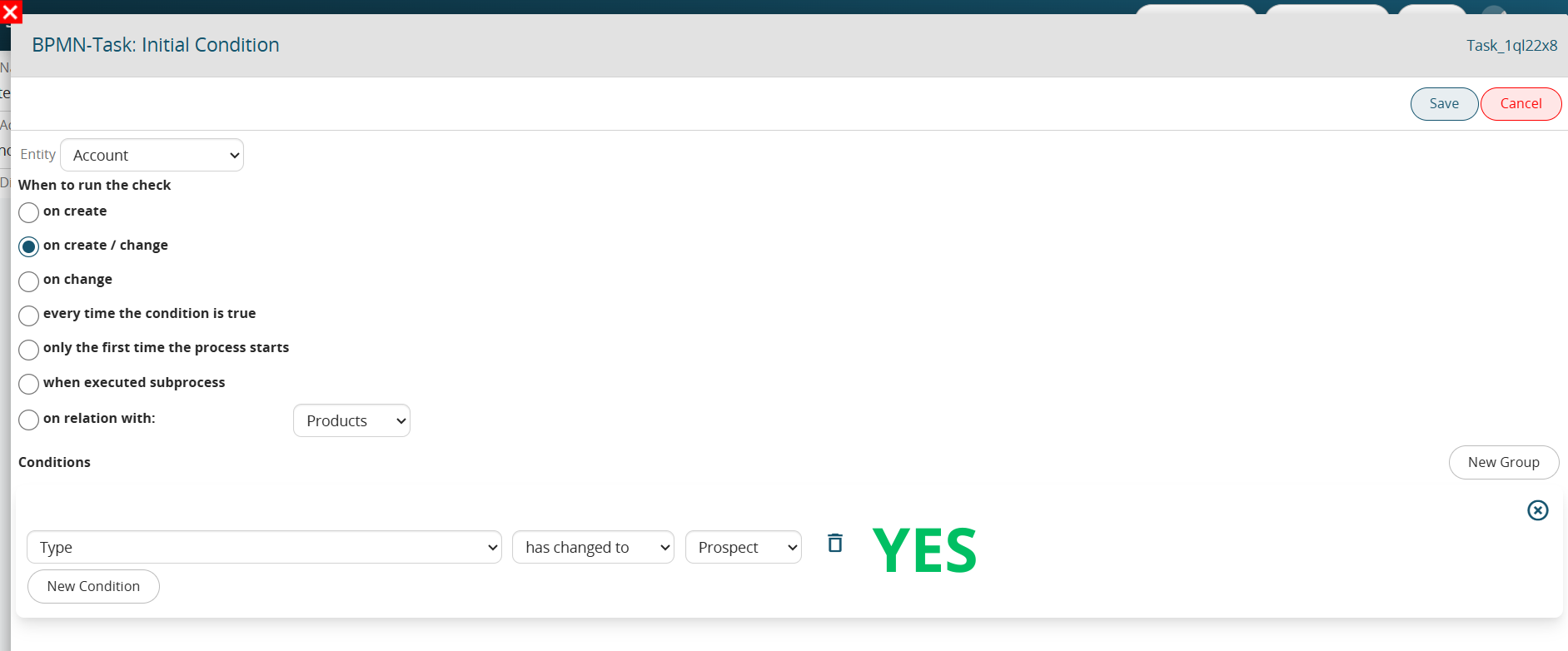
<span class="--l sentence_highlight">Precisely to overcome this issue, the system provides the “**has changed to**” and “**has changed from**” comparison operators that allow the process to trigger only in the save in which the setting of that specific value occurred.</span>

<span class="--l --r sentence_highlight">  
</span>

<span class="--l --r sentence_highlight">Thus, by configuring the process as shown in Figure 4, the process will only trigger on the save in which the value in “Potential” is set.</span>

[![image.png](https://usermanual.vtenext.com/uploads/images/gallery/2025-05/scaled-1680-/XYiimage.png)](https://usermanual.vtenext.com/uploads/images/gallery/2025-05/XYiimage.png)

Figure 4 (click on image for higher graphic resolution)

# 2.10 Configuration Section “When to run the check” in the Initial Condition Task.

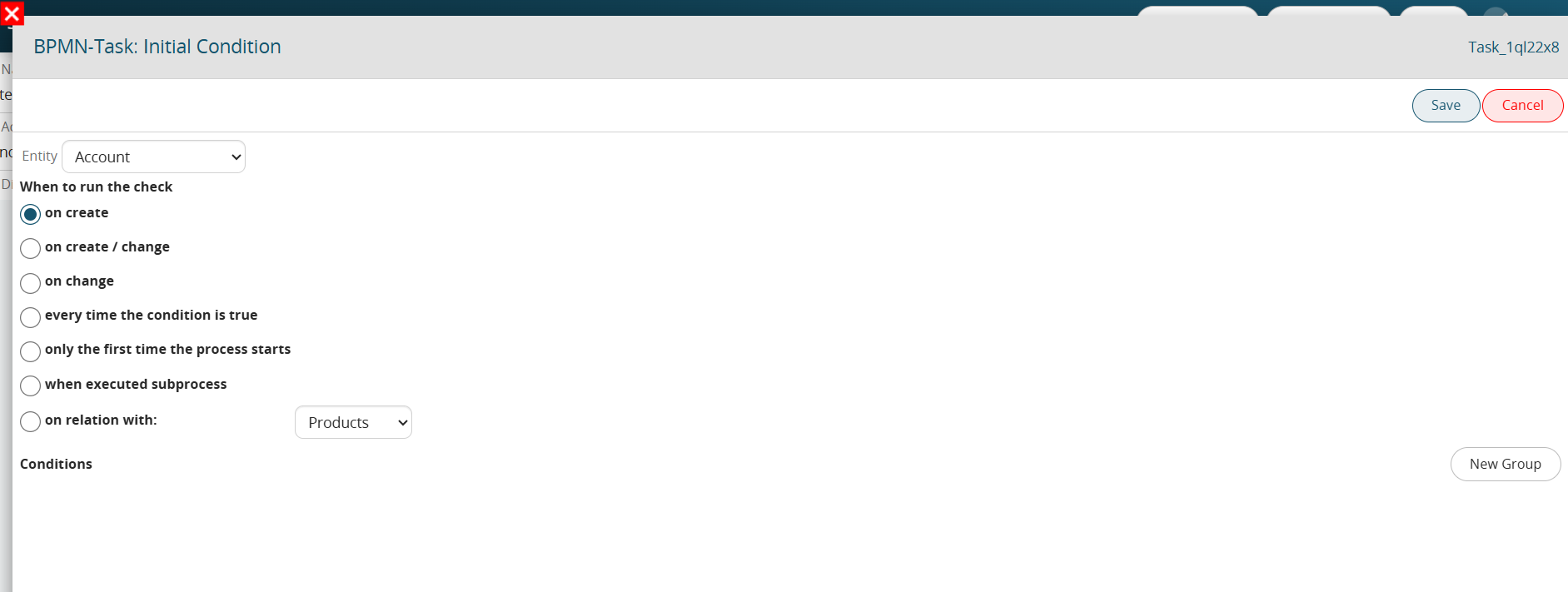
<span class=" --l alignedSentenceHighlight-module--alignedSentenceHighlight--e599c alignedSentenceHighlight-module--partialHighlightAnimationWeb--324f1 bg-[#E1F0F5] text-[#25282D] sentence_highlight">Within the “Initial Condition” Tasks, i.e., those Conditional Tasks directly associated with the Start Event within which the conditions that allow the process to be triggered or not are defined, the “When to Run Control” section is presented with the following values:</span>

<span class=" --l --r alignedSentenceHighlight-module--alignedSentenceHighlight--e599c alignedSentenceHighlight-module--partialHighlightAnimationWeb--324f1 bg-[#E1F0F5] text-[#25282D] sentence_highlight">  
</span>

<span class=" --l alignedSentenceHighlight-module--alignedSentenceHighlight--e599c alignedSentenceHighlight-module--partialHighlightAnimationWeb--324f1 bg-[#E1F0F5] text-[#25282D] sentence_highlight">- “**at creation**” -&gt; the process will trigger only after the creation of a record (instance of a form)</span>

<span class=" --l --r alignedSentenceHighlight-module--alignedSentenceHighlight--e599c alignedSentenceHighlight-module--partialHighlightAnimationWeb--324f1 bg-[#E1F0F5] text-[#25282D] sentence_highlight">  
</span>

<span class=" --l alignedSentenceHighlight-module--alignedSentenceHighlight--e599c alignedSentenceHighlight-module--partialHighlightAnimationWeb--324f1 bg-[#E1F0F5] text-[#25282D] sentence_highlight">- “**upon creation and modification**” -&gt; the process will trigger after the creation or modification of a record (instance of a form), so in fact in all situations currently handled in the processes.</span><span class=" --r alignedSentenceHighlight-module--alignedSentenceHighlight--e599c alignedSentenceHighlight-module--partialHighlightAnimationWeb--324f1 bg-[#E1F0F5] text-[#25282D] sentence_highlight">  
</span>

<span class=" --l alignedSentenceHighlight-module--alignedSentenceHighlight--e599c alignedSentenceHighlight-module--partialHighlightAnimationWeb--324f1 bg-[#E1F0F5] text-[#25282D] sentence_highlight">PLEASE NOTE: deletion of a record is a situation not handled in processes</span>

<span class=" --l --r alignedSentenceHighlight-module--alignedSentenceHighlight--e599c alignedSentenceHighlight-module--partialHighlightAnimationWeb--324f1 bg-[#E1F0F5] text-[#25282D] sentence_highlight">  
</span>

<span class=" --l alignedSentenceHighlight-module--alignedSentenceHighlight--e599c alignedSentenceHighlight-module--partialHighlightAnimationWeb--324f1 bg-[#E1F0F5] text-[#25282D] sentence_highlight">- “**upon modification**” -&gt; the process will be triggered only after the modification of a record (instance of a module)</span>

<span class=" --l --r alignedSentenceHighlight-module--alignedSentenceHighlight--e599c alignedSentenceHighlight-module--partialHighlightAnimationWeb--324f1 bg-[#E1F0F5] text-[#25282D] sentence_highlight">  
</span>

<span class=" --l alignedSentenceHighlight-module--alignedSentenceHighlight--e599c alignedSentenceHighlight-module--partialHighlightAnimationWeb--324f1 bg-[#E1F0F5] text-[#25282D] sentence_highlight">- “**whenever condition is true**” -&gt; the process will be triggered upon occurrence of the conditions (always after saving) entered in the “Conditions” section.</span><span class=" --r alignedSentenceHighlight-module--alignedSentenceHighlight--e599c alignedSentenceHighlight-module--partialHighlightAnimationWeb--324f1 bg-[#E1F0F5] text-[#25282D] sentence_highlight">  
</span>

<span class=" --l --r alignedSentenceHighlight-module--alignedSentenceHighlight--e599c alignedSentenceHighlight-module--partialHighlightAnimationWeb--324f1 bg-[#E1F0F5] text-[#25282D] sentence_highlight">Conditions can also be entered in the “Conditions” section for other values, so this item turns out to be for all intents and purposes analogous to the “upon creation and modification” item, this is because both creation and modification are involved.</span>

<span class="--l sentence_highlight">- “**only the first time the process is triggered**” -&gt; the process will trigger are the first time the condition entered in the “Conditions” section occurs.</span><span class="--r sentence_highlight">  
</span>

<span class="--l sentence_highlight">Thereafter, the process can never trigger on that specific record (instance of a module) again, even if the conditions configured within it have occurred.</span>

<span class="--l sentence_highlight"><span class="--l --r hover:bg-blue-100 hover:dark:bg-blue-600">-</span> <span class="--l --r hover:bg-blue-100 hover:dark:bg-blue-600">“</span>**<span class="--l --r hover:bg-blue-100 hover:dark:bg-blue-600">at</span> <span class="--l --r hover:bg-blue-100 hover:dark:bg-blue-600">subprocess</span> <span class="--l --r hover:bg-blue-100 hover:dark:bg-blue-600">launch</span>**<span class="--l --r hover:bg-blue-100 hover:dark:bg-blue-600">”</span> <span class="--l --r hover:bg-blue-100 hover:dark:bg-blue-600">-</span><span class="--l --r hover:bg-blue-100 hover:dark:bg-blue-600">&gt;</span> <span class="--l --r hover:bg-blue-100 hover:dark:bg-blue-600">is</span> <span class="--l --r hover:bg-blue-100 hover:dark:bg-blue-600">used</span> <span class="--l --r hover:bg-blue-100 hover:dark:bg-blue-600">exclusively</span> <span class="--l --r hover:bg-blue-100 hover:dark:bg-blue-600">for</span> <span class="--l --r hover:bg-blue-100 hover:dark:bg-blue-600">subprocess</span> <span class="--l --r hover:bg-blue-100 hover:dark:bg-blue-600">configuration</span> <span class="--l --r hover:bg-blue-100 hover:dark:bg-blue-600">and</span> <span class="--l --r hover:bg-blue-100 hover:dark:bg-blue-600">allows</span> <span class="--l --r hover:bg-blue-100 hover:dark:bg-blue-600">the</span> <span class="--l --r hover:bg-blue-100 hover:dark:bg-blue-600">subprocess</span> <span class="--l --r hover:bg-blue-100 hover:dark:bg-blue-600">to</span> <span class="--l --r hover:bg-blue-100 hover:dark:bg-blue-600">be</span> <span class="--l --r hover:bg-blue-100 hover:dark:bg-blue-600">triggered</span> <span class="--l --r hover:bg-blue-100 hover:dark:bg-blue-600">the</span> <span class="--l --r hover:bg-blue-100 hover:dark:bg-blue-600">moment</span> <span class="--l --r hover:bg-blue-100 hover:dark:bg-blue-600">the</span> <span class="--l --r hover:bg-blue-100 hover:dark:bg-blue-600">callback</span> <span class="--l --r hover:bg-blue-100 hover:dark:bg-blue-600">task</span> <span class="--l --r hover:bg-blue-100 hover:dark:bg-blue-600">configured</span> <span class="--l --r hover:bg-blue-100 hover:dark:bg-blue-600">in</span> <span class="--l --r hover:bg-blue-100 hover:dark:bg-blue-600">the</span> <span class="--l --r hover:bg-blue-100 hover:dark:bg-blue-600">parent</span> <span class="--l --r hover:bg-blue-100 hover:dark:bg-blue-600">process</span> <span class="--l --r hover:bg-blue-100 hover:dark:bg-blue-600">is</span> <span class="--l --r hover:bg-blue-100 hover:dark:bg-blue-600">executed</span><span class="--l --r hover:bg-blue-100 hover:dark:bg-blue-600">.</span></span>

<span class="--l --r sentence_highlight">  
</span>

<span class="--l --r sentence_highlight">- “**in relation with**” -&gt; allows the process to be triggered the moment a relation is established between two records (instance of a module) of two modules having an N - N relation</span>

[![image.png](https://usermanual.vtenext.com/uploads/images/gallery/2025-05/scaled-1680-/v5Dimage.png)](https://usermanual.vtenext.com/uploads/images/gallery/2025-05/v5Dimage.png)

Figure 1 (click on image for higher graphic resolution)

# 2.11 Configuration Section “When to run the check” in Conditional Tasks

<span class="--l sentence_highlight">Within classic Conditional Tasks, i.e., those Tasks used to perform checks within the process, the “When to check” section is presented with the following values:</span>

<span class="--l --r sentence_highlight">  
</span>

<span class="--l sentence_highlight">- “**upon change**” -&gt; the process will wait for a change in the record (instance of a form) involved before checking the conditions configured within the Conditional Task, even if they should already be checked.</span>

<span class="--l --r sentence_highlight">  
</span>

<span class="--l sentence_highlight">- “**whenever condition is true**” -&gt; the process will immediately verify the conditions configured within the Conditional Task, then continue with the flow in case they should already be verified.</span>

<span class="--l --r sentence_highlight">  
</span>

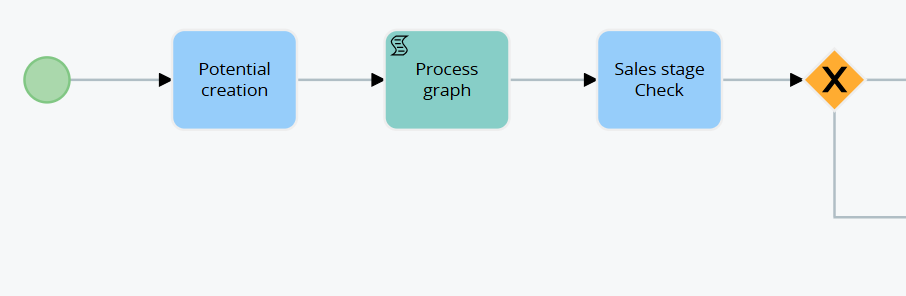
<span class="--l --r sentence_highlight">To better understand how it works, Figure 1 shows a process that, when an opportunity is created, performs a check on the Sales Stage and is divided into two different branches. </span><span class="--l --r sentence_highlight">(Figure 1)</span>

[![image.png](https://usermanual.vtenext.com/uploads/images/gallery/2025-05/scaled-1680-/iB6image.png)](https://usermanual.vtenext.com/uploads/images/gallery/2025-05/iB6image.png)

<span class="--l sentence_highlight">Figure 1</span>

<span class="--r sentence_highlight">  
</span>

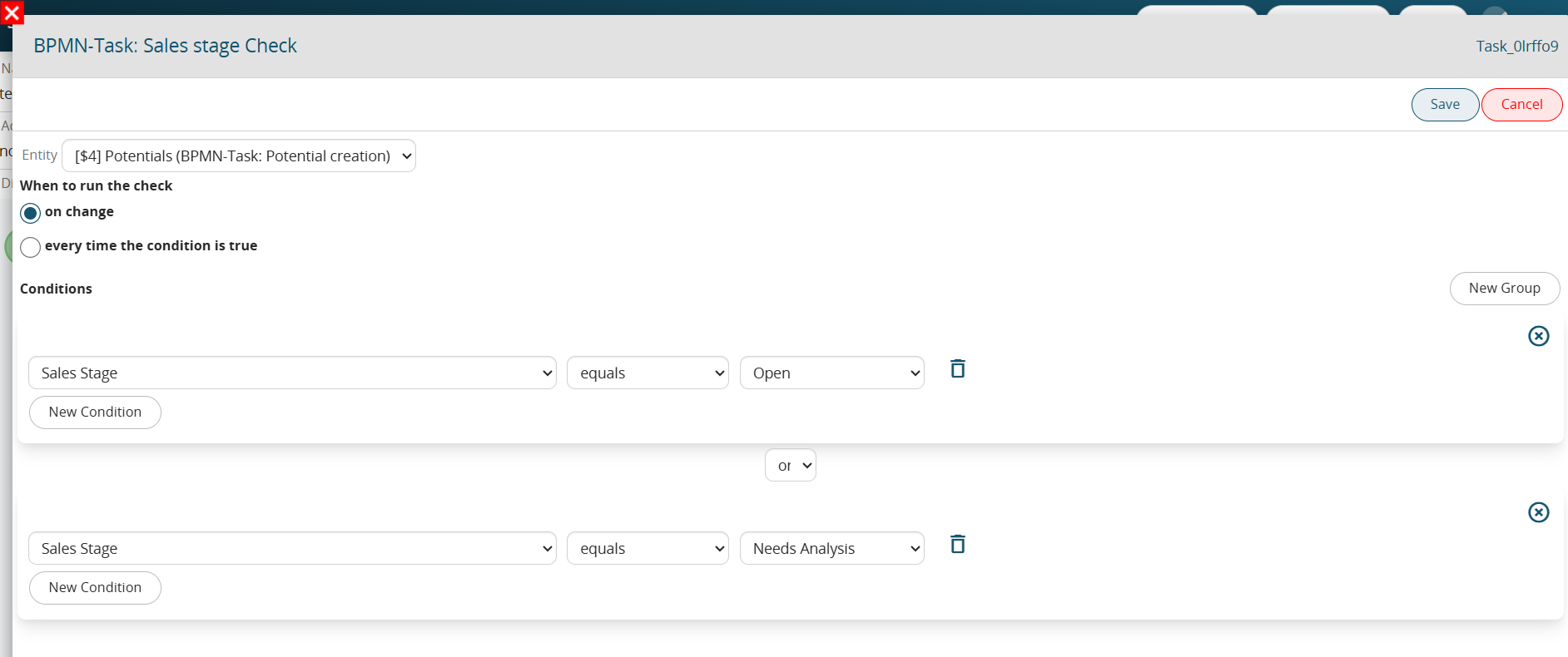
<span class="--l sentence_highlight"><span class="--l --r hover:bg-blue-100 hover:dark:bg-blue-600">In</span> <span class="--l --r hover:bg-blue-100 hover:dark:bg-blue-600">the</span> <span class="--l --r hover:bg-blue-100 hover:dark:bg-blue-600">event</span> <span class="--l --r hover:bg-blue-100 hover:dark:bg-blue-600">that</span> <span class="--l --r hover:bg-blue-100 hover:dark:bg-blue-600">the</span> <span class="--l --r hover:bg-blue-100 hover:dark:bg-blue-600">Conditional</span> <span class="--l --r hover:bg-blue-100 hover:dark:bg-blue-600">Task</span> <span class="--l --r hover:bg-blue-100 hover:dark:bg-blue-600">“</span><span class="--l --r hover:bg-blue-100 hover:dark:bg-blue-600">Checking</span> <span class="--l --r hover:bg-blue-100 hover:dark:bg-blue-600">Sales</span> <span class="--l --r hover:bg-blue-100 hover:dark:bg-blue-600">Stage</span><span class="--l --r hover:bg-blue-100 hover:dark:bg-blue-600">”</span> <span class="--l --r hover:bg-blue-100 hover:dark:bg-blue-600">was</span> <span class="--l --r hover:bg-blue-100 hover:dark:bg-blue-600">set</span> <span class="--l --r hover:bg-blue-100 hover:dark:bg-blue-600">“</span><span class="--l --r hover:bg-blue-100 hover:dark:bg-blue-600">upon</span> <span class="--l --r hover:bg-blue-100 hover:dark:bg-blue-600">modification</span><span class="--l --r hover:bg-blue-100 hover:dark:bg-blue-600">,</span><span class="--l --r hover:bg-blue-100 hover:dark:bg-blue-600">”</span> <span class="--l --r hover:bg-blue-100 hover:dark:bg-blue-600">even</span> <span class="--l --r hover:bg-blue-100 hover:dark:bg-blue-600">though</span> <span class="--l --r hover:bg-blue-100 hover:dark:bg-blue-600">the</span> <span class="--l --r hover:bg-blue-100 hover:dark:bg-blue-600">opportunity</span> <span class="--l --r hover:bg-blue-100 hover:dark:bg-blue-600">being</span> <span class="--l --r hover:bg-blue-100 hover:dark:bg-blue-600">created</span> <span class="--l --r hover:bg-blue-100 hover:dark:bg-blue-600">will</span> <span class="--l --r hover:bg-blue-100 hover:dark:bg-blue-600">have</span> <span class="--l --r hover:bg-blue-100 hover:dark:bg-blue-600">the</span> <span class="--l --r hover:bg-blue-100 hover:dark:bg-blue-600">“</span><span class="--l --r hover:bg-blue-100 hover:dark:bg-blue-600">Sales</span> <span class="--l --r hover:bg-blue-100 hover:dark:bg-blue-600">Stage</span><span class="--l --r hover:bg-blue-100 hover:dark:bg-blue-600">”</span> <span class="--l --r hover:bg-blue-100 hover:dark:bg-blue-600">=</span> <span class="--l --r hover:bg-blue-100 hover:dark:bg-blue-600">“</span><span class="--l --r hover:bg-blue-100 hover:dark:bg-blue-600">Open</span><span class="--l --r hover:bg-blue-100 hover:dark:bg-blue-600">”</span> <span class="--l --r hover:bg-blue-100 hover:dark:bg-blue-600">or</span> <span class="--l --r hover:bg-blue-100 hover:dark:bg-blue-600">“</span><span class="--l --r hover:bg-blue-100 hover:dark:bg-blue-600">To</span> <span class="--l --r hover:bg-blue-100 hover:dark:bg-blue-600">be</span> <span class="--l --r hover:bg-blue-100 hover:dark:bg-blue-600">Analyzed</span><span class="--l --r hover:bg-blue-100 hover:dark:bg-blue-600">,</span><span class="--l --r hover:bg-blue-100 hover:dark:bg-blue-600">”</span> <span class="--l --r hover:bg-blue-100 hover:dark:bg-blue-600">the</span> <span class="--l --r hover:bg-blue-100 hover:dark:bg-blue-600">process</span> <span class="--l --r hover:bg-blue-100 hover:dark:bg-blue-600">will</span> <span class="--l --r hover:bg-blue-100 hover:dark:bg-blue-600">not</span> <span class="--l --r hover:bg-blue-100 hover:dark:bg-blue-600">consider</span> <span class="--l --r hover:bg-blue-100 hover:dark:bg-blue-600">the</span> <span class="--l --r hover:bg-blue-100 hover:dark:bg-blue-600">conditions</span> <span class="--l --r hover:bg-blue-100 hover:dark:bg-blue-600">verified</span><span class="--l --r hover:bg-blue-100 hover:dark:bg-blue-600">.</span></span><span class="--r sentence_highlight">  
</span>

<span class="--l --r sentence_highlight">This is because a post-creation save of the opportunity will be waited for before verifying the conditions configured within it. </span><span class="--l --r sentence_highlight">(Figure 2)</span>

[![image.png](https://usermanual.vtenext.com/uploads/images/gallery/2025-05/scaled-1680-/JSVimage.png)](https://usermanual.vtenext.com/uploads/images/gallery/2025-05/JSVimage.png)

<span class="--l sentence_highlight">Figure 2</span>

<span class="--l --r sentence_highlight">  
</span>

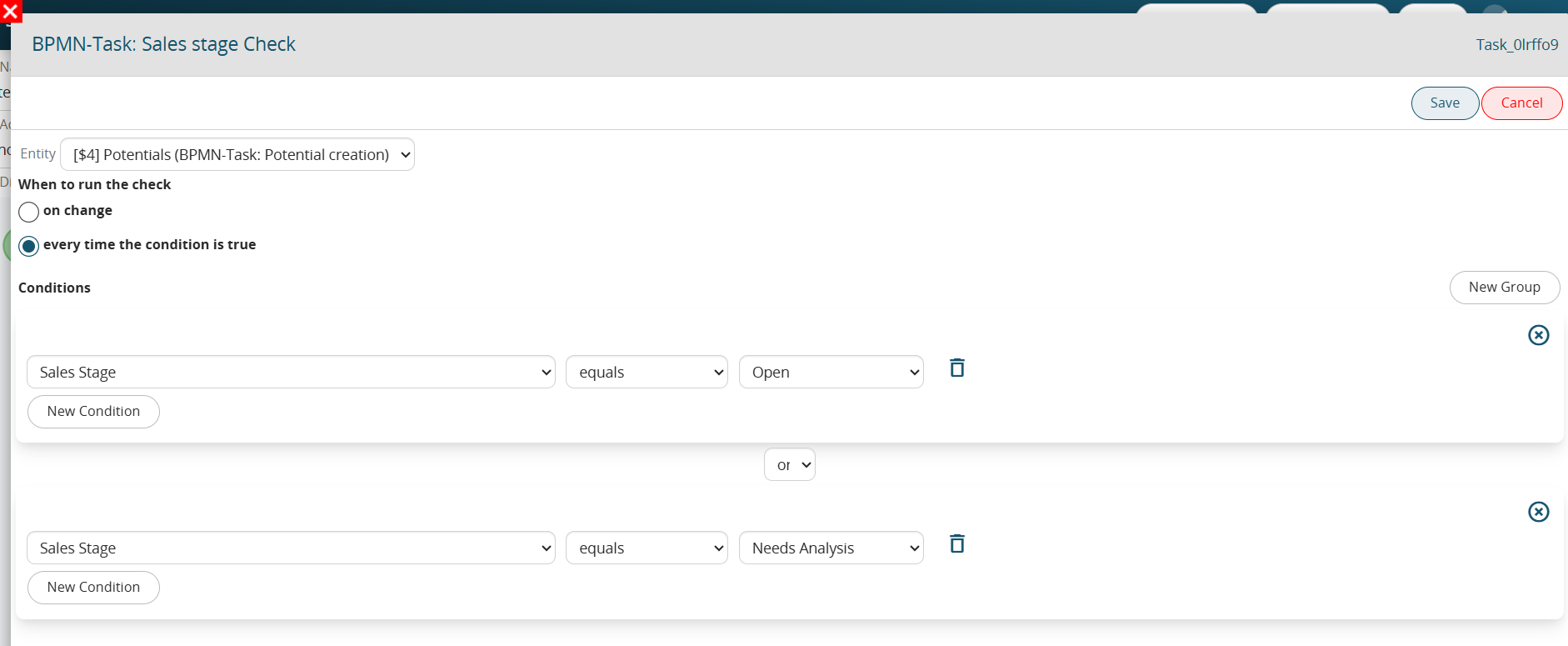
<span class="--l --r sentence_highlight">On the other hand, in the case where the Conditional Task “Checking Sales Stage” had been set “whenever condition is true,” if the opportunity being created will have the “Sales Stage” = “Open” or “To be Analyzed,” the system will perform a check in the immediate proceeding then in the first or second branch in case there are verified conditions. </span><span class="--l --r sentence_highlight">(Figure 3)</span>

[![image.png](https://usermanual.vtenext.com/uploads/images/gallery/2025-05/scaled-1680-/gYCimage.png)](https://usermanual.vtenext.com/uploads/images/gallery/2025-05/gYCimage.png)

Figure 3

# 2.12 Managing Visibility Permissions in Processes

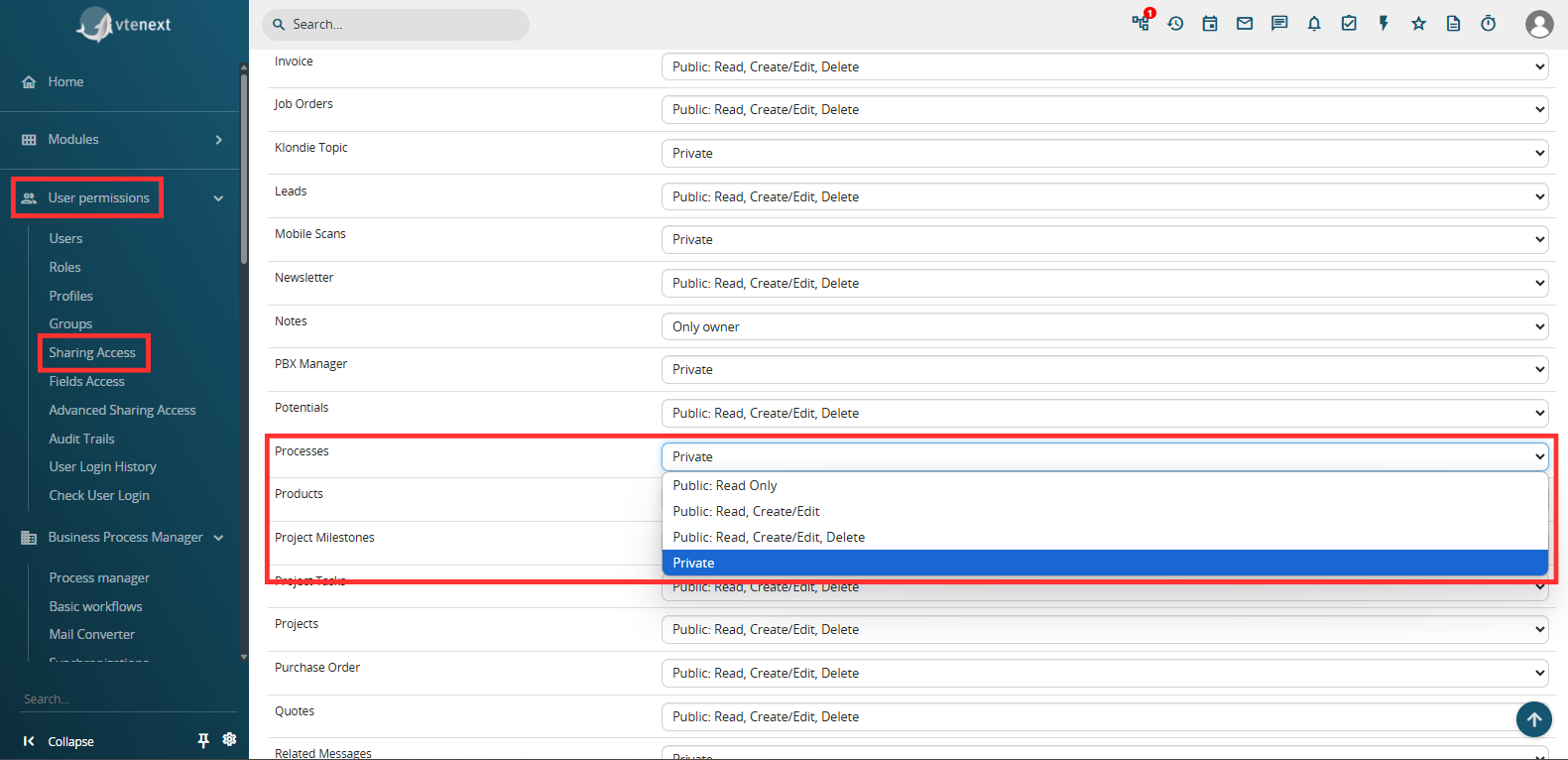
As with any other standard/custom module, to configure the visibility of the Processes module you must access the dedicated "Sharing Access" section located in Settings -&gt; User Permissions -&gt; Sharing Access. (Figure 1)

[![image.png](https://usermanual.vtenext.com/uploads/images/gallery/2025-06/scaled-1680-/hM7image.png)](https://usermanual.vtenext.com/uploads/images/gallery/2025-06/hM7image.png)

Figure 1

"**Private**" -&gt; only the following users will be able to view the process:  
\- the user who triggered the process, that is, the user who made the change on the module record associated with the process by verifying the initial conditions defined.  
Even if, in a specific phase of the flow, the process will be assigned to a different user, the user who triggered the process will still be able to see the process from start to finish with the respective graph.

EXAMPLE:

Considering the process shown in Figure 2 having in the EndEvent a Process Helper with assignee corresponding to the user "UserY" (Figure 3), in the case in which the process is triggered by "UserX", the latter will always be able to see the process even if in the EndEvent it is assigned to "UserY".

[![image.png](https://usermanual.vtenext.com/uploads/images/gallery/2025-06/scaled-1680-/K6limage.png)](https://usermanual.vtenext.com/uploads/images/gallery/2025-06/K6limage.png)
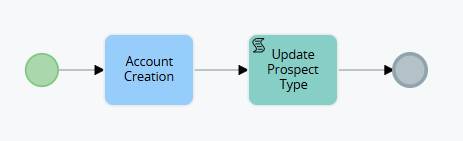
Figure 2

[![image.png](https://usermanual.vtenext.com/uploads/images/gallery/2025-06/scaled-1680-/qsFimage.png)](https://usermanual.vtenext.com/uploads/images/gallery/2025-06/qsFimage.png)
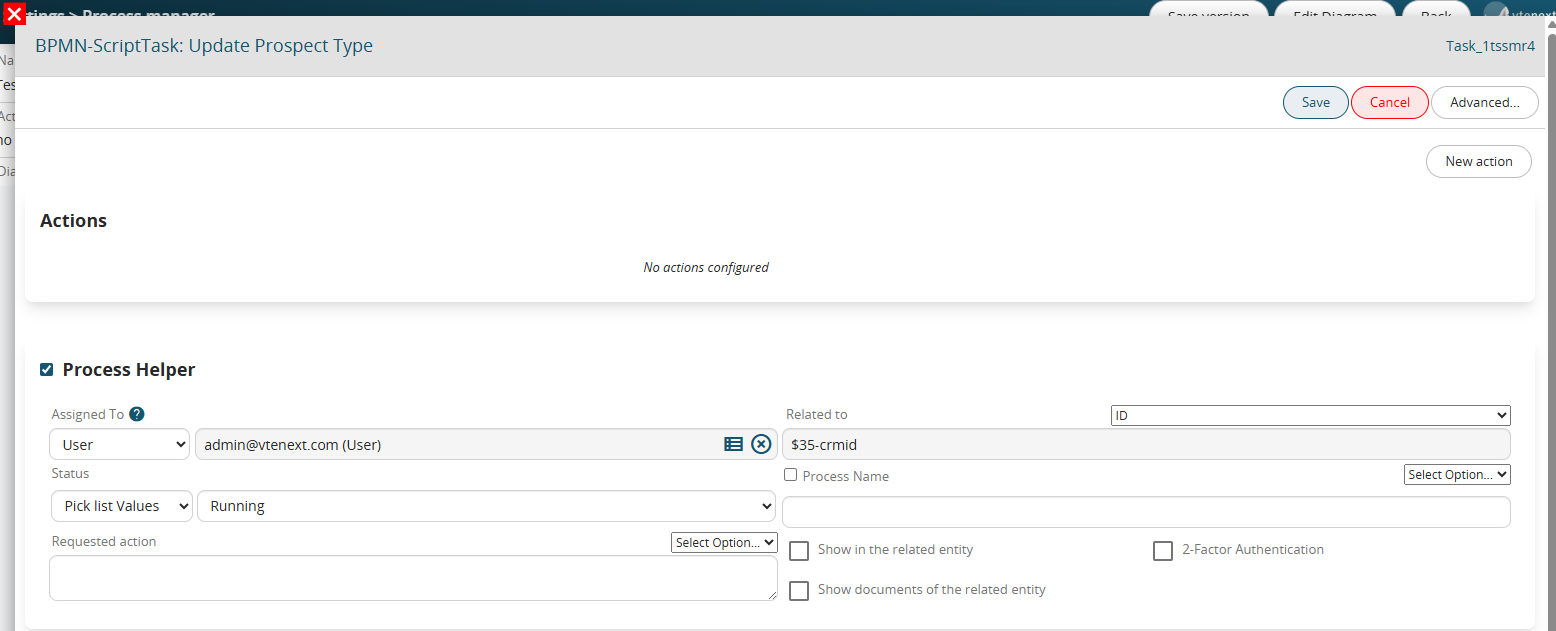
Figure 3

-all users with administrator permissions, that is, with the "Administrator" flag checked in their user preferences

-the user assigned to the Process Helper (and therefore the process) at that specific moment

-the user who performed an activity that allowed the process to continue with its flow, such as modifying a field on the form for which the process was waiting (via a Task)

EXAMPLE:

Considering the process shown in Figure 4, in the case in which the process is triggered by "UserX" and stops on the Task "Waiting for company modification", if the modification to the company is always performed by "UserX" and therefore "UserY" will not have any interaction with the process, in fact "UserY" will never be able to see the process.  
If, on the other hand, the modification to the company is performed by "UserY", from that moment on he will be able to start seeing the process.

[![image.png](https://usermanual.vtenext.com/uploads/images/gallery/2025-06/scaled-1680-/FMQimage.png)](https://usermanual.vtenext.com/uploads/images/gallery/2025-06/FMQimage.png)
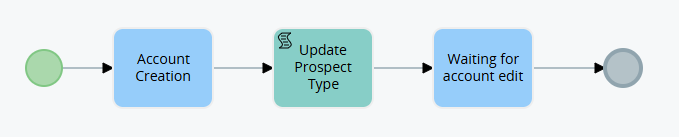
Figure 4

"**Public: Read Only**" -&gt; all users in the system will be able to view active or terminated processes.  
ATTENTION! -&gt; this permission refers to the Processes module and not to the Dynamic Forms of the Process Helpers, so the latter will continue to refer to the Assigned to field of the Process helper and therefore be compilable only by the users or groups defined within it.

"**Public: Read, Create/Modify**" -&gt; all users in the system will be able to view, create or modify active or terminated processes.  
ATTENTION! -&gt; this permission refers to the Processes module and not to the Dynamic Forms of the Process Helpers, so the latter will continue to refer to the Assigned to field of the Process helper and therefore be compilable only by the users or groups defined within it.

"**Public: Read, Create/Modify, Delete**" -&gt; all users in the system will be able to view, create or modify and finally delete active or terminated processes.  
ATTENTION! -&gt; this permission refers to the Processes module and not to the Dynamic Forms of the Process Helpers, therefore the latter will continue to refer to the Assigned to field of the Process helper and therefore can be filled in only by the users or groups defined within it.

# 2.13 Process Manager: Versioning Management

Within each individual process configured in the system, there is a button called "Save Version" in the top left. (Figure 1)

[![image.png](https://usermanual.vtenext.com/uploads/images/gallery/2025-09/scaled-1680-/4I5image.png)](https://usermanual.vtenext.com/uploads/images/gallery/2025-09/4I5image.png)
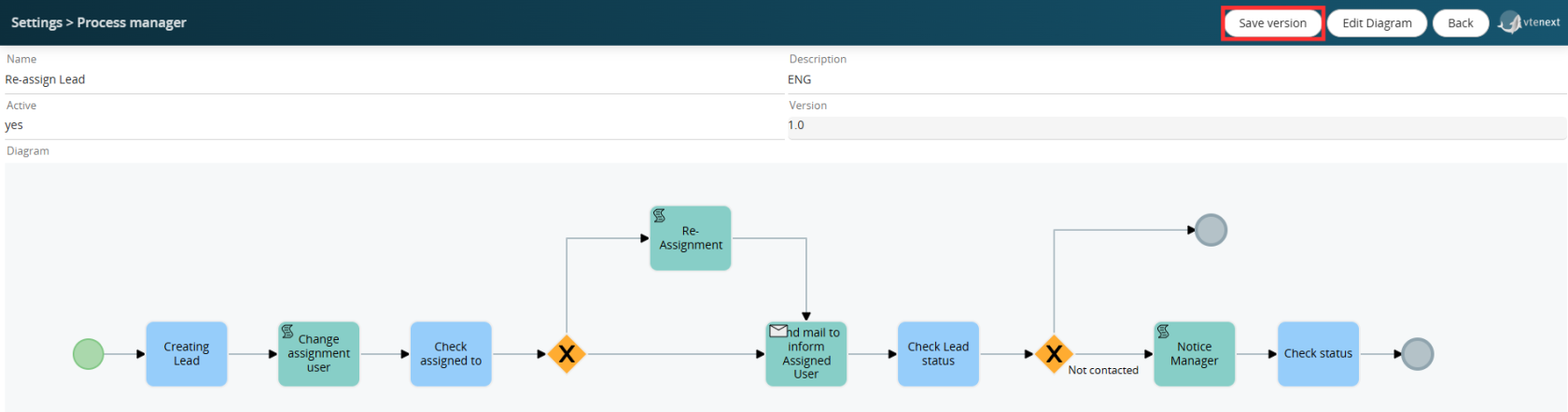
Figure 1

This allows you to force a new process version to be saved, ensuring its historicization in a dedicated DB table.  
In simple terms, it simulates the "Export BPMN Process VTE" button, allowing you to save a copy of the current process configuration in a table other than the main table linked to the Process Manager section.  
Furthermore, the value of the related "Version" field is also updated. (Figure 2)

[![image.png](https://usermanual.vtenext.com/uploads/images/gallery/2025-09/scaled-1680-/17Himage.png)](https://usermanual.vtenext.com/uploads/images/gallery/2025-09/17Himage.png)
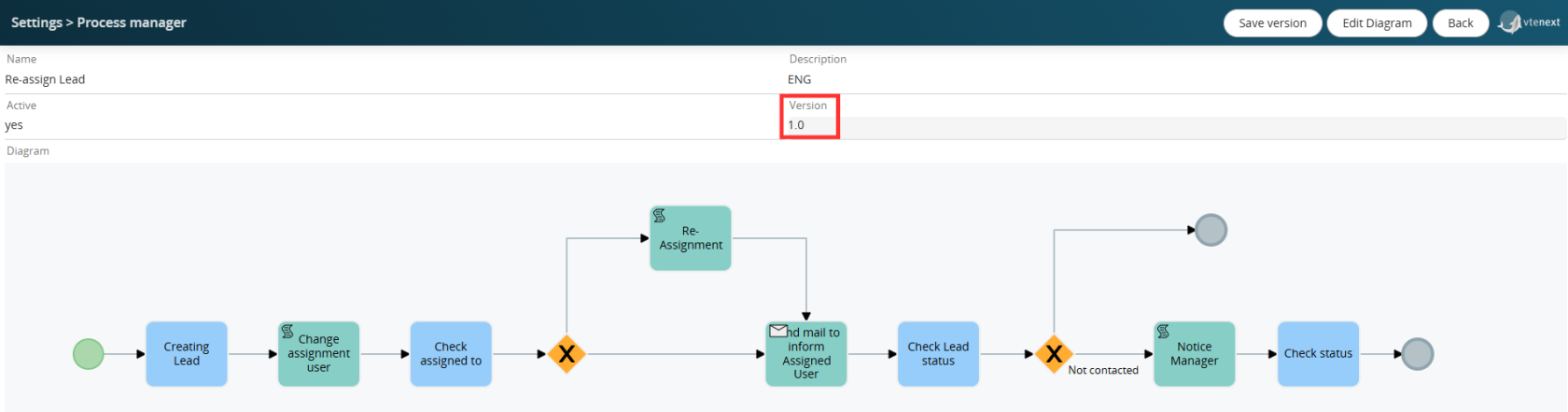
Figure 2

This type of operation is essential to ensure the ability to restore a previous version of the process in the event of configuration errors or other situations.

WARNING!: Deleting a process using the X button in the Process Manager section permanently deletes the process from all related tables in the database, including the aforementioned table.  
Therefore, it is important to proceed with caution when using this function, as once the deletion is performed, there will be no way to restore the process and all pending instances associated with the records involved.

If you want to save a new version of a process with pending instances (in our case, some leads with the Lead Re-Assignment process active), the system will display the popup shown in Figure 3.

[![image.png](https://usermanual.vtenext.com/uploads/images/gallery/2025-09/scaled-1680-/9xJimage.png)](https://usermanual.vtenext.com/uploads/images/gallery/2025-09/9xJimage.png)
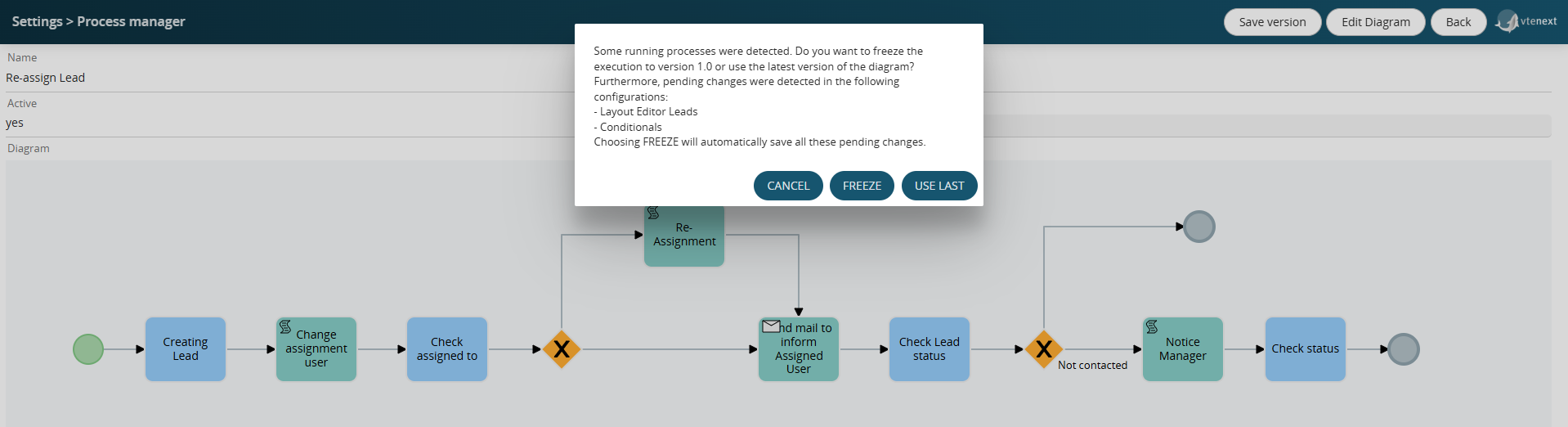
Figure 3

Furthermore, for completeness, all pending changes to Conditional Fields and Layout Editors for the modules in the system will also be displayed (even for modules not involved in the process, as the system performs a general check).

By clicking the FREEZE button, the system will automatically save the version of all pending changes indicated above and will NOT update the version of pending process instances on the identified records (in our case, maintaining version 1.0).  
This feature is useful when you want to apply the new process version only to process instances starting in the future, or rather, from the time of the version update onward.

By clicking the USE LAST button, the system will update the version of pending process instances on the identified records (in our case, setting version 1.1).