Normally, tools return results in a format suitable for interpretation by an LLM model. Therefore, the response should be reviewed and processed before being included in a workflow.
Example of a response from the `web_search_exa` tool to the question: “What is the certified email (PEC) address of VTENEXT?” ``` Title: Contatti - vtenext CRM + BPM URL: https://www.vtenext.com/it/contatti/ Published: 2021-01-28T21:00:22.000Z Author: N/A Highlights: info@vtenext.com Viale Sarca, 336/F 20126 Milano (MI) Tel (+39) 02 3790 1352 P.I. 09869110966 Registration Number MI – 2118732 --- Title: Fatturato Vtenext Srl (MI) – Scarica Bilanci e Visure Camerali Ufficiali URL: https://www.companyreports.it/vtenext-srl-09869110966 Published: N/A Author: N/A Highlights: **Indirizzo** Viale Sarca, 336/F - [Milano (](https://www.companyreports.it/comune/milano "Vedi le aziende del comune di Milano")[MI](https://www.companyreports.it/provincia/milano "Vedi le aziende della provincia di Milano")) ... ** ** ... ## **Visura Camerale di Vtenext Srl** La visura camerale di **Vtenext Srl** fornisce una panoramica completa dell’assetto legale e societario dell’impresa: sede legale, capitale sociale, oggetto sociale, elenco soci, cariche in corso e indirizzo PEC. La visura è disponibile in formato ordinario o storico ed è scaricabile in tempo reale da **CompanyReports.it**. ### **Bilanci e Documenti Aziendali di Vtenext Srl** ... PEC * ... * Email PEC * Codice di fatturazione ... ```json { "@context": "https://schema.org", "@type": "Organization", "name": "CompanyReports", "url": "https://www.companyreports.it", "logo": "https://www.companyreports.it/dist/img/companyreports-logo-new.webp", "contactPoint": { "@type": "ContactPoint", "contactType": "sales", "email": "info@adcapital.it" } } ... { "@context": "https://schema.org", "@type": "LocalBusiness", "name": "Vtenext Srl", "legalName": "Vtenext Srl", "image": "https://www.companyreports.it/og-image-Fatturato%20Vtenext%20Srl%20%28MI%29%20%E2%80%93%20Scarica%20Bilanci%20e%20Visure%20Camerali%20Ufficiali.jpg", "vatID": "09869110966", "taxID": "09869110966", "foundingLocation": "MI", "foundingDate": "2017-04-04", "isicV4": "6201", "knowsAbout": "Produzione di software non connesso all'edizione", "address": { "@type": "PostalAddress", "postalCode": "", "addressLocality": "Milano, Italy", "addressCountry": "IT", "addressRegion": "MI", "streetAddress": "Viale Sarca, 336/F" }, "keywords": "Vtenext Srl fatturato, utile Vtenext Srl, perdita Vtenext Srl, risultato Vtenext Srl , andamento Vtenext Srl, partita iva Vtenext Srl , bilancio Vtenext Srl , visura Vtenext Srl, 09869110966, Partita Iva 09869110966, Codice Fiscale 09869110966, DUNS Vtenext Srl, D-U-N-S Vtenext Srl, Report Aziende per fatturato" --- Title: VTENEXT S.R.L. SOCIETA' BENEFIT 03641400233 - Visurissima.it - Le informazioni a portata di click URL: https://www.visurissima.it/aziende/VTENEXT-SRL-SOCIETA-BENEFIT_03641400233.html Published: N/A Author: N/A Highlights: Indirizzo completo ... VIA ALZANA 2/C, 37040 ARCOLE (VR) ... crmvillage@pec.it ... Scopri Email Scopri --- [...] ``` # 3.A.3 Call Agent This action allows you to send a request to an agent that has been previously configured in Settings > AI Tools > Agents. Once one of the available agents has been selected, all the elements configured in Settings > AI Tools > Agents are loaded automatically and can be customized. The agent is able to perform tasks automatically based on the enabled tools and the knowledge sources available through RAG and LLM. The **System Prompt** can be modified, while operational instructions must be entered in the **User Message** field.The Output Fields section already includes the response content field by default, allowing the agent's output to be used in subsequent process steps. Below is an example where the agent is requested to find a solution to a customer support request received through a ticket, using the user\_manual tool, and write the solution as a comment. [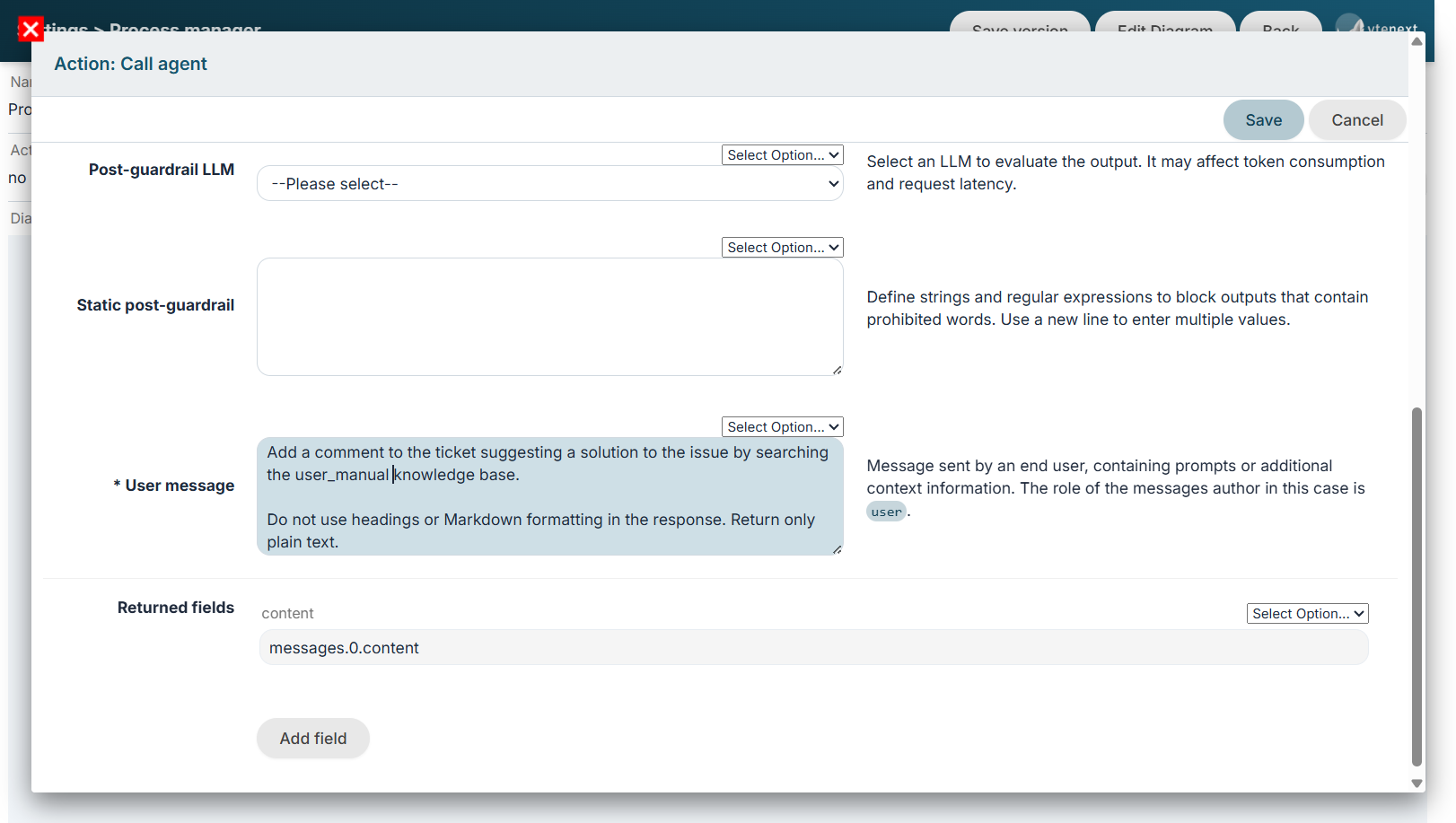](https://usermanual.vtenext.com/uploads/images/gallery/2026-07/MKXimage.png)Figure 1Additional information is added to the prompt written by the user to provide the context of the request, such as the entities involved in the process, including their name, module, and CRM ID (crmid). This allows the agent to understand which CRM entity the request refers to. If needed, process variables can be used to make the request even clearer. Example: Add a comment to ticket $15-crmid suggesting a solution...
# 3.A.4 Call Process Tool Allows you to invoke and execute a Tool Process. For more information about its configuration, refer to [Chapter 16](https://usermanual.vtenext.com/books/business-process-manager-manual/chapter/16-tool-processes). Once the desired tool has been selected, the expected Input Parameters are loaded and can be configured using process variables, as usual. Unlike sub-processes, this action does not have the same limitations and can be called multiple times within the same process and also from different processes. Below is an example of a tool call used to add a comment to a ticket. The parameters are those defined in the process tool, which in this case are the ticket ID and the comment text. [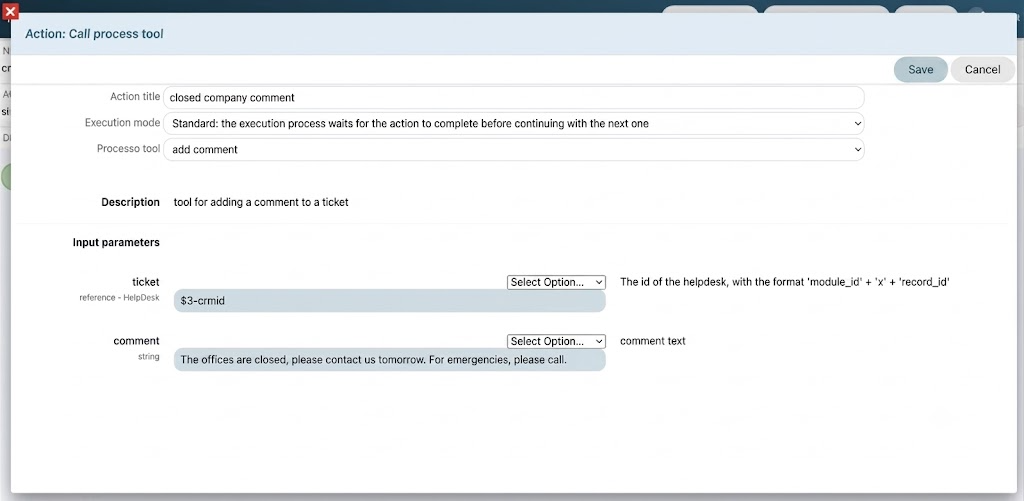](https://usermanual.vtenext.com/uploads/images/gallery/2026-07/xnGimage.png) # 3.A.5 Examples Below are some example applications showing how these new tools can be integrated into processes. --- ### Web scraping This process, triggered when a new company is created, calls an agent that is requested to search online for information about the company and populate the corresponding fields in the company record. The agent must have an enabled web search tool (for example, web\_search\_exa) and the VTENEXT MCP Client tools enabled in order to access the module structure and update the record. [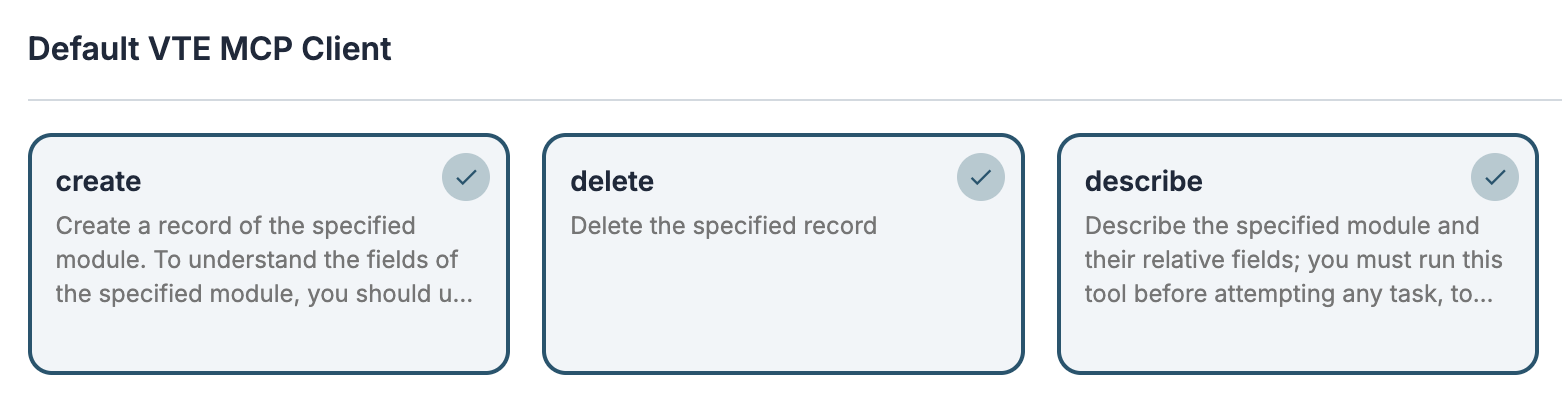](https://usermanual.vtenext.com/uploads/images/gallery/2026-07/NQCimage.png)[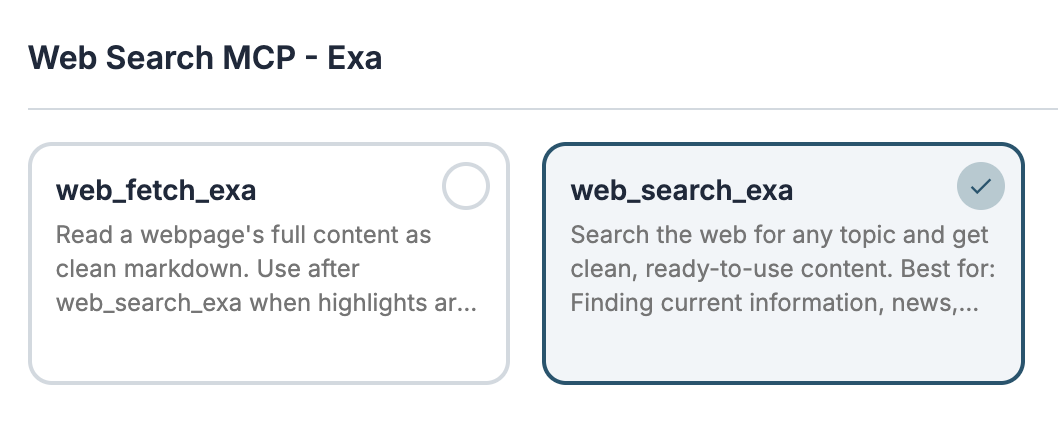](https://usermanual.vtenext.com/uploads/images/gallery/2026-07/screenshot-2026-07-09-alle-09-22-05.png) The process starts when a company is created and executes the Call Agent action. [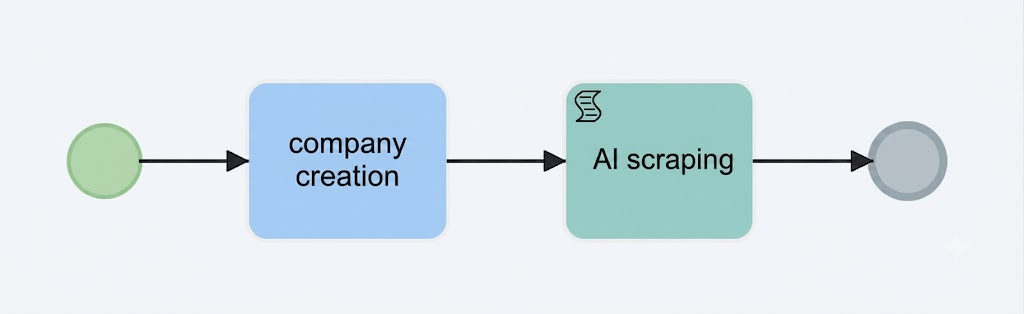](https://usermanual.vtenext.com/uploads/images/gallery/2026-07/CRzimage.png) In the **User Message**, I request the agent to search online for the required information and populate the corresponding fields in the company record. I also request the creation of a contact for the Chief Executive Officer. [](https://usermanual.vtenext.com/uploads/images/gallery/2026-07/p9Oimage.png) If the **Background** execution mode has been configured in the process action, after saving the record the system will notify you that the record is still being updated. Once the process is completed, the browser page will automatically refresh. [](https://usermanual.vtenext.com/uploads/images/gallery/2026-07/oP3image.png) From the **History** tab, you can view the fields that have been updated. [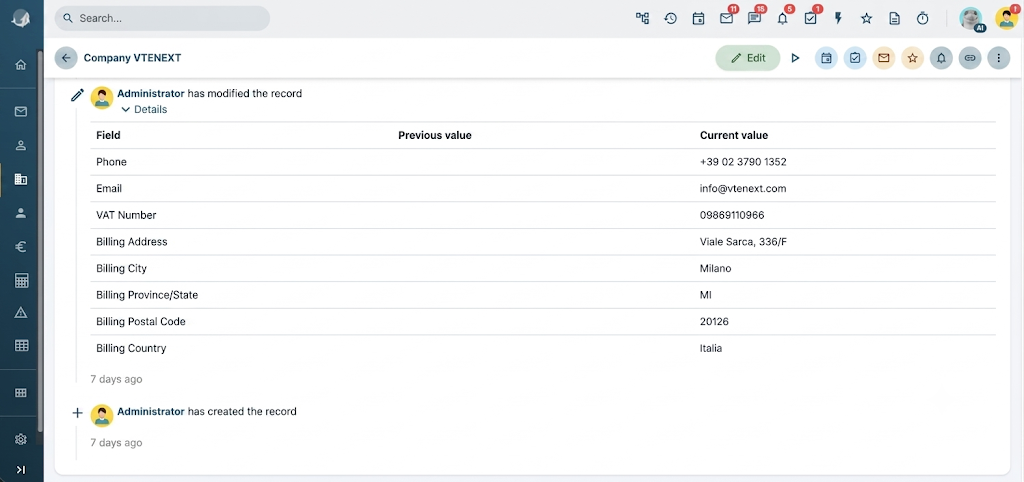](https://usermanual.vtenext.com/uploads/images/gallery/2026-07/uEEimage.png) ##### Closed Customer Support In this example, we implement a process that automatically replies to technical support tickets outside office hours, informing customers that the office is closed and attempting to provide a solution to their issue. ##### Tool add\_comment First, we create a process tool to add a comment to a ticket. The tool requires the following input parameters: - Ticket ID - Comment [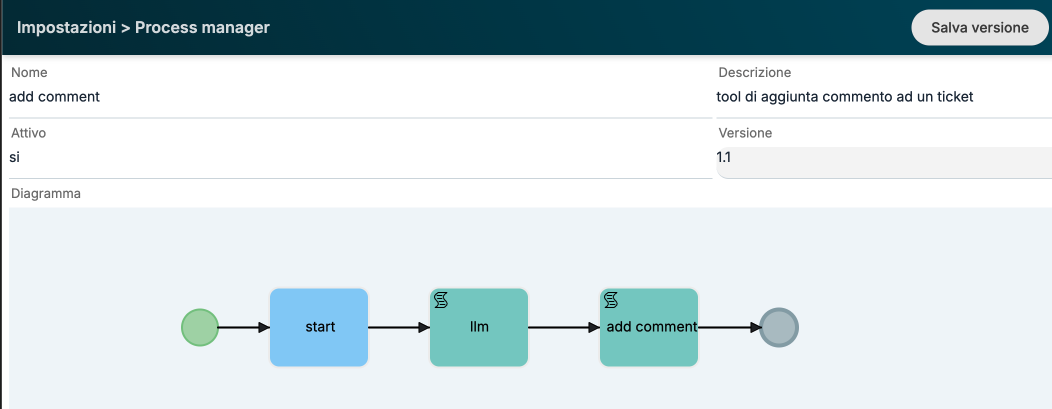](https://usermanual.vtenext.com/uploads/images/gallery/2026-07/iGKimage.png) [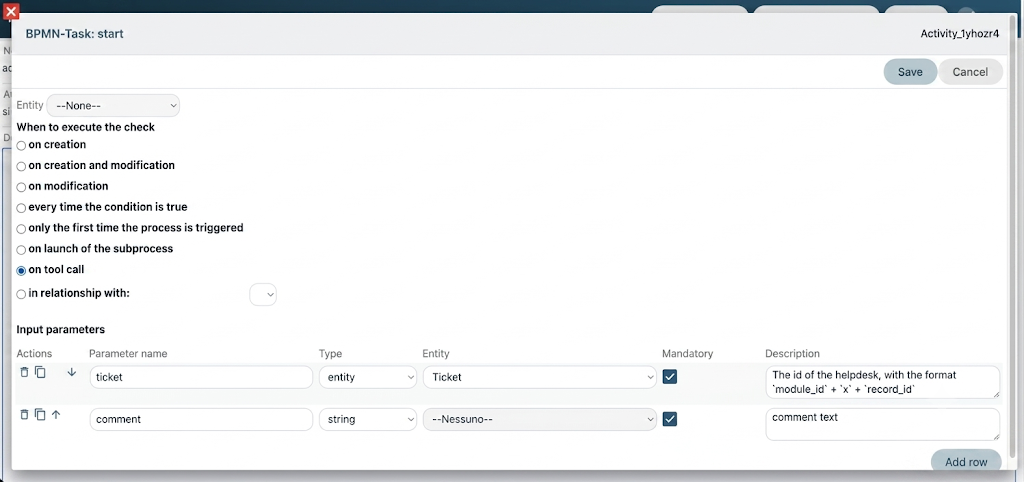](https://usermanual.vtenext.com/uploads/images/gallery/2026-07/kX7image.png) In the second step of the process, we execute an LLM call to rework the comment text by applying a specific style. [](https://usermanual.vtenext.com/uploads/images/gallery/2026-07/8Jdimage.png)In this case, it is sufficient to use only an LLM instead of an agent, since no tools are required. We only need to leverage the language capabilities of the model.
Finally, we use the SDK Add Comment function by mapping all the required fields. In this case, we set the ownerid parameter with the ID of the Kitt user. By setting the ai parameter to true, we force the addition of an informational note at the bottom of the comment indicating that the text was generated using AI. [](https://usermanual.vtenext.com/uploads/images/gallery/2026-07/W1dimage.png) The add\_comment tool must therefore be enabled for the agent that will be used in the following steps, together with the user\_manual tool and/or any documents configured in the RAG section to provide the knowledge required to generate a solution. [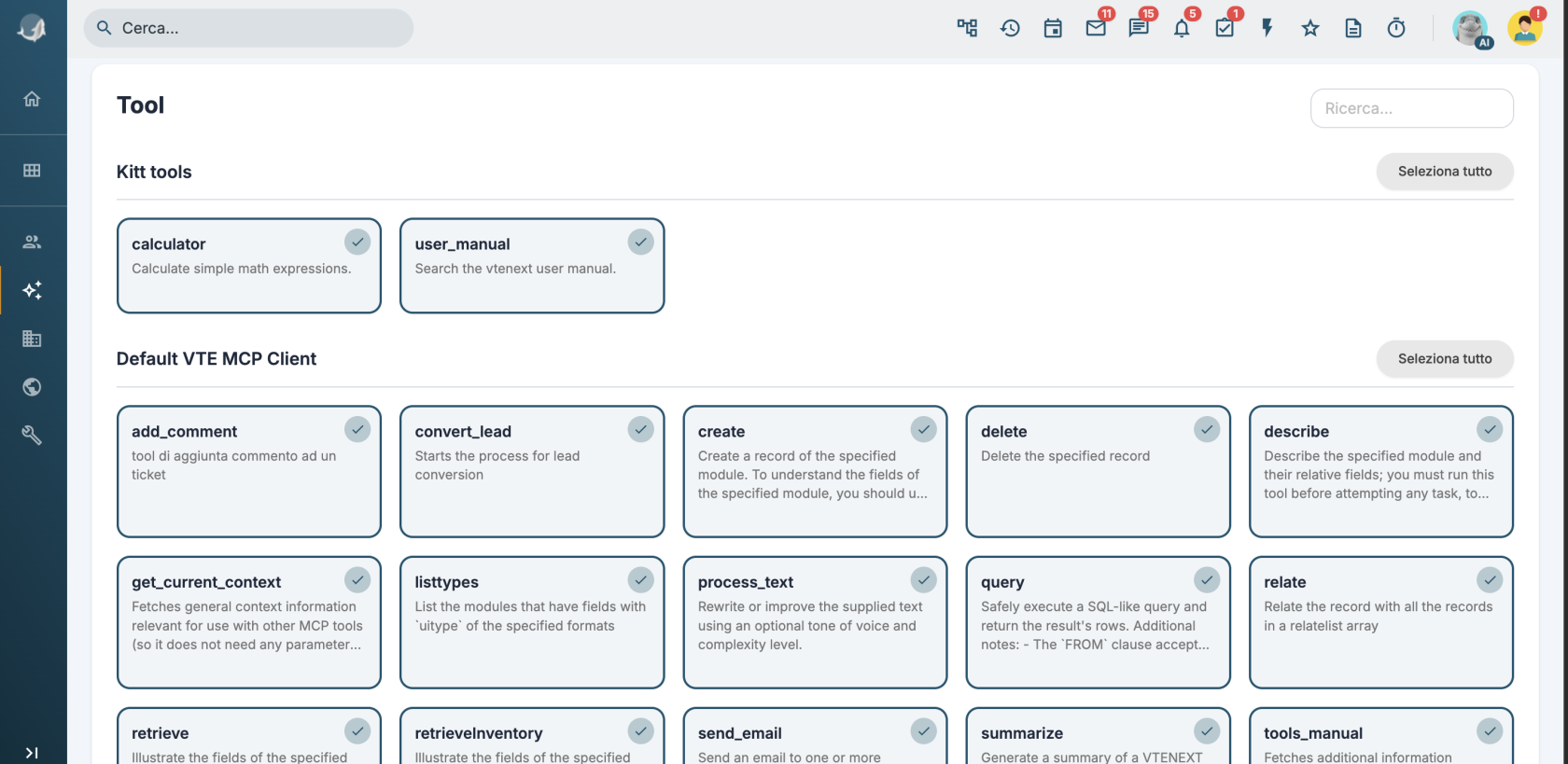](https://usermanual.vtenext.com/uploads/images/gallery/2026-07/X03image.png) ### Implementing the Process on Tickets We can either implement a new process or integrate the new AI features into an existing one. In this example, we use an existing process that, when a ticket is created, sets the SLA based on the ticket priority. [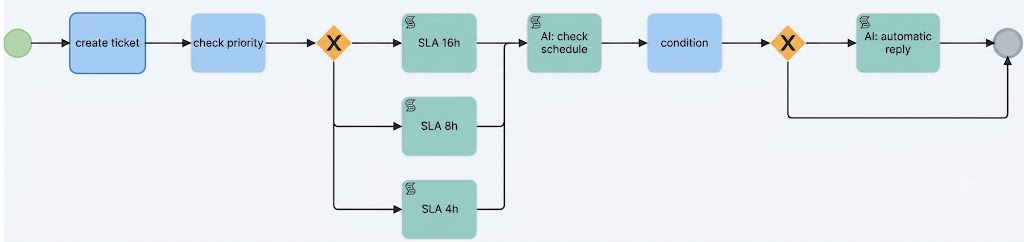](https://usermanual.vtenext.com/uploads/images/gallery/2026-07/0mRimage.png) In the **AI: Check Office Hours** task, I execute a call to the agent using the following prompt: ``` The company is open Monday through Friday from 9:00 AM to 1:00 PM and from 2:00 PM to 6:00 PM, excluding public holidays. If the ticket was created during business hours, return the string "open"; otherwise, return "closed". Return exactly one of these strings and do not include any additional text, explanations, or headings. ``` I then configure the dynamic form with a field populated by the response returned by the LLM. [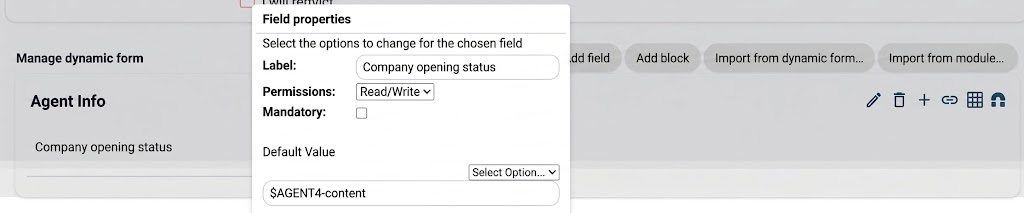](https://usermanual.vtenext.com/uploads/images/gallery/2026-07/VKZimage.png) Next, I configure the condition based on the value of the dynamic form field and set up the following gateway so that, if the agent returns **"closed"**, the process proceeds to the **AI: Automatic Reply** task. [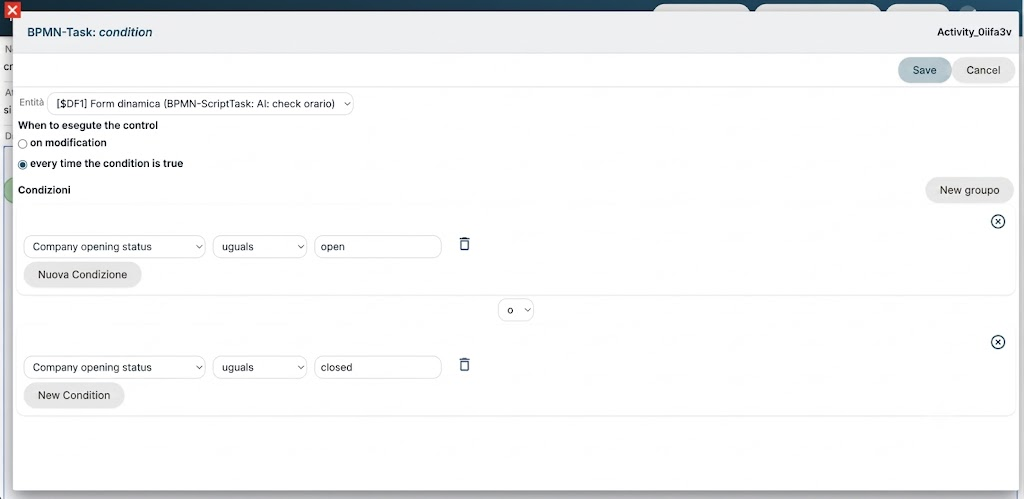](https://usermanual.vtenext.com/uploads/images/gallery/2026-07/Z6limage.png) In the final task of the process, I first call the add\_comment tool to inform the customer that the office is closed. I then call the agent to generate and add a proposed solution to the issue [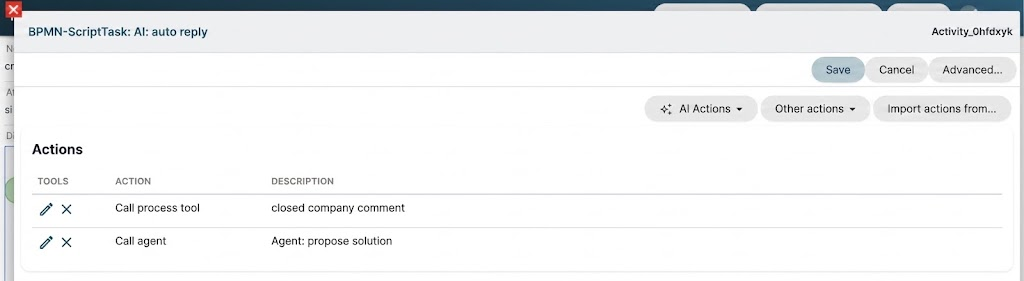](https://usermanual.vtenext.com/uploads/images/gallery/2026-07/aacimage.png) [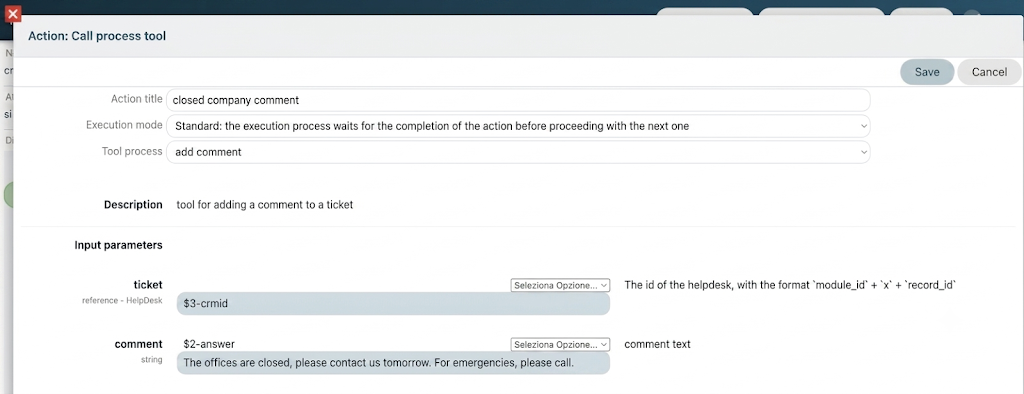](https://usermanual.vtenext.com/uploads/images/gallery/2026-07/QGPimage.png)The comment entered here will then be reworked by the LLM as part of the process tool.
Agent Prompt: ``` aggiungi un commento con il tool add_comment proponendo una soluzione al suo problema cercando in user_manual. Nel testo non usare mai titoli o codice markdown, restituisci solo testo semplice. ``` ##### Test We can test the process by creating a ticket during closing hours with the title “Login Failed” and the following description: *"Good morning, this morning I am no longer able to log in to vtenext. Could you please check this urgently?"* Comments similar to the following will be added: [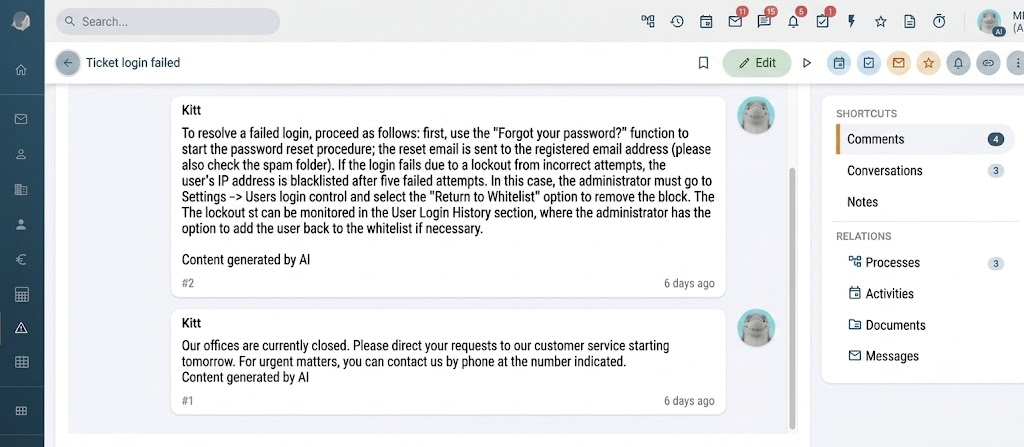](https://usermanual.vtenext.com/uploads/images/gallery/2026-07/qXBimage.png)