# Backup

### General premises

<p class="callout warning">In this section you can find a **general guide to perform vtenext backups**.</p>

<p class="callout warning">The backup procedure was performed with **vtenext 19ce**. **The guide is also valid for the other versions of vtenext**.</p>

##### Windows

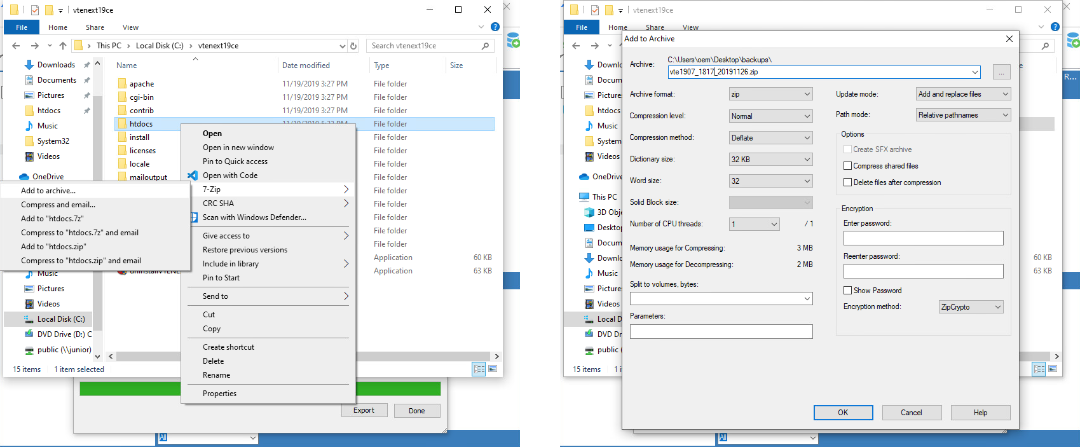
Go to the root folder of vtenext (eg. `C:\vtenext19ce\htdocs`) and create new zip archive.
<div drawio-diagram="1930"><img src="https://usermanual.vtenext.com/uploads/images/drawio/2019-11-Nov/Drawing-manuel.tagliapietra-1574673713.png" alt=""/></div>

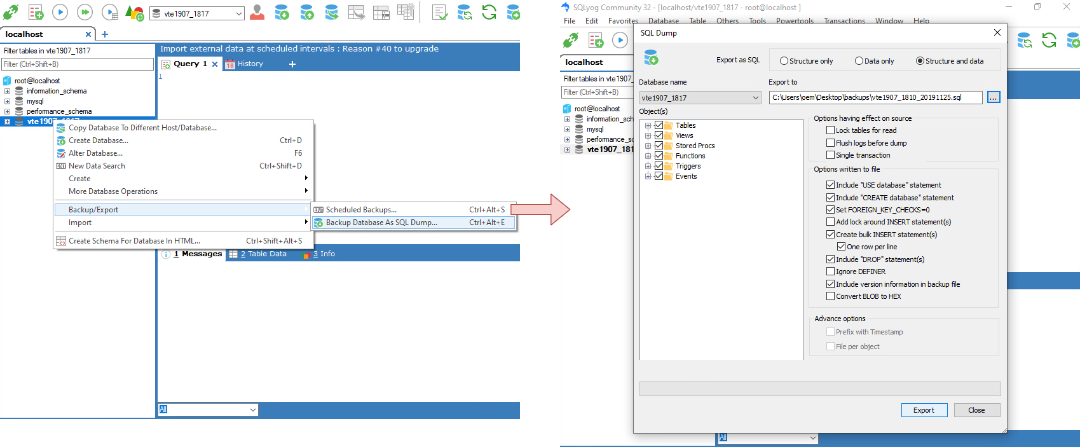
Then open [SQLyog](https://www.webyog.com/product/sqlyog) or [phpMyAdmin](https://www.phpmyadmin.net/) and dump the database. If you use SQLyog follow these step:

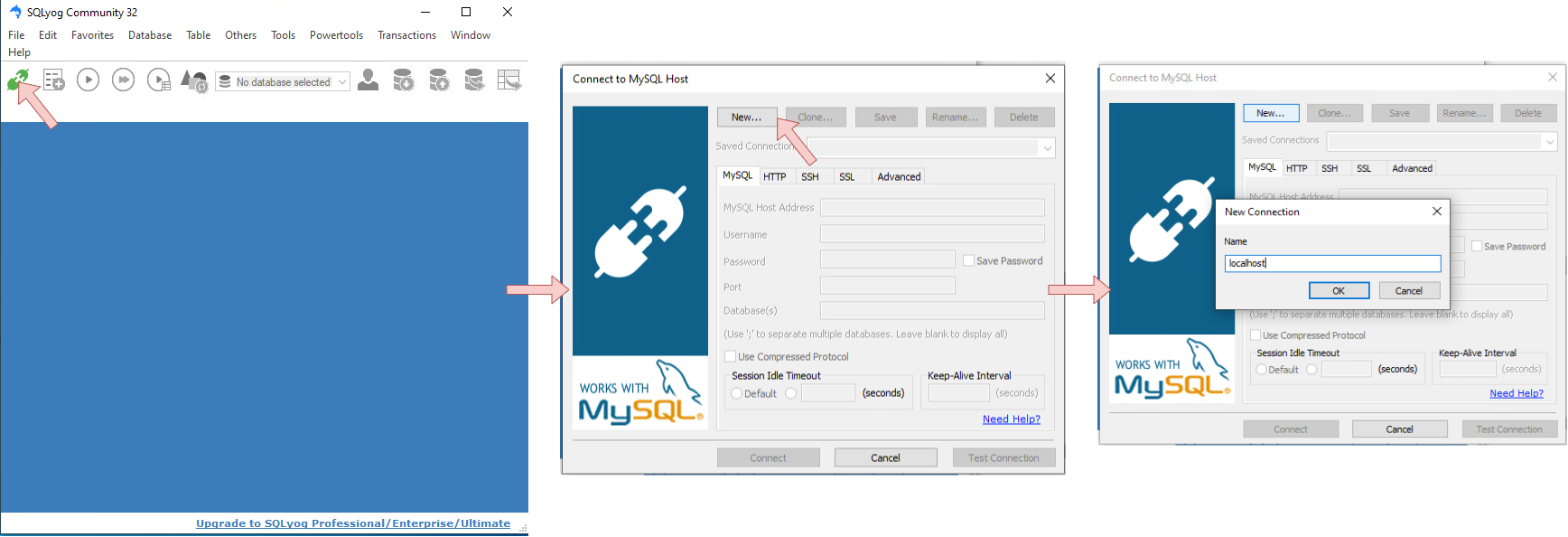
- Open SQLyog and create new connection

<div drawio-diagram="1938"><img src="https://usermanual.vtenext.com/uploads/images/drawio/2019-11-Nov/Drawing-manuel.tagliapietra-1574675951.png" alt=""/></div>

- Go to the root folder of vtenext and open the `config.inc.php` file

![](https://usermanual.vtenext.com/uploads/images/gallery/2019-11-Nov/scaled-840-0/image-1574674294024.png)

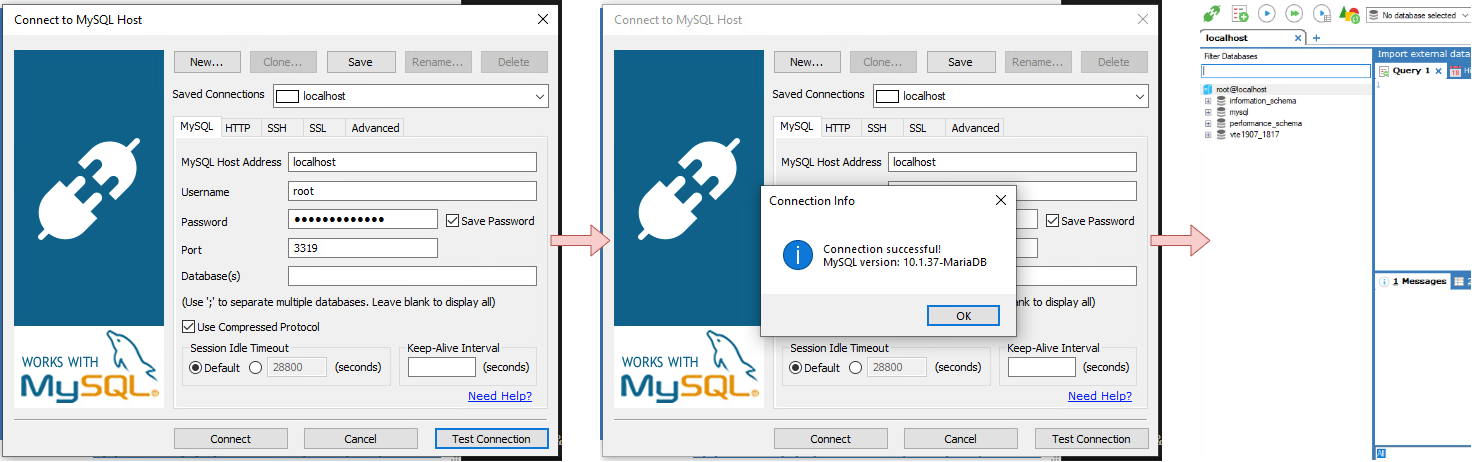
- Reopen SQLyog, compile the connection form and save the connection

<div drawio-diagram="1935"><img src="https://usermanual.vtenext.com/uploads/images/drawio/2019-11-Nov/Drawing-manuel.tagliapietra-1574675813.png" alt=""/></div>

- Save the database dump

<div drawio-diagram="1934"><img src="https://usermanual.vtenext.com/uploads/images/drawio/2019-11-Nov/Drawing-manuel.tagliapietra-1574674731.png" alt=""/></div>

Done!

##### Linux

Go to the root folder of vtenext (eg. `/var/www/html/vtenext19ce`) and create new archive.

`cd /var/www/html`

`tar cvzf backups/vte1907_1817_20191126.tgz vtenext19ce`

<p class="callout warning">**Replace `vtenext19ce` with your folder name**</p>

<p class="callout warning">**You can rename the backup `vte1907_1817_20191126.tgz` as you want**</p>

Then dump the database.

`mysqldump -u root -p  vte1907_1817 --single-transaction --quick --routines --triggers --events | gzip -7 > backups/vte1907_1817_20191126.sql.gz`

<p class="callout warning">**Replace `vte1907_1817` with your database name**</p>

<p class="callout warning">**You can rename the backup `vte1907_1817_20191126.sql.gz` as you want**</p>