New developers features in vtenext 26.04
In version 26.04 some additional changes have been made to the code to simplify the development of custom functionalities in certain areas.
View the developer release notes.
- Mailscanner (Mail Converter)
- Record conversion
- CSV Import
- VteSync (synchronizations)
- ListView extendability
- Webforms
- Code Review Skill
Mailscanner (Mail Converter)
Several Mailscanner classes are now exendable via SDK::setClass:
- MailScanner
- MailScannerAction
- MailScannerInfo
- MailScannerRule
- MailScannerSpam
- MailScannerMailBox
- MailScannerMailBoxZend
This allows for easier extensibility using our standard SDK.
Moreover, the list of actions (for example: Create Ticket, Update Ticket, ...) for each rule is now stored in the database and not hardcoded in various files. So adding a new a new action is much easier now:
require_once 'modules/Settings/MailScanner/core/MailScannerAction.php';

// extend the class to implement custom actions
SDK::setClass('MailScannerAction', 'MailScannerActionCustom', 'modules/SDK/src/CUSTOMER/MailScannerActionCustom.php');

// add an action to create a task (custom module, or even Calendar)
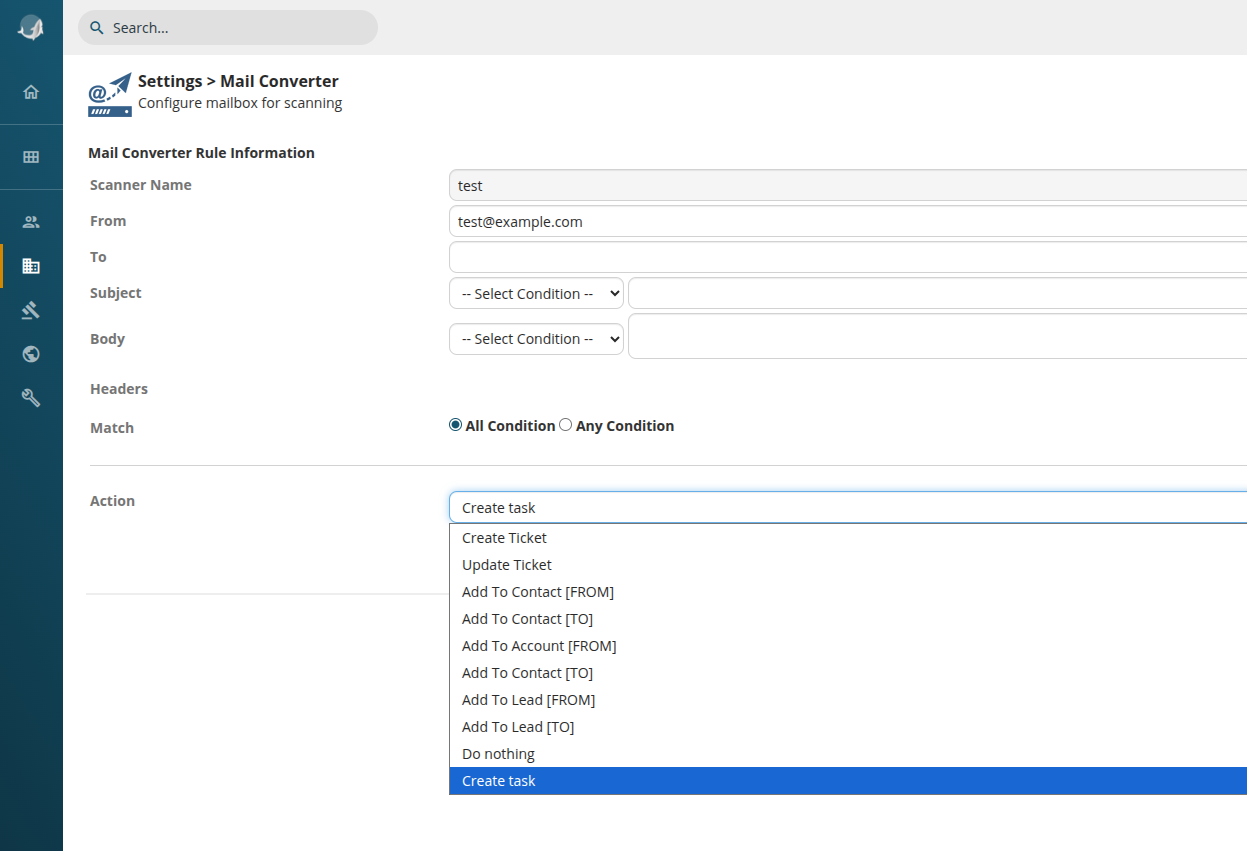
MailScannerAction::addActionType('CREATE,Task,FROM', 'LBL_CREATE_MS_TASK', 'createTask');

// add the label
SDK::setLanguageEntries('Settings', 'LBL_CREATE_MS_TASK', ['it_it' => 'Crea compito', 'en_us' => 'Create task']);
And the extended class in MailScannerActionCustom.php:
<?php

class MailScannerActionCustom extends MailScannerAction {

	/**
	 * Example of a custom mailscanner action
	 */
	function createTask($mailscanner, $mailrecord, $regexMatchInfo, $compare_parentid, $match_field) {

		$subject = $mailrecord->_subject;
		$description = $mailrecord->getBodyText();

		// create a record "CustomTask"
		$inst = \CRMEntity::getInstance('CustomTask');
		$inst->mode = '';

		// populate some fields
		$inst->column_fields['taskname'] = $subject;
		$inst->column_fields['description'] = $description;
		$inst->column_fields['date'] = date('Y-m-d');

		// save it
		$inst->save('CustomTask');

		// Associate any attachement of the email to the record
		$this->__SaveAttachements($mailrecord, $inst->modulename, $inst, $inst);

		// create the Messages record
		$this->__CreateNewEmail($mailrecord, $this->module, $inst);

		// return the record id, to signal the correct application of the action
		return $inst->id;

	}

}
Will produce a new action in the rule:
Record conversion
In the latest version the handling of record conversion (converting a Quote to a SalesOrder, or a SalesOrder to an Invoice...) has been generalized and centralized in a single place.
The list of available conversion modes is now in the table vte_convertmodes, which is managed by the class ConvertModesUtils which gives the possibility to add new conversion modes between standard or custom modules.
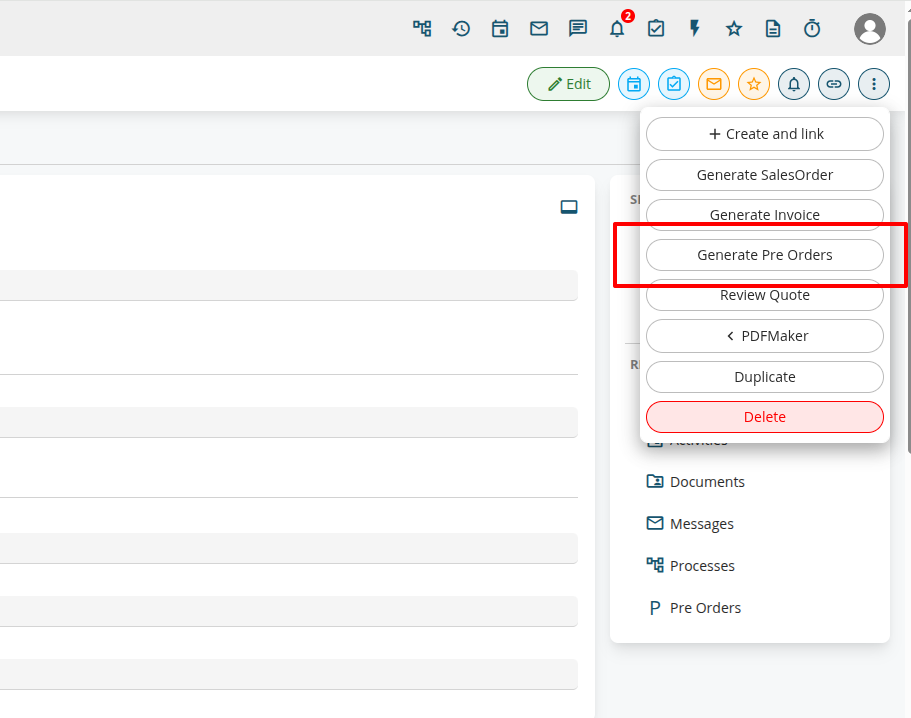
For example, to add a new conversion mode from module Quote, to a custom module (with products) PreOrders:
// instantiate the utils class
$CMU = ConvertModesUtils::getInstance();

// define the mapping for the fields, key is destination field, value is the source
$mapping = [
    // dest => source
	'vcf_1_1' => 'subject',
	'description' => 'description'
];

// add the convert mode
$CMU->addConvertMode(
	'quotetopreorder', 			// unique name for the mode, can be any string
	'Quotes',					// starting module
	'PreOrders',				// second module
	'record',					// the parameter in request that will pass the record id. by default "record"
	'quoteid',					// name of the field in the destination module with a reference to the first module, can be null
	true,						// if true, show the button in Quotes
	5,							// sequence of the button, among other conversion buttons
	'handleRecordConversion',	// the method to handle the conversion. You can specify a different one in the PreOrders class if you wish to do something different
	$mapping					// the fields mapping. products block is automatically copied
);
CSV Import
One of the classes used by the standard CSV Import (the one available from any module's ListView) has been made extendable via SDK::setClass and highly refactored to split the main method into smaller ones, to ease modification of specific behaviours:
Import_Data_Controller: This class now can be extended
For example, if you need to modify a value of a specific field before being saved to the database:
// register the class
SDK::setClass('Import_Data_Controller', 'Import_Data_ControllerCustom', 'modules/SDK/src/CUSTOMER/ImportCustom.php');
And the class:
<?php

require_once('modules/Import/controllers/Import_Data_Controller.php');

class Import_Data_ControllerCustom extends Import_Data_Controller {

	/**
	 * Transform a single field value to a format suitable to vte
	 */
	protected function transformFieldValue($fieldName, $fieldValue, $fieldInstance, $moduleMeta) {
		$fieldValue = parent::transformFieldValue($fieldName, $fieldValue, $fieldInstance, $moduleMeta);

		if ('Accounts' === $this->module && 'accountname' === $fieldName) {
			// append "IMPORTED" to the accountname
			$fieldValue .= ' - IMPORTED';
		}

		return $fieldValue;
	}
}
VteSync (synchronizations)
VteSync connectors are now extendable via SDK::setClass so it's easier to add new functionalities or changing the field mapping.
For example, to extend the WooCommerce connector:
// classes are namespaced
SDK::setClass('VteSyncLib\Connector\WooCommerce', 'WooCommerceCustom', 'modules/SDK/src/CUSTOMER/WooCommerceCustom.php');
The extended connector:
<?php

// namespace the class, so it's easier to work with it
namespace VteSyncLib\Connector;

class WooCommerceCustom extends WooCommerce {

	// extend the constructor to alter the standard models
	public function __construct($config = array(), $storage = null) {
		parent::__construct($config, $storage);

		// in this case, the class is in the same folder, so no need to include it
		$this->classes['Accounts'] = array(
          'module' => 'Accounts',
          'commonClass' => 'VteSyncLib\Model\CommonRecord',
          'class' => 'VteSyncLib\Connector\WooCommerce\Model\AccountCustom'
        );
	}

	// or it's possible to redefine any existing method
}
And the custom model:
<?php

// include parent class
require_once(__DIR__.'/Account.php');

namespace VteSyncLib\Connector\WooCommerce\Model;

class AccountCustom extends Account {

	// here I redefine the mapping, removing or adding fields
    protected static $fieldMap = array(
        // WooCommerce => CommonRecord
        'email' => 'email',
        'username' => 'name',
        //'phone' => 'phone', // THIS IS COMMENTED

        // billing address
        'address' => 'billingstreet',
        'city' => 'billingcity',
        'postcode' => 'billingpostalcode',
        'state' => 'billingstate',
        'country' => 'billingcountry',
        'companybill' => 'companybill',
        'firstnamebill' => 'firstnamebill',
        'lastnamebill' => 'lastnamebill',
        // shipping address
        'address_shipping' => 'shippingstreet',
        'city_shipping' => 'shippingcity',
        'postcode_shipping' => 'shippingpostalcode',
        'state_shipping' => 'shippingstate',
        'country_shipping' => 'shippingcountry',
        'companyship' => 'companyship',
        'firstnameship' => 'firstnameship',
        'lastnameship' => 'lastnameship',

		'otherfield' => 'otherfield', // THIS IS CUSTOM!
		// you probably also need to alter the VTE models, to connect this mapping to vte's one
    );

	// this function is called to prepare the array to be sent to woocommerce
    public function toRawData($mode) {
		$raw = parent::toRawData($mode);

		// when sendind data to woo, hardcode this additional field:
		$row['somefield'] = 'somevalue';

		return $raw;
	}

}
ListView extendability
The ListViewController class has been refactored to be more perfomant and easily extendable.
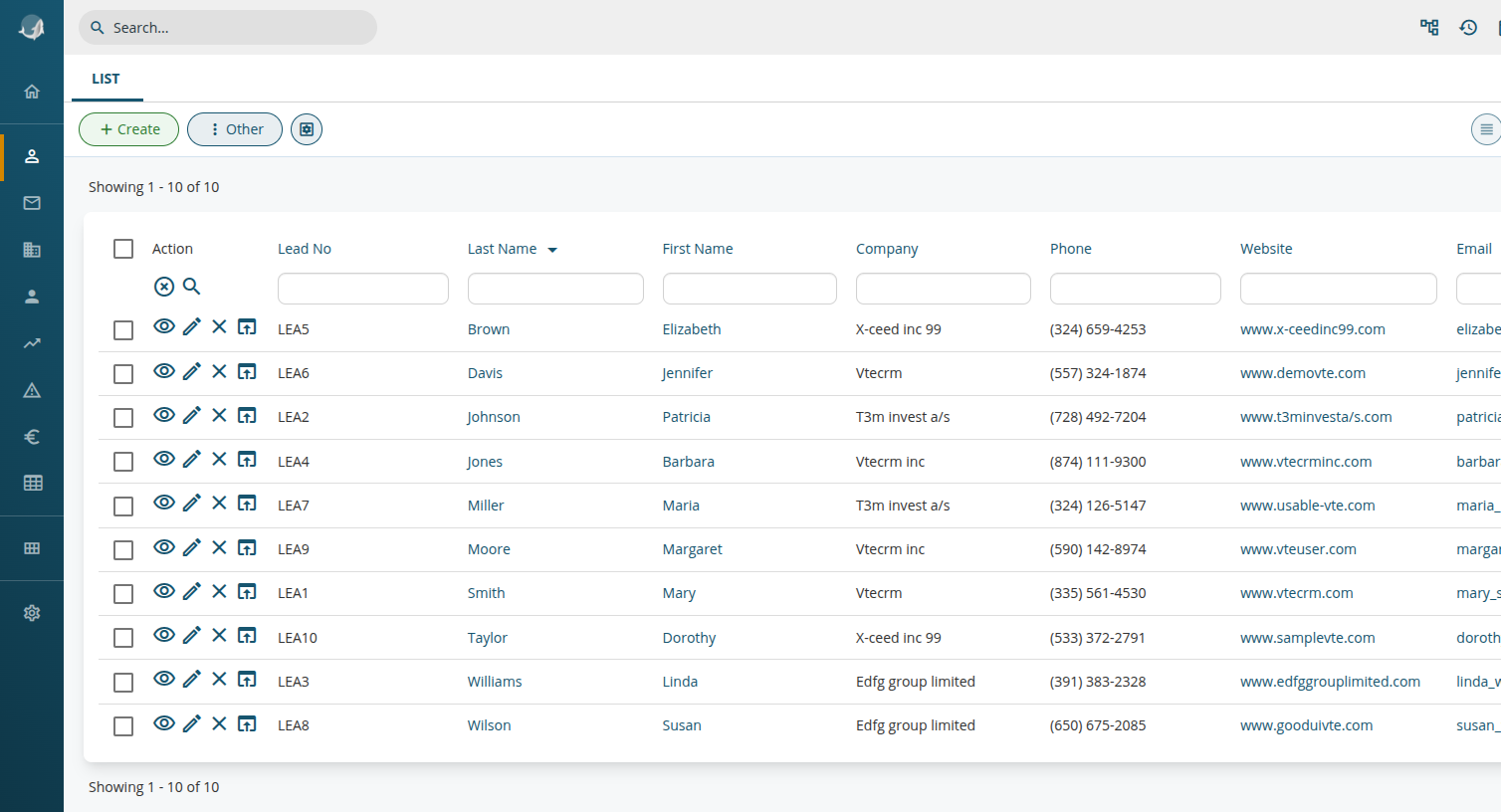
For example, now it's much easier to add new icons into the Actions column:
SDK::setClass('ListViewController', 'ListViewControllerCustom', 'modules/SDK/src/CUSTOMER/ListViewControllerCustom.php');And the class:
<?php

require_once('include/ListView/ListViewController.php');

class ListViewControllerCustom extends ListViewController {

	/**
	 * Generate an array of strings to be concatenated and set as the "action" column
	 */
	public function generateActions($focus, $recordId, array $sqlrow = [], $navigationInfo = []) : array {
		$actionLinkInfo = parent::generateActions($focus, $recordId, $sqlrow, $navigationInfo);

		$module = $focus->modulename;
		if ($module === 'Leads') {
			// add an icon to each lead to open the record in the erp:
			$actionLinkInfo[] = "<a href=\"https://myerp.example.com/lead/$recordId\" target=\"_blank\"><i class=\"vteicon\"'>open_in_browser</i></a>";
		}

		return $actionLinkInfo;
	}

}
Resulting in:
Webforms
The class WebformCapture is now extendable via SDK::setClass and the main method captureNow has been split up in several methods to facilitate modification of specific behaviours.
For example, to force the value of a field with a dynamic value upon Lead creation:
First we have to register the extension:
SDK::setClass('WebformCapture', 'WebformCaptureCustom', 'modules/SDK/src/CUSTOMER/WebformCaptureCustom.php');And then extend the prepareParameters method:
<?php

require_once('modules/Webforms/WebformCapture.php');

class WebformCaptureCustom extends WebformCapture {

	/**
	 * Read data from request and populate the necessary fields
	 */
	protected function prepareParameters(array $request, Webforms_Model $webform) : array {
        // call the parent method to fill the standard values
		$parameters = parent::prepareParameters($request, $webform);

        // populate the field with a random value (makeRandomString is just an example here)
		$parameters['my_field_random'] = makeRandomString();

		return $parameters;
	}
}
Code Review Skill
There is a skill available for use with AI agents built into your IDE that can help you adapt your code to the new release.
More details available in the documentation.
Once the analysis is complete, the files are checked and the original ones are overwritten, run tools/check-requests to check for any further references to the superglobal variable $_REQUEST. If none are found, the config/request.config.override.php file will be removed; otherwise, it will be updated, leaving only the new occurrences.
If you use a cloud agent, make sure your files do not contain sensitive data or credentials.