# New developers features in vtenext 26.04
In version 26.04 some additional changes have been made to the code to simplify the development of custom functionalities in certain areas.
View the [developer release notes](https://usermanual.vtenext.com/link/5751#bkmrk-developers).
# Mailscanner (Mail Converter)
Several Mailscanner classes are now exendable via `SDK::setClass`:
- MailScanner
- MailScannerAction
- MailScannerInfo
- MailScannerRule
- MailScannerSpam
- MailScannerMailBox
- MailScannerMailBoxZend
This allows for easier extensibility using our standard SDK.
Moreover, the list of actions (for example: Create Ticket, Update Ticket, ...) for each rule is now stored in the database and not hardcoded in various files. So adding a new a new action is much easier now:
```php
require_once 'modules/Settings/MailScanner/core/MailScannerAction.php';
// extend the class to implement custom actions
SDK::setClass('MailScannerAction', 'MailScannerActionCustom', 'modules/SDK/src/CUSTOMER/MailScannerActionCustom.php');
// add an action to create a task (custom module, or even Calendar)
MailScannerAction::addActionType('CREATE,Task,FROM', 'LBL_CREATE_MS_TASK', 'createTask');
// add the label
SDK::setLanguageEntries('Settings', 'LBL_CREATE_MS_TASK', ['it_it' => 'Crea compito', 'en_us' => 'Create task']);
```
And the extended class in `MailScannerActionCustom.php`:
```php
_subject;
$description = $mailrecord->getBodyText();
// create a record "CustomTask"
$inst = \CRMEntity::getInstance('CustomTask');
$inst->mode = '';
// populate some fields
$inst->column_fields['taskname'] = $subject;
$inst->column_fields['description'] = $description;
$inst->column_fields['date'] = date('Y-m-d');
// save it
$inst->save('CustomTask');
// Associate any attachement of the email to the record
$this->__SaveAttachements($mailrecord, $inst->modulename, $inst, $inst);
// create the Messages record
$this->__CreateNewEmail($mailrecord, $this->module, $inst);
// return the record id, to signal the correct application of the action
return $inst->id;
}
}
```
Will produce a new action in the rule:
[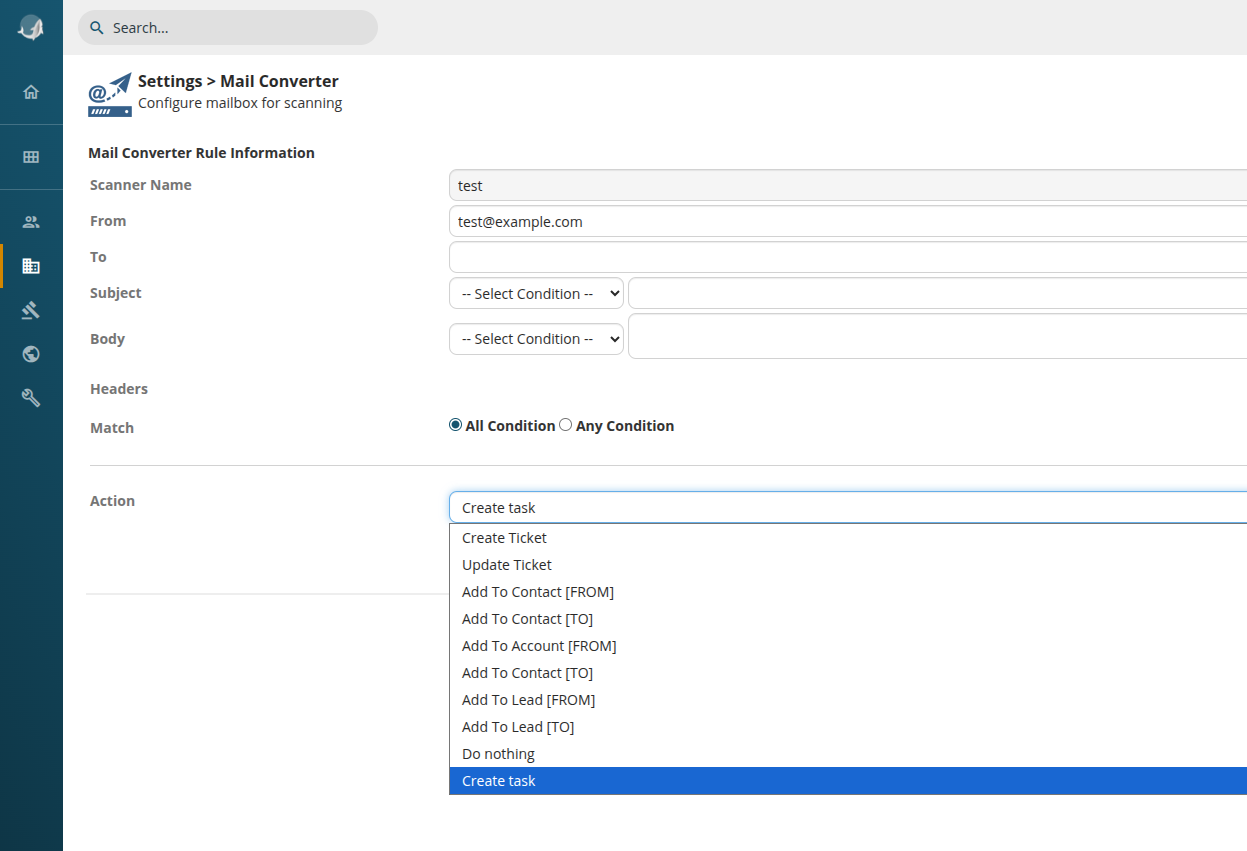](https://usermanual.vtenext.com/uploads/images/gallery/2026-03/NU1image.png)
# Record conversion
In the latest version the handling of record conversion (converting a Quote to a SalesOrder, or a SalesOrder to an Invoice...) has been generalized and centralized in a single place.
The list of available conversion modes is now in the table `vte_convertmodes`, which is managed by the class `ConvertModesUtils` which gives the possibility to add new conversion modes between standard or custom modules.
For example, to add a new conversion mode from module Quote, to a custom module (with products) PreOrders:
```php
// instantiate the utils class
$CMU = ConvertModesUtils::getInstance();
// define the mapping for the fields, key is destination field, value is the source
$mapping = [
// dest => source
'vcf_1_1' => 'subject',
'description' => 'description'
];
// add the convert mode
$CMU->addConvertMode(
'quotetopreorder', // unique name for the mode, can be any string
'Quotes', // starting module
'PreOrders', // second module
'record', // the parameter in request that will pass the record id. by default "record"
'quoteid', // name of the field in the destination module with a reference to the first module, can be null
true, // if true, show the button in Quotes
5, // sequence of the button, among other conversion buttons
'handleRecordConversion', // the method to handle the conversion. You can specify a different one in the PreOrders class if you wish to do something different
$mapping // the fields mapping. products block is automatically copied
);
```
The button will appear automatically:
[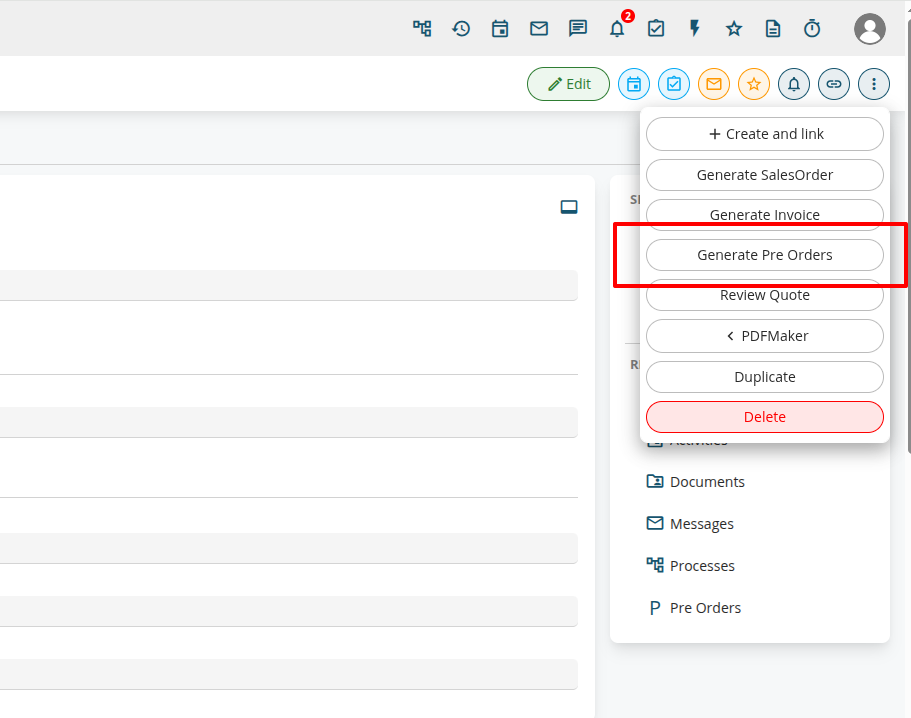](https://usermanual.vtenext.com/uploads/images/gallery/2026-03/goiimage.png)
# CSV Import
One of the classes used by the standard CSV Import (the one available from any module's ListView) has been made extendable via `SDK::setClass` and highly refactored to split the main method into smaller ones, to ease modification of specific behaviours:
- `Import_Data_Controller`: This class now can be extended
For example, if you need to modify a value of a specific field before being saved to the database:
```php
// register the class
SDK::setClass('Import_Data_Controller', 'Import_Data_ControllerCustom', 'modules/SDK/src/CUSTOMER/ImportCustom.php');
```
And the class:
```php
module && 'accountname' === $fieldName) {
// append "IMPORTED" to the accountname
$fieldValue .= ' - IMPORTED';
}
return $fieldValue;
}
}
```
# VteSync (synchronizations)
VteSync connectors are now extendable via `SDK::setClass` so it's easier to add new functionalities or changing the field mapping.
For example, to extend the WooCommerce connector:
```php
// classes are namespaced
SDK::setClass('VteSyncLib\Connector\WooCommerce', 'WooCommerceCustom', 'modules/SDK/src/CUSTOMER/WooCommerceCustom.php');
```
The extended connector:
```php
classes['Accounts'] = array(
'module' => 'Accounts',
'commonClass' => 'VteSyncLib\Model\CommonRecord',
'class' => 'VteSyncLib\Connector\WooCommerce\Model\AccountCustom'
);
}
// or it's possible to redefine any existing method
}
```
And the custom model:
```php
CommonRecord
'email' => 'email',
'username' => 'name',
//'phone' => 'phone', // THIS IS COMMENTED
// billing address
'address' => 'billingstreet',
'city' => 'billingcity',
'postcode' => 'billingpostalcode',
'state' => 'billingstate',
'country' => 'billingcountry',
'companybill' => 'companybill',
'firstnamebill' => 'firstnamebill',
'lastnamebill' => 'lastnamebill',
// shipping address
'address_shipping' => 'shippingstreet',
'city_shipping' => 'shippingcity',
'postcode_shipping' => 'shippingpostalcode',
'state_shipping' => 'shippingstate',
'country_shipping' => 'shippingcountry',
'companyship' => 'companyship',
'firstnameship' => 'firstnameship',
'lastnameship' => 'lastnameship',
'otherfield' => 'otherfield', // THIS IS CUSTOM!
// you probably also need to alter the VTE models, to connect this mapping to vte's one
);
// this function is called to prepare the array to be sent to woocommerce
public function toRawData($mode) {
$raw = parent::toRawData($mode);
// when sendind data to woo, hardcode this additional field:
$row['somefield'] = 'somevalue';
return $raw;
}
}
```
# ListView extendability
The `ListViewController` class has been refactored to be more perfomant and easily extendable.
For example, now it's much easier to add new icons into the *Actions* column:
```php
SDK::setClass('ListViewController', 'ListViewControllerCustom', 'modules/SDK/src/CUSTOMER/ListViewControllerCustom.php');
```
And the class:
```php
modulename;
if ($module === 'Leads') {
// add an icon to each lead to open the record in the erp:
$actionLinkInfo[] = "open_in_browser";
}
return $actionLinkInfo;
}
}
```
Resulting in:
[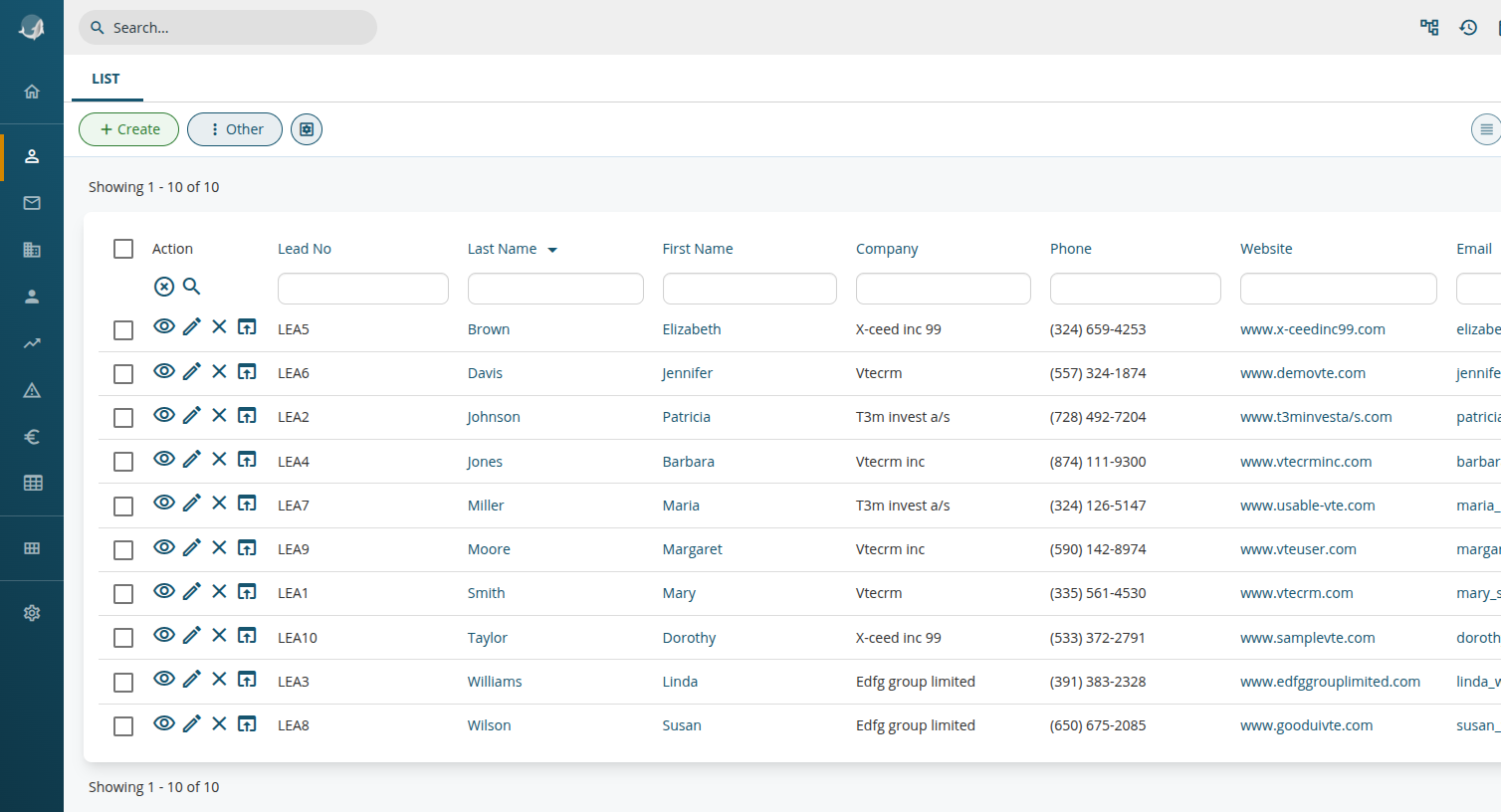](https://usermanual.vtenext.com/uploads/images/gallery/2026-03/GMVimage.png)
# Webforms
The class WebformCapture is now extendable via `SDK::setClass` and the main method `captureNow` has been split up in several methods to facilitate modification of specific behaviours.
For example, to force the value of a field with a dynamic value upon Lead creation:
First we have to register the extension:
```php
SDK::setClass('WebformCapture', 'WebformCaptureCustom', 'modules/SDK/src/CUSTOMER/WebformCaptureCustom.php');
```
And then extend the prepareParameters method:
```php
If you use a cloud agent, make sure your files do not contain sensitive data or credentials.