New developers features in vtenext 26.07
- Worker
- Agent orchestrator
- SDK uitypes in ProcessMaker actions
- New properties for processes
- Stronger hashing algorithm for user password
- REST Webservice Methods
- MCP Server
Worker
The Worker is a background daemon that runs alongside the CRM. When a task takes a long time (such as chatting with an AI, running a process, uploading documents for a vector search, etc..), the Worker handles it asynchronously so the browser does not freeze and the user can keep working. Also it allows the processing to be detached from the browser request, allowing the user to close the tab.
Architecture Overview
Default setup flows
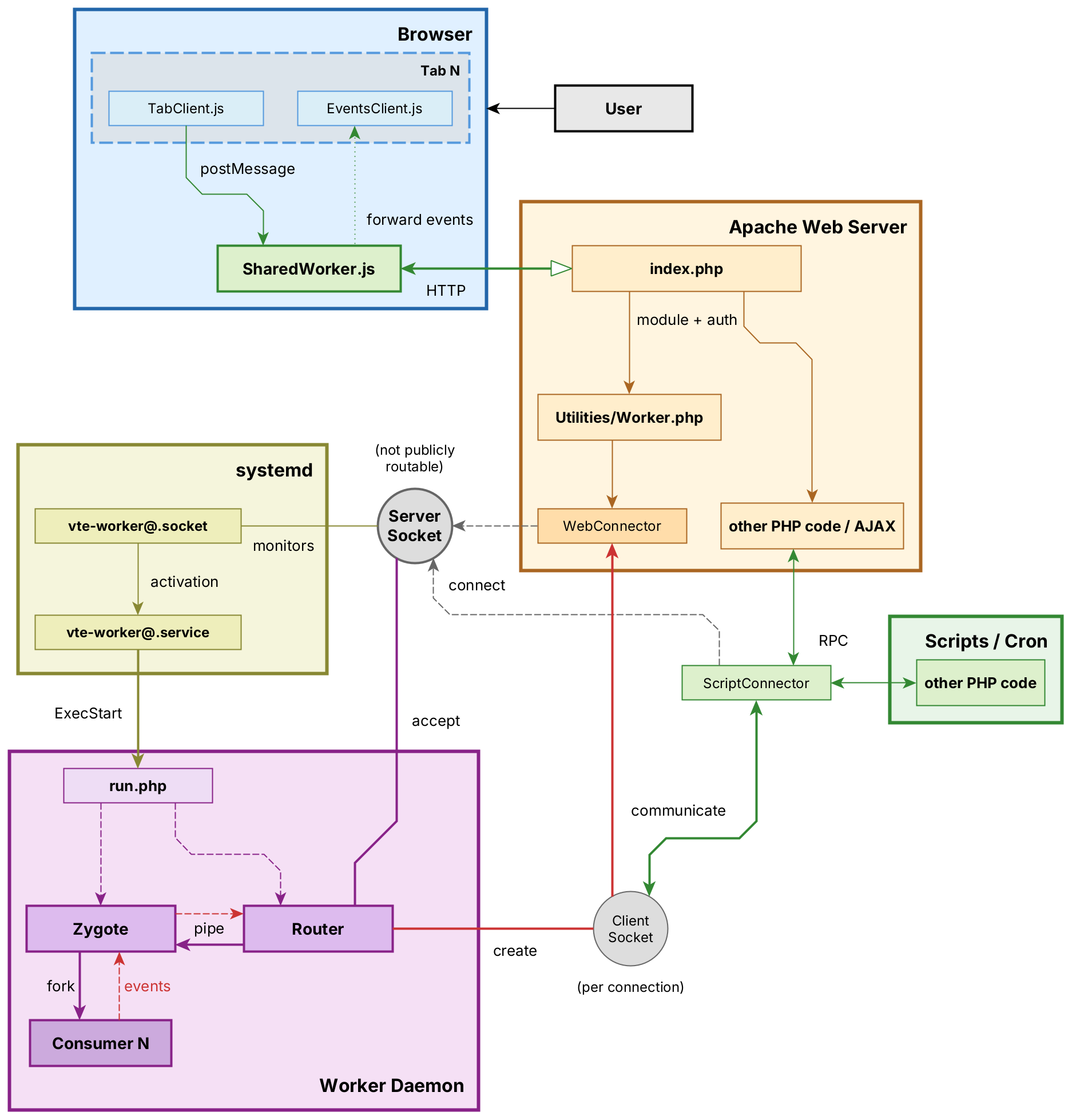
The Worker is composed of three processes that work together:
1. Router
File: include/Services/Worker/Router.php
The Router listens on a Unix socket for incoming connections. When a browser tab or a PHP script connects, the Router identifies who is connecting, decides what to do with the request, and forwards it to the Zygote. It also keeps track of all connected clients and can push live updates (Server-Sent Events) back to browsers.
- Process name:
vte-worker-router - Listens on a socket (Unix
cache_local/worker.sockwith systemd, or a TCP/IP address for cluster setups). The address is configured inconfig.inc.phpvia$worker_socket_URLand must match the path in the systemd socket unit. - Manages client subscriptions for real-time push events
2. Zygote
File: include/Services/Worker/Zygote.php
The Zygote manages a pool of worker processes. When the Router forwards a job, the Zygote forks a Consumer process to execute it. Up to 10 Consumers can run concurrently; if all are busy, the job is queued and executed when a slot becomes available.
- Process name:
vte-worker-zygote - Maximum concurrent Consumers:
CONSUMERS_MAX = 10(configurable in Zygote.php) - Queues excess jobs until a Consumer is free
3. Consumer
File: include/Services/Worker/Consumer.php
The Consumer is a short-lived process that performs the actual work. It connects to the database, loads the user context of the person who requested the task, executes the requested method, and terminates when done. Each Consumer handles exactly one job and then exits.
- Process name:
vte-worker-consumer - Process isolation: a crash in one Consumer does not affect others
- Database connection is established fresh for each job
Communication Between Processes
The three processes communicate through Unix pipes created by stream_socket_pair(). This is faster and lighter than running a full HTTP server inside the Worker.
Client Types
There are two kinds of clients that can connect to the Worker:
| Client | How It Connects | Used By |
|---|---|---|
Web |
Browser → Apache → modules/Utilities/Worker.php (handles web auth) → socket → Router |
Browser tabs (AI chat, notifications). Each web connection holds an Apache process slot. |
Script |
PHP code → ScriptConnector → Unix socket → Router |
CLI scripts, cron jobs, AJAX handlers |
For Web Clients (SSE)
When a browser connects, the Router upgrades the connection to Server-Sent Events (SSE). This allows the Consumer to push data back in real-time — for example, streaming an AI response word by word, or sending a notification as soon as it is created.
Relevant files: WebConnector.php (client side), WebHandler.php (server side), SharedWorker.js (browser — optional, reduces connections to one per browser).
For Script Clients
PHP code connects using ScriptConnector with a 30-second I/O timeout (long enough for background tasks). The connection supports both synchronous calls (wait for response) and asynchronous calls (fire and forget).
Relevant files: ScriptConnector.php (client side), ScriptHandler.php (server side).
Internal Protocol
Messages use a simple text-based format over the socket. Each message is a JSON object with an event type (init, call, return, error, event) and event-specific data. The ProtocolTrait handles encoding and decoding on both sides.
Available Tasks
These are the methods the Worker can execute. Consumer methods are registered in ScriptMethodsTrait (Methods.php) and implemented in Consumer.php. Worker methods execute directly in the Zygote (no Consumer fork).
| Method | Where Executed | Description | Definition |
|---|---|---|---|
llmChat |
Consumer | Send a message to an AI assistant (Agent, LLM, or External WebService). Streams the response back to the browser via SSE. | Consumer.php:162 |
elaborateRag |
Consumer | Upload selected CRM documents to the external AI orchestrator and build the vector database for RAG retrieval. | Consumer.php:601 |
delegateProcess |
Consumer | Execute a BPMN workflow process (ProcessMaker) in the background. | Consumer.php:118 |
resumeProcesses |
Consumer | Resume queued workflow processes. Runs at Worker startup and on demand. | Consumer.php:133 |
sendToAll |
Consumer | Push a custom event to a specific user or to all connected browser sessions. | Router.php:249 |
notifyNow |
Consumer | Send a CRM notification to a specific user in real-time. | Router.php:321 |
workerStats |
Zygote | Returns uptime, number of active consumers, queued jobs. | Zygote.php:219, Router.php:222 |
workerRestart |
Zygote | Restarts the entire Worker (Router + Zygote + all Consumers). Works independently of how the Worker was started (systemd or direct CLI), but only if the Worker is actually running. | Router.php:239 |
Adding a New Task
To add a new job that the Worker can execute, two files must be modified. Because Consumer processes load PHP classes after being forked from the Zygote, changes to existing methods take effect on the next consumer start without restarting the Router or Zygote. Adding a brand new method requires registering it in the trait (step 2) and may need a full restart only for the trait to be recognized.
Step 1: Implement the method in Consumer.php
Add your method inside the //region Methods section of Consumer.php:
protected function convertPdf(int $documentId) {
    global $adb;
    // ... perform work ...
    $this->client->return($result);
}
Useful tools available inside the Consumer:
$this->client->return($data)— send a successful response$this->client->error("message")— signal an error$this->sendToAll(Roles::web, $userId, 'eventName', $data)— push a live event to browsers$this->later(function() { ... })— schedule work for the next event-loop tick
Step 2: Register the method in Methods.php
Add the method signature to ScriptMethodsTrait in Protocol/Methods.php:
/** @return void */
public function convertPdf(int $document_id) {
    return $this->call(__FUNCTION__, get_defined_vars(), ['wait' => false]);
}
Calling the new method
From PHP code (the connector is reused and reconnects on failure):
$conn = ScriptConnector::reuseInstance();
if ($conn->tryConnect()) {
    $conn->convertPdf(42);
}
From the command line:
php -f include/Services/Worker/run.php call convertPdf 42A method that belongs in WorkerMethodsTrait instead (executed by the Zygote without forking a Consumer) uses the same two-step process: add the signature to the trait and implement it in Zygote.php or Router.php.
Broadcasting Events to the Browser
From any Consumer method, you can push real-time data to connected browsers:
// Send to a specific user
$this->sendToAll(Roles::web, $userId, 'myEvent', ['progress' => 50]);

// Send to ALL users
$this->sendToAll(Roles::web, 0, 'myEvent', $data);
On the browser side, events are received through SharedWorker.js and EventsClient.js. The Router maintains a tree of connected clients indexed by user ID, session ID, and instance ID, and dispatches events to the matching tabs.
Operation
Startup
The Worker can be started through systemd socket activation or directly from the command line for testing and custom setups:
php -f include/Services/Worker/run.phpWith systemd socket activation:
- systemd creates the Unix socket (
cache_local/worker.sock) - On the first connection, systemd launches
php run.php run.phploads the CRM environment (config, database, etc.)Worker::start()callspairedFork(), splitting into two processes:- The parent becomes the Router (socket listener)
- The child becomes the Zygote (consumer pool manager)
- When a job arrives, the Zygote forks a Consumer to execute it
- The Consumer runs the job and exits
Installation
sudo tools/worker installThis copies the systemd unit files (vte-worker@.service and vte-worker@.socket) to /etc/systemd/system/, enables the socket, and starts it. Both files are systemd templates that take the relative path from /var/www/html as the instance parameter (e.g. vte-worker@vte-agentic), which allows running multiple Workers for different VTE installations on the same machine.
If your installation differs from /var/www/html/PATH, you must edit the templates manually or with systemctl edit [--full] for both vte-worker@.socket and vte-worker@.service, before installing.
Commands
| Command | Effect |
|---|---|
tools/worker install |
Install systemd units, enable and start the socket |
tools/worker restart |
Send a restart signal to the running Worker |
tools/worker status |
Print uptime, number of active consumers, queued jobs |
Signals
| Signal | Effect |
|---|---|
SIGTERM / SIGINT |
Graceful shutdown: stop accepting new connections, wait for all running Consumers to finish, then exit. |
SIGHUP / SIGUSR1 |
Reload. |
Configuration
| Setting | Location |
|---|---|
| Maximum concurrent Consumers | Zygote.php:29 — CONSUMERS_MAX |
| Socket path | systemd/vte-worker@.socket — ListenStreamconfig.inc.php — $worker_socket_URL |
| Log file | logs/worker.log |
Troubleshooting
Enable Logging
Logging is disabled by default. To enable it, set the static flag before starting the Worker:
\Vtenext\Services\Worker\Worker::$enableLog = true;Logs are written to logs/worker.log. The log format includes a timestamp, the process role, and the message.
In the browser, put the console verbosity to debug.
Common Issues
| Symptom | Likely Cause |
|---|---|
| Connection refused | The Worker is not running or the socket path is incorrect. Check $worker_socket_URL in config.inc.php and verify the socket file exists. |
| Consumer not starting | Process limit reached (RLIMIT_NPROC). The Worker attempts to raise it to 1000 + CONSUMERS_MAX at startup. |
| Job queued but never runs | All 10 Consumer slots are occupied by long-running tasks. Check tools/worker status for current usage. |
SharedWorker
- Firefox — visit about:debugging#workers (copy-paste) and press Debug then you can inspect everything and put breakpoints. Logs are also shown in the first tab that spawned the SW (yes 3 times, it's a browser bug as of June 2026) and in the browser console in multi-process mode (Ctrl+Shift+J).
- Chrome — visit chrome://inspect/#workers (copy-paste) and press Inspect, same story. No logs are shown in individual tabs.
Technical limitations
Browsers connections cap
Web connections from browser tabs rely on Server-Sent Events (SSE), which keep a long-lived HTTP connection open to the server. Browsers enforce a hard limit of 6 concurrent connections per domain (HTTP/1.1). The SharedWorker.js script multiplexes all tabs through a single SSE connection per browser, bypassing the limit entirely.
Disconnection detection
TCP provides no built-in notification when a peer disconnects. To detect that a browser has closed the connection, PHP must attempt to write to the socket. The WebConnector handles this by writing a newline to the output buffer at every read tick (default every 10 seconds). This means a disconnected browser may not be detected for such time, and an inactive but still connected tab generates a small amount of periodic traffic.
Xdebug and set_time_limit
When the Xdebug extension is loaded, set_time_limit(0) (which normally removes the execution time limit) does not work reliably. Xdebug overrides PHP's internal timer and enforces its own xdebug.max_nesting_level and related constraints, which can cause long-running Consumer methods to be terminated prematurely on development environments where Xdebug is active. If the Worker behaves unexpectedly during development, disable Xdebug or set xdebug.mode=off in the PHP configuration.
File Reference
include/Services/Worker/
├── run.php                          # Entry point (called by systemd)
├── Worker.php                       # Base Worker class + WorkerTrait
├── Router.php                       # Socket listener, client registry, SSE push
├── Zygote.php                       # Consumer pool manager, job queue
├── Consumer.php                     # Task executor (llmChat, elaborateRag, etc.)
├── utils.php                        # shared utilities
├── Protocol/
│   ├── Protocol.php                 # Wire protocol encode/decode
│   ├── Roles.php                    # Role constants (router, zygote, consumer, etc.)
│   ├── Methods.php                  # Method traits (ScriptMethods, WebMethods, WorkerMethods)
│   ├── ClientHandler.php            # Server-side connection handler
│   ├── BaseConnector.php            # Client-side connector base class
│   ├── ScriptHandler.php            # Handler for script connections
│   ├── ScriptConnector.php          # Connector for PHP scripts
│   ├── WebHandler.php               # Handler for web connections (SSE)
│   └── WebConnector.php             # Connector for browser (HTTP to socket bridge)
├── systemd/
│   ├── vte-worker@.service          # systemd service template
│   └── vte-worker@.socket           # systemd socket template
├── SharedWorker.js                  # Browser SharedWorker (multiplexes connections)
├── TabClient.js                     # Client for tab-to-tab messaging
└── EventsClient.js                  # Event subscription client in the browser

modules/Utilities/Worker.php         # HTTP bridge (Apache -> Worker socket)
modules/Settings/WorkerConfig.php    # Admin settings panel
modules/Settings/WorkerConfig.tpl    # Smarty template for the admin panel
tools/worker                         # CLI management tool
logs/worker.log                      # Log file
Agent orchestrator
Python service providing AI agent chat, MCP tools integration, and RAG on CRM documents, based on FastAPI and LangChain. Called by the Worker's Consumer processes via HTTP/SSE.
System Requirements
llama-cpp-python is installed as a pre-built wheel (not compiled from source). requirements.txt specifies the Vulkan variant via --extra-index-url https://abetlen.github.io/llama-cpp-python/whl/vulkan. Other backends are available by changing the index URL:
| Backend | Index URL suffix |
|---|---|
| cpu | .../whl/cpu |
| vulkan (default) | .../whl/vulkan |
| cuda | .../whl/cuda |
| rocm | .../whl/rocm |
| metal | .../whl/metal |
| sycl | .../whl/sycl |
Docker image installs libvulkan1. GPU access (/dev/dri) is commented out in compose.yaml by default — uncomment for hardware acceleration. Falls back to CPU without GPU.
The x86-64-v2 baseline or equivalent is required by NumPy's pre-built wheels (see NumPy SIMD build options). CPUs without these instructions can still run the orchestrator by recompiling NumPy from source with reduced SIMD flags (NPY_DISABLE_CPU_FEATURES), or by using a distro that ships a compatible build.
Architecture Summary
Three layers:
- PHP CRM (Worker Consumer), calls orchestrator via HTTP
- Python orchestrator (FastAPI, Docker)
- LLM / MCP servers / Chroma
Relevant Consumer methods: llmChat() (chat relay), elaborateRag() (document upload + vector build).
RAG Document Building
Indexing (Elaboration)
Triggered on agent save with the Documents feature enabled. The Worker Consumer:
- Reads selected CRM Documents
POST /rag/keep— prunes stale docs from orchestratorPOST /rag/upload— uploads new/changed files (multipart), stored asdocs/shared/<md5>.<ext>, symlinked intodocs/<agent_id>/POST /rag/build— indexes all docs for the agent into Chroma atvectors/<agent_id>/.
Querying (Runtime)
With rag: true in /agent/run, Python injects a query_documents tool. The LLM decides when to call it. The orchestrator decomposes the question into ≤3 sub-questions (needs_retrieval flag), queries Chroma per sub-question, deduplicates by doc_id, re-ranks with FlashRank, and returns context. The LLM answer is grounded strictly in retrieved context.
Python Orchestrator Endpoints
The Python service exposes the following REST endpoints. All are mounted on the FastAPI app at port 8120.
| Endpoint | Description |
|---|---|
POST /agent/run |
Agent loop: LLM + MCP tools + guardrails + optional RAG. SSE or JSON. |
POST /tools/inspect |
Introspect MCP server tools. |
POST /rag/build |
Index documents for an agent_id into Chroma. |
POST /rag/run |
Query vector store with question decomposition. |
POST /rag/keep |
Prune agent's doc symlinks to match {filename: md5}. |
POST /rag/upload?agent_id= |
Upload file to shared pool + symlink into agent's dir. |
Installation & Configuration
Docker Setup
The Python orchestrator runs in Docker. Quick start:
cd plugins/agent
docker compose up -d --build
Verify: curl http://localhost:8120/docs should show the Swagger UI.
Port 127.0.0.1:8120:8120 — bound to localhost only, MUST NOT be publicly exposed.
Here a quick snippet to install docker.
Environment Variables
| Variable | Default |
|---|---|
HOST (inside the container) |
0.0.0.0 |
PORT |
8120 |
EMBED_MODEL |
nomic-ai/nomic-embed-text-v2-moe-GGUF:Q8_0 |
RERANK_MODEL |
ms-marco-MiniLM-L-12-v2 |
HF_CACHE_DIR |
/app/hf_cache |
DOCUMENTS_DIR |
/app/docs |
VECTORS_DIR |
/app/vectors |
Troubleshooting
- Startup slow: Embedding model downloads from HuggingFace on first container start — cached in
HF_CACHE_DIRafterwards. - Empty docs:
/rag/buildraisesRuntimeErrorifdocs/<agent_id>/is empty. - GPU not used: Uncomment
/dev/driincompose.yaml. Falls back to CPU otherwise. - CPU compat: Verify with
/lib64/ld-linux-x86-64.so.2 --help
File Reference
plugins/agent/
├── compose.yaml
├── app.Dockerfile
├── requirements.txt
├── src/vte_agent/
│   ├── __main__.py
│   ├── config.py
│   ├── schemas.py
│   ├── agent.py              # /agent/run, /tools/inspect, calculator + rag tools
│   ├── rag.py                # /rag/* endpoints
│   ├── docs.py               # doc loaders
│   ├── models.py             # GGUFEmbeddings
│   ├── user_manual.py        # builtin vtenext user manual search tool
│   └── utils.py
├── docs/
│   ├── shared/        # <md5>.<ext> — deduplicated by content hash
│   └── <agent_id>/    # symlinks → ../shared/<md5>.<ext>
└── vectors/
    └── <agent_id>/    # chroma.sqlite3, parent_docs.json, description.txt

cache_local/
└── huggingface/       # local models cache (embedding, rerank)
SDK uitypes in ProcessMaker actions
SDK uitype fields will all be shown as uitype 1 (text) in ProcessMaker actions
New properties for processes
If you don't want to attach external dynamic form emails to the record you can set to false this prop:modules.processes.dfe.save_cache_link
If you assign a dynaform to email or portal, you can force the assigned user of the record Processes with these props:modules.processes.assigned_user_id.emailmodules.processes.assigned_user_id.portal
With the value related_to, the process will be assigned to the owner of the linked record. Alternatively, you can enter the ID (int) of a user/group.
Stronger hashing algorithm for user password
Replaced the password hashing algorithm from md5 to argon2id.
REST Webservice Methods
Below are all the SDK functions for registering REST methods and all the properties for describing them according to the OpenAPI standard.
Registering custom Webservice methods
SDK::setRestOperation($name, $handlerFilePath, $handlerMethodName, $params, $permission, $mcpSupport, $info)$name: method name called by REST webservice;$handlerFilePath: file path where the function is defined;$handlerMethodName: name of the function to use from the specified handler file;$params: if provided, the associative array of parameter names with their definition (see Parameter Definition ($params))$permission(since vtenext 23.08): one of “read”, “write” or “readwrite”, describing the kind of operation of this webservice. Used with additional accesskey for the users;$mcpSupport(since vtenext 26.XX): default to 0 ("disabled"), it can be set to 1 to allow the registration of this method to MCP servers;$info(since vtenext 26.XX): additional information used to display this method, for documentation purposes (see$infoParameter)
This function returns the id of the new Webservice if created successfully, and false otherwise.
SDK::setRestOperationInfo(string $name, array $operation = [], array $parameters = [], array $requestExamples = [], array $responses = [])This function takes name as the name of the operation, and the arrays described in the $info Parameter section.
This function returns true if the webservice information was set up successfully, and false otherwise.
Parameter Definition ($params)
The $params function parameter is an associative array that has the name of the parameter as the key, and the type of the parameter.
The types currently registered are string, encoded, datetime, double, and boolean.
$info Parameter
The $info parameter of the function SDK::setRestOperation is an optional associative array that has the keys operation, parameters, examples, and responses.
This parameter is passed accordingly to SDK::setRestOperationInfo, which is the method responsible for filling the information for the Webservice method that is needed for the OpenAPI specification and the MCP servers.
operation Key
The operation key is an associative array with two optional keys:
description:string, human-readable description of the Webservice method;tags:string, comma-separated list of tags to group the Webservice method with;tool_description:string, specific description for MCP tool, if not provided the MCP server will default the generic description.
parameters Key
The parameters key is an associative array with the name of the parameter as the key, and an associative array that contains additional information, used for documentation purposes.
This information is used to further document the parameters of the webservice method, while still adhereing to the conventions already established with the use of this SDK.
The associative array for the parameter has the following, optional, attributes:
required:bool, whether the parameter is mandatory;default_value:mixed, the default value of the parameter;description:string, informative description of the parameter;example:mixed, an example value of the parameter;extra: associativearray, complementary information that can't be documented otherwise.
The extra attribute has the following, optional, attributes, that are of type string except when noted:
type: used, for example, when the parameter is registered asencoded, allowing it to "cast" it asobjectorarray;schema: the name of the schema definition that describes the structure of the parameter, used whentypeisobject;items: required whentypeisarray, specifies the typing of the values contained in the array; it can be a simple type such asstring,int,float,double,bool, or the name of a schema definition;enum:arrayof values that are supported by the parameter.
examples Key
The examples key is a list of associative arrays that showcase a full usage of the webservice method. This key is optional.
The associative array of a single example has the following attributes:
name:string, the name chosen for the example;summary:string, brief description of the example;data: associativearray, the payload passed by the request.
responses Key
The responses key is an associative array with the status code of the response as the key, and an associative array that contains the information of the response.
The associative array of a response has the following optional attributes:
description:string, brief description of the response;fields: associativearray, the payload of the response, seefieldsAttributeexamples: associativearray, example representations of the response, seeexamplesKey;ref:string, predefined information of the response; if provided
fields Attribute
The fields attribute is an associative array with the name of the field as the key, and an associative array that contains the information of the field.
The associative array of a field has the following optional attributes:
type: the type of the field, can bestring,int,float,double,bool,object, orarray; if omitted, the field can be of "any" type;schema: iftypeisobject, the name of the schema definition that describes the structure of the field;items: required whentypeisarray, specifies the typing of the values contained in the array; it can be a simple type such asstring,int,float,double,bool, or the name of a schema definition;required:boolwhether the field is mandatory;default:mixed, the default value of the field;description:string, informative description of the field;example:mixed, an example value of the field;enum:arrayof values that are supported by the field.
Deregistering custom Webservice methods
SDK::unsetRestOperation(string $name)$name: name of the webservice method to delete.
This function returns true on success and false on failure.
SDK::unsetRestOperationInfo(string $name, string $type = 'all')$name: name of the webservice method whose information need to be deleted;$type: the type of information to delete, can beall,operation,parameters,requestExamples,responses, andresponseExamples.
This function returns true on success and false on failure.
Registering custom Webservice schemas
SDK::setRestOperationSchema(string $name, array $fields)$name: name of the schema;$fields: seefieldsAttribute.
This function returns the id of the new webservice schema if created successfully, and false otherwise.
Deregistering custom Webservice schemas
SDK::unsetRestOperationSchema(string $name)$name is the method name of the webservice schema to delete.
This function returns true on success and false on failure.
MCP Server
The Model Context Protocol (MCP) is a standard that enables AI applications to connect to external systems.
In VTENEXT, this standard is used to expose REST APIs, custom methods and processes to AI applications, to enable them to interact with the CRM itself.
Currently VTENEXT has set up a basic MCP server with the main webservices (referred here as tools) that ensure a wide extent of interoperability with the CRM; the user can choose to extend this server by registering other webservices to it, or even create custom tools to be used with the servers. Be mindful that, with roughly more than 30 tools registered to a MCP server, the accuracy of the server might degrade.
In VTENEXT, the MCP servers are fundamentally handled like any other webservice, but they have their own SDK methods to work with them.
Tools registered in the base MCP server (REST name: mcp)
createdeletedescribelisttypesqueryrelateretrieveretrieveInventoryget_currenciesupdateRecordconvert_leadget_current_contextprocess_textsummarizetools_manualtranslate
SDK methods for working with MCP servers
Setting up a MCP server
SDK::setMcpServer(string $name, ?string $description = null, bool $isActive = true, ?string $operationName = null)$name: the name of the MCP server;$description: human-readable description of the MCP server;$isActive: set it tofalseto prevent the Server from accepting requests;$operationName: the name to give to the corresponding REST Webservice method; defaults to the name of the MCP server prefixed withmcp..
This function returns the id of the MCP server if created successfully, and false otherwise.
Registering a tool to a MCP server
SDK::registerMcpTool(string $mcp, string $name, string $type, ?string $tool_name = null, ?string $description = null)$mcp: the name of the MCP server;$name: the name of the webservice method or the custom MCP tool;$type: the type of the tool to register, can beoperationfor the webservice method orcustomfor the custom tool;$tool_name: the name to give to the registered tool, defaults to$name;$description: MCP-specific information to give to the registered tool, will take precedence over any information provided by the webservice method/custom tool.
If successful, this function returns an array with the id of the MCP server and the id of the webservice method/custom tool; this function returns false on failure.
Defining a custom tool for MCP servers
SDK::setMcpTool(string $name, string $handlerFilePath, ?string $handlerMethodName = null, ?string $description = null, ?array $inputSchema = null, ?array $outputSchema = null)$name: the name of the custom tool;$handlerFilePath: file path where the function is defined;$handlerMethodName: name of the function to use from the specified handler file;$description: informative description of the custom tool;$inputSchema: the definition of the function input;$outputSchema: the definition of the function output.
$inputSchema and $outputSchema follow the JSON Schema 2020-12 Specification.
N.B.: the function should always return an array and, if possible, the array should be associative.
Removing a MCP server
SDK::unsetMcpServer(string $mcp, bool $force = false)$mcp: the name of the MCP server to delete;$force: iftrue, force the deletion of the MCP server, even if it has tools registered to it.
This function returns true on success and false on failure.
Deregistering a tool from a MCP server
SDK::unregisterMcpTool(string $mcp, string $name, string $type)$mcp: the name of the MCP server;$name: the name of the tool to deregister;$type: the type of the tool to deregister, can beoperationorcustom.
This function returns true on success and false on failure.
Deregistering a custom tool
SDK::unsetMcpTool(string $name)$name: name of the custom tool to delete.
This function returns true on success and false on failure.