# 5.1 Settings Overview

<span style="color: #444444;"><span lang="en-GB">The Settings page can be opened using the icon </span></span>![image-1655733952929.png](https://usermanual.vtenext.com/uploads/images/gallery/2022-06/scaled-1680-/image-1655733952929.png) <span style="color: #444444;"><span lang="en-GB">at the top right of the Home</span></span> <span style="color: #444444;"><span lang="en-GB">page,</span></span><span style="color: #444444;"><span lang="en-GB"> displaying the following information </span></span>

<span style="color: #ff0000;"><span lang="en-GB"><span style="color: #000000;">**General Settings**</span> (not editable)</span></span><span style="color: #444444;"><span lang="en-GB">:  
</span></span>- <span style="font-size: small;"><span lang="en-GB">**Web address:**</span></span> <span style="font-size: small;"><span lang="en-GB">to which the Wilson</span></span> <span style="font-size: small;"><span lang="en-GB">for</span></span> <span style="font-size: small;"><span lang="en-GB">vtenext mobile App connects;  
</span></span>- **Username:** <span style="font-size: small;"><span style="color: #444444;"><span lang="en-GB">identity of the user who accessed the App;  
</span></span></span><span style="font-size: small;"><span style="color: #444444;"><span lang="en-GB">**- Vtenext version:**</span></span> <span style="color: #444444;"><span lang="en-GB">the currently installed version</span></span> <span style="color: #444444;"><span lang="en-GB">of vtenext</span></span> <span style="color: #444444;"><span lang="en-GB">on your server or cloud;  
</span></span></span><span style="font-size: small;"><span lang="en-GB">**- App version:**</span></span> <span style="font-size: small;"><span lang="en-GB">the version currently in use of the Wilson</span></span> <span style="font-size: small;"><span lang="en-GB">for</span></span> <span style="font-size: small;"><span lang="en-GB">vtenext App;</span></span>

**Notifications**:   
\- **Receive push notifications**: enable or disable push notifications (only if they have been previously activated from the web settings);  
\- **Configure push notifications**: you can choose for which modules to receive notifications, set a customized time range to receive them, and choose whether to be simultaneously notified or not when using the web application;  
\- **Open settings**: to enable or block notifications and to activate or deactivate the notification badge on the mobile device;

**Two-factors Authentication (2FA):  
\- Biometrics:** enable or disable access to the app and other actions that can be performed with the app using fingerprint recognition instead of the device PIN;

[![10.png](https://usermanual.vtenext.com/uploads/images/gallery/2023-08/scaled-1680-/10.png)](https://usermanual.vtenext.com/uploads/images/gallery/2023-08/10.png)
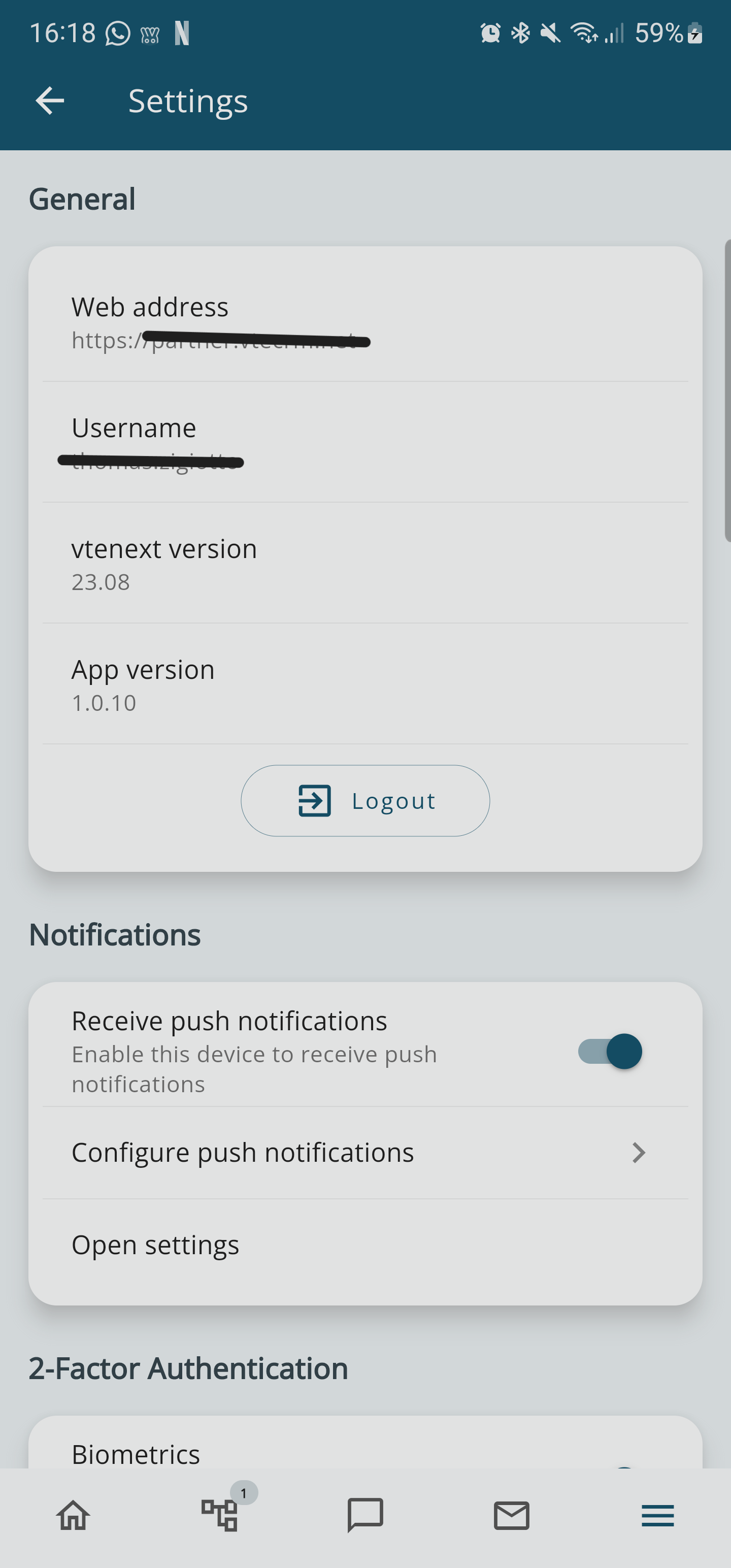
*Settings detail view 1*

[![11.png](https://usermanual.vtenext.com/uploads/images/gallery/2023-08/scaled-1680-/11.png)](https://usermanual.vtenext.com/uploads/images/gallery/2023-08/11.png)

*Settings detail view 2*