
Basic rules
Before seeing in detail the symbols used in vtenext is important to understand some fundamental rules for the graphical design of a process. Here below you can find and easy diagram and in the following slides a description for its configuration in vtenext.
In the diagram we begin from an initial event, the circle, the Connector, must have the same direction
as the flow. The Activity symbol is a Task that can be used both as Condition and Action.
- 1 -After the initial event there always must be a condition. Those are the conditions that make the flow go.
- 2 - Before the Getaway there always must be a condition that decides the sorting.
- 3 - After one or two conditions there are always different types of action (Script Task, Send Task, Manual Task, Human Task...)
- 4 - It would be useful to put an Activity before the End event.


The Start Event is where the process begins, by clicking on it is possible to display the symbols reported on the left.
In red is displayed the wrench that allows to choose among the different symbols.

By clicking on Intermediate Event and then on the wrench the symbols reported on the wrench will be displayed.
An important tool is the Time Intermediate Catch Event, useful if there is the need to postpone an action.


Here below an example of the Timer Intermediate Catch Event is reported. By positioning this symbol between the condition and the action, the sending of an email for example, it is possible to set the Timer and postpone its sending.
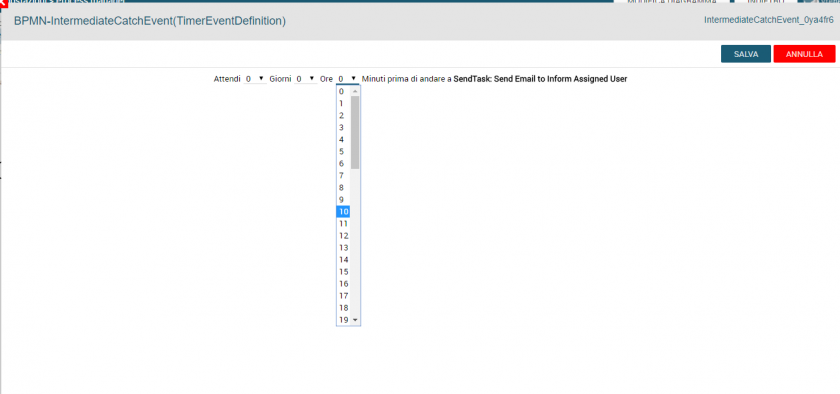
By clicking on the Timer Intermediate Catch Event symbol a screen will open, in which is possible to set the timer for the next action.
The End Event will close the process, more than one can be used as the process can take different paths, or it can be the same End Event as a common end point of different paths.


It is recommended to draw an action before the end point so it is clear how the process ends.
The Activity Task is represented by a rectangle, and indicates a condition or an action, the difference is that the latter is marked by a script.

To create a task or an activity you have to click on the wrench and then chose the script that fits better. The symbols are used to identify the actions on a diagram level, during the configuration the procedures will be the same, except for the sub processes.
Connecting object :
In the process the elements of the flows (events, activities or ramifications) represents what actually happens, therefore they have to be logically connected. And to do so we use the connectors.

The symbol on the top left is the Gateway, at the moment only the Parallel and the Exclusive ones can be used.
The one with the big X is the Exclusive Gateway and is used when the process takes two or more different paths, that depends on the condition that is placed before the gateway. Doing so only the paths that meets the conditions will be
taken. Always by clicking on the wrench is possible to chose the Parallel Gateway.

The Parallel Gateway is used when one or more conditions, but not all of them, have to be met to proceed with the process.
