
2.3 Intermediate / Boundary Event Timer
INTERMEDIATE/BOUNDARY EVENT TIMER
It represents an element widely used for managing the timing of task and process execution.

It can be quickly selected from the menu on the left while in diagram editing mode.

There are two groups of timers, which differ based on the actions to be performed and the tasks/elements involved:
1) Intermediate Event Timer
2) Boundary Event Timer
1) INTERMEDIATE EVENT TIMER
The first group consists of various types of "Intermediate Events" and is used between two tasks/elements.
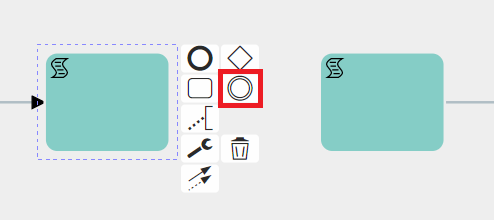
They can be selected in diagram editing mode by first clicking on the task or element from which the flow should then continue to the timer, and then clicking on the icon showing two circles, called "Intermediate/Boundary Event Timer."
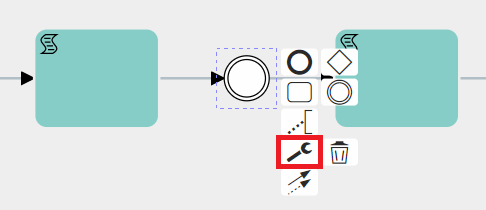
At this point, you need to select the timer just mentioned, click on the wrench icon, and then choose one of the available options.
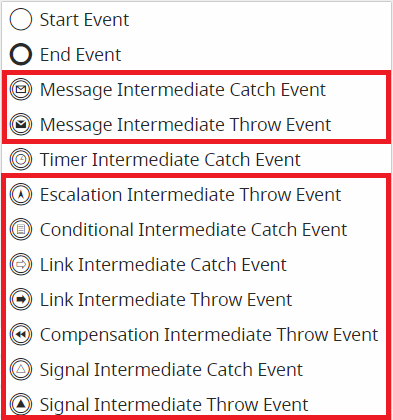
Timer Intermediate Catch Event
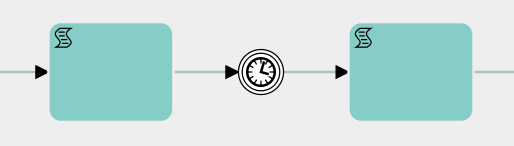
This is a type of timer used to wait for a specific period of time before moving on to the next task/element.
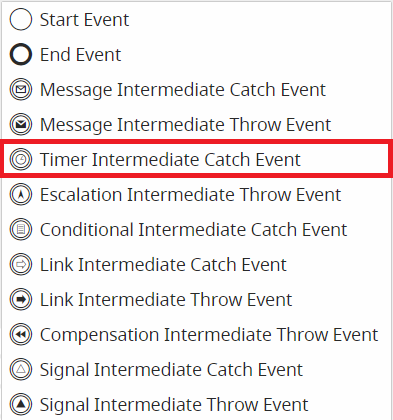
The other selectable types of Intermediate Events are currently not implemented.
IMPORTANT NOTE: As of version 24.08, they have been completely removed.
During the configuration phase, by clicking on the Timer Intermediate Catch Event symbol, a dedicated interface opens where you can enter the waiting time and the date to be used as a reference.

All'interno della prima picklist partendo da sinistra, è possibile indicare se attendere la tempistica indicata PRIMA o DOPO rispetto alla data di riferimento.
Invece nella picklist successiva, vengono resi disponibili tre valori:
- Adesso -> come data di riferimenti prenderà la data-ora (timestamp) del momento preciso in cui il processo si posiziona sul timer.
- Data -> permette di inserire una data-ora statici

Altro -> permette di inserire valori dinamici, quindi pescati dai campi data dei moduli coinvolti all'interno del processo.
2) BOUNDARY EVENT TIMER
The second group consists of various types of Boundary Events, which are used on control tasks and are triggered when a task remains idle for a specific period of time.
They can be selected in diagram editing mode by first clicking on the task or element from which the flow should then continue to the timer, and then clicking on the icon showing two circles, called "Intermediate/Boundary Event."
At this point, you need to select the timer just mentioned and drag it onto one of the edges of the relevant control task.