
3.6 Send Newsletter
This action allows you to send a newsletter directly from process related to a static or dynamic campaign defined within the "Campaign" field.
MAIN FIELDS
- Campaign -> represents the field through which the campaign related to the newsletter that will be sent is defined.
Depending on the situation, you can select one of the following options:
- Create new each time -> the system will create a new campaign each time the process starts.
- Create and then reuse the same campaign -> the system will only create a campaign the first time the process starts, then the next times it will use the campaign created the first time.
- Existing -> allows to select an existing campaign
- From the process -> allows to select a record of the module Campaigns involved in the process
- Sender name -> represents the alias relative to the newsletter sender
- Sender address -> represents the email of the newsletter sender
- Recipients -> allows to select static records or taken from entities directly involved in the processes.
N.B: The records belonging to the modules Companies, Contacts, Target and Lead can be selected.
- Subject -> represents the subject of the newsletter
- Email template -> represents the Email template that will be used as newsletter body.
- Body -> Through the Editor it is possible to modify the body by inserting static/dynamic text or HTML/CSS code
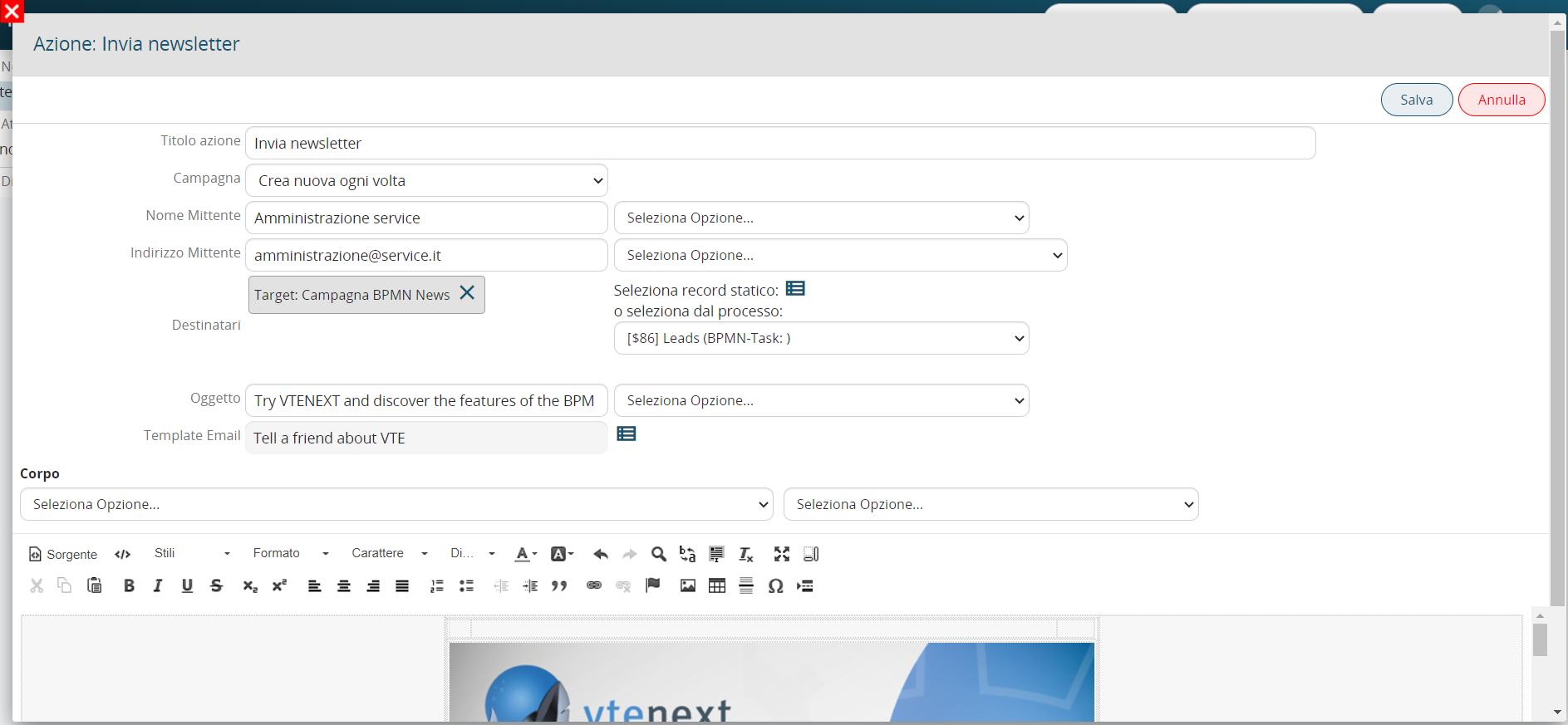
Figure 1