
3.6 Send Newsletter
This action allows you to send a newsletter directly from processthe relatedprocess, linked to a static or dynamic campaign defined withinin the "Campaign" field.
MAINKEY FIELDS
- Campaign -> represents the field through whichdefines the campaign relatedassociated towith the newsletter that willto be sent is defined.sent.
Depending on the situation,scenario, you can select one of the following options:
- Create new eachevery time -> the system will createcreates a new campaign each time the process starts.runs.
- Create and then reuse the same campaign -> the system will only createcreates a campaign only the first time the process starts,runs, then thereuses nextthat times it will use thesame campaign createdfor thesubsequent first time.runs.
- Existing -> allows you to select an existing campaigncampaign.
- From the process -> allows you to select a record offrom the Campaigns module Campaigns involved in the processprocess.
- Sender nameName -> represents the alias relative tofor the newsletter sendersender.
- Sender addressAddress -> represents the email address of the newsletter sendersender.
- Recipients -> allows you to select static records or takenrecords from entities directly involved in the processes.N.B:Note: TheRecords records belonging tofrom the modules Companies,Accounts, Contacts, TargetTargets, and LeadLeads modules can be selected.
- Subject -> represents the subject line of the newsletternewsletter.
- Email templateTemplate -> represents the Emailemail template that will be used as the newsletter body.
- Body -> ThroughUsing the Editoreditor, ityou is possible tocan modify the body by inserting static/dynamic text or HTML/CSS codecode.
As of version 26.04, the following configurable fields have been added:
- Language -> allows you to specify a reference language.
- Reply To -> allows you to enter an email address to which any replies to the newsletter sender will be directed.
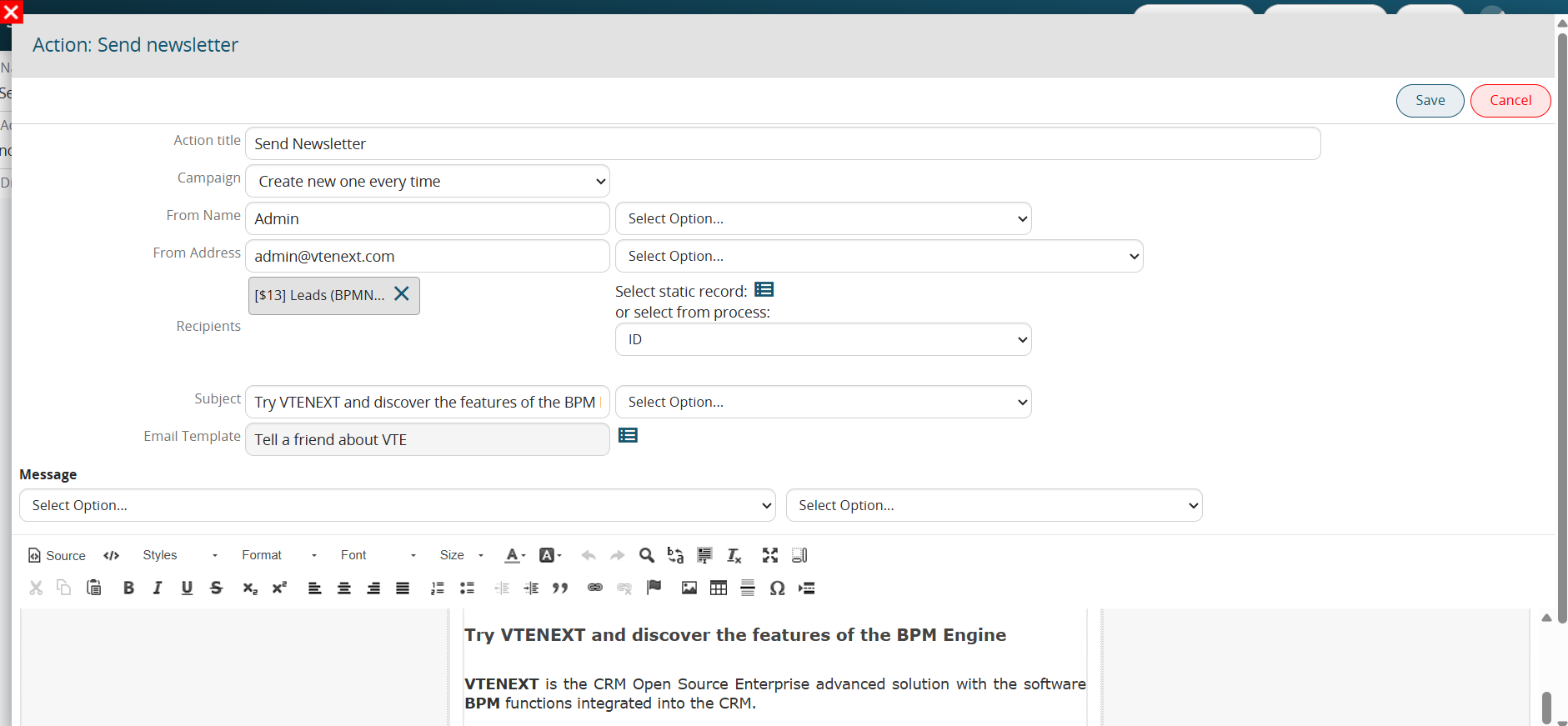
Figure 1