
Worker
The Worker is a background daemon that runs alongside the CRM. When a task takes a long time (such as chatting with an AI, running a process, uploading documents for a vector search, etc..), the Worker handles it asynchronously so the browser does not freeze and the user can keep working. Also it allows the processing to be detached from the browser request, allowing the user to close the tab.
Architecture Overview
Default setup flows
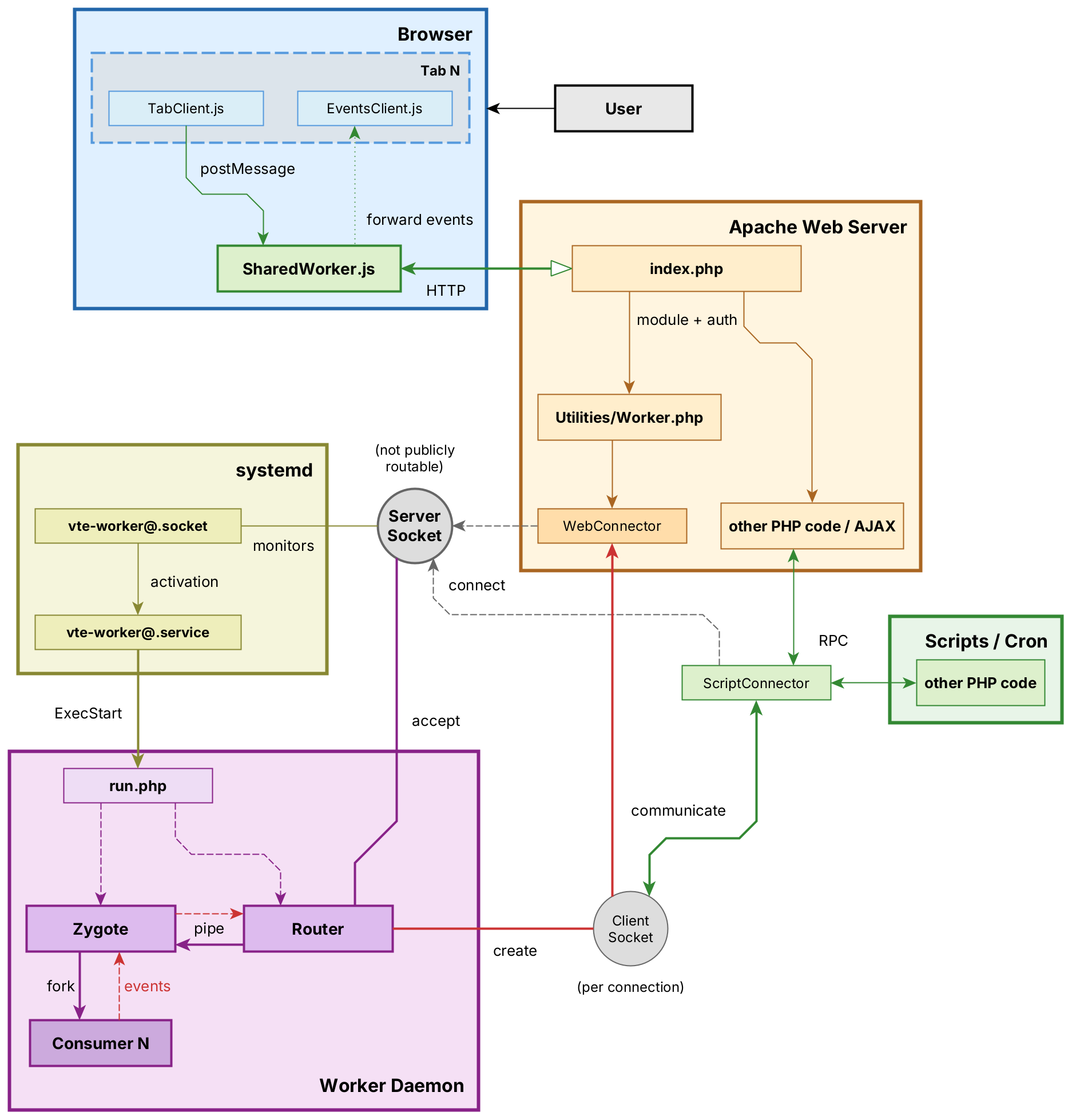
The Worker is composed of three processes that work together:
1. Router
File: include/Services/Worker/Router.php
The Router listens on a Unix socket for incoming connections. When a browser tab or a PHP script connects, the Router identifies who is connecting, decides what to do with the request, and forwards it to the Zygote. It also keeps track of all connected clients and can push live updates (Server-Sent Events) back to browsers.
- Process name:
vte-worker-router - Listens on a socket (Unix
cache_local/worker.sockwith systemd, or a TCP/IP address for cluster setups). The address is configured inconfig.inc.phpvia$worker_socket_URLand must match the path in the systemd socket unit. - Manages client subscriptions for real-time push events
2. Zygote
File: include/Services/Worker/Zygote.php
The Zygote manages a pool of worker processes. When the Router forwards a job, the Zygote forks a Consumer process to execute it. Up to 10 Consumers can run concurrently; if all are busy, the job is queued and executed when a slot becomes available.
- Process name:
vte-worker-zygote - Maximum concurrent Consumers:
CONSUMERS_MAX = 10(configurable in Zygote.php) - Queues excess jobs until a Consumer is free
3. Consumer
File: include/Services/Worker/Consumer.php
The Consumer is a short-lived process that performs the actual work. It connects to the database, loads the user context of the person who requested the task, executes the requested method, and terminates when done. Each Consumer handles exactly one job and then exits.
- Process name:
vte-worker-consumer - Process isolation: a crash in one Consumer does not affect others
- Database connection is established fresh for each job
Communication Between Processes
The three processes communicate through Unix pipes created by stream_socket_pair(). This is faster and lighter than running a full HTTP server inside the Worker.
Client Types
There are two kinds of clients that can connect to the Worker:
| Client | How It Connects | Used By |
|---|---|---|
Web |
Browser → Apache → modules/Utilities/Worker.php (handles web auth) → socket → Router |
Browser tabs (AI chat, notifications). Each web connection holds an Apache process slot. |
Script |
PHP code → ScriptConnector → Unix socket → Router |
CLI scripts, cron jobs, AJAX handlers |
For Web Clients (SSE)
When a browser connects, the Router upgrades the connection to Server-Sent Events (SSE). This allows the Consumer to push data back in real-time — for example, streaming an AI response word by word, or sending a notification as soon as it is created.
Relevant files: WebConnector.php (client side), WebHandler.php (server side), SharedWorker.js (browser — optional, reduces connections to one per browser).
For Script Clients
PHP code connects using ScriptConnector with a 30-second I/O timeout (long enough for background tasks). The connection supports both synchronous calls (wait for response) and asynchronous calls (fire and forget).
Relevant files: ScriptConnector.php (client side), ScriptHandler.php (server side).
Internal Protocol
Messages use a simple text-based format over the socket. Each message is a JSON object with an event type (init, call, return, error, event) and event-specific data. The ProtocolTrait handles encoding and decoding on both sides.
Available Tasks
These are the methods the Worker can execute. Consumer methods are registered in ScriptMethodsTrait (Methods.php) and implemented in Consumer.php. Worker methods execute directly in the Zygote (no Consumer fork).
| Method | Where Executed | Description | Definition |
|---|---|---|---|
llmChat |
Consumer | Send a message to an AI assistant (Agent, LLM, or External WebService). Streams the response back to the browser via SSE. | Consumer.php:162 |
elaborateRag |
Consumer | Upload selected CRM documents to the external AI orchestrator and build the vector database for RAG retrieval. | Consumer.php:601 |
delegateProcess |
Consumer | Execute a BPMN workflow process (ProcessMaker) in the background. | Consumer.php:118 |
resumeProcesses |
Consumer | Resume queued workflow processes. Runs at Worker startup and on demand. | Consumer.php:133 |
sendToAll |
Consumer | Push a custom event to a specific user or to all connected browser sessions. | Router.php:249 |
notifyNow |
Consumer | Send a CRM notification to a specific user in real-time. | Router.php:321 |
workerStats |
Zygote | Returns uptime, number of active consumers, queued jobs. | Zygote.php:219, Router.php:222 |
workerRestart |
Zygote | Restarts the entire Worker (Router + Zygote + all Consumers). Works independently of how the Worker was started (systemd or direct CLI), but only if the Worker is actually running. | Router.php:239 |
Adding a New Task
To add a new job that the Worker can execute, two files must be modified. Because Consumer processes load PHP classes after being forked from the Zygote, changes to existing methods take effect on the next consumer start without restarting the Router or Zygote. Adding a brand new method requires registering it in the trait (step 2) and may need a full restart only for the trait to be recognized.
Step 1: Implement the method in Consumer.php
Add your method inside the //region Methods section of Consumer.php:
protected function convertPdf(int $documentId) {
    global $adb;
    // ... perform work ...
    $this->client->return($result);
}
Useful tools available inside the Consumer:
$this->client->return($data)— send a successful response$this->client->error("message")— signal an error$this->sendToAll(Roles::web, $userId, 'eventName', $data)— push a live event to browsers$this->later(function() { ... })— schedule work for the next event-loop tick
Step 2: Register the method in Methods.php
Add the method signature to ScriptMethodsTrait in Protocol/Methods.php:
/** @return void */
public function convertPdf(int $document_id) {
    return $this->call(__FUNCTION__, get_defined_vars(), ['wait' => false]);
}
Calling the new method
From PHP code (the connector is reused and reconnects on failure):
$conn = ScriptConnector::reuseInstance();
if ($conn->tryConnect()) {
    $conn->convertPdf(42);
}
From the command line:
php -f include/Services/Worker/run.php call convertPdf 42A method that belongs in WorkerMethodsTrait instead (executed by the Zygote without forking a Consumer) uses the same two-step process: add the signature to the trait and implement it in Zygote.php or Router.php.
Broadcasting Events to the Browser
From any Consumer method, you can push real-time data to connected browsers:
// Send to a specific user
$this->sendToAll(Roles::web, $userId, 'myEvent', ['progress' => 50]);

// Send to ALL users
$this->sendToAll(Roles::web, 0, 'myEvent', $data);
On the browser side, events are received through SharedWorker.js and EventsClient.js. The Router maintains a tree of connected clients indexed by user ID, session ID, and instance ID, and dispatches events to the matching tabs.
Operation
Startup
The Worker can be started through systemd socket activation or directly from the command line for testing and custom setups:
php -f include/Services/Worker/run.phpWith systemd socket activation:
- systemd creates the Unix socket (
cache_local/worker.sock) - On the first connection, systemd launches
php run.php run.phploads the CRM environment (config, database, etc.)Worker::start()callspairedFork(), splitting into two processes:- The parent becomes the Router (socket listener)
- The child becomes the Zygote (consumer pool manager)
- When a job arrives, the Zygote forks a Consumer to execute it
- The Consumer runs the job and exits
Installation
sudo tools/worker installThis copies the systemd unit files (vte-worker@.service and vte-worker@.socket) to /etc/systemd/system/, enables the socket, and starts it. Both files are systemd templates that take the relative path from /var/www/html as the instance parameter (e.g. vte-worker@vte-agentic), which allows running multiple Workers for different VTE installations on the same machine.
If your installation differs from /var/www/html/PATH, you must edit the templates manually or with systemctl edit [--full] for both vte-worker@.socket and vte-worker@.service, before installing.
Commands
| Command | Effect |
|---|---|
tools/worker install |
Install systemd units, enable and start the socket |
tools/worker restart |
Send a restart signal to the running Worker |
tools/worker status |
Print uptime, number of active consumers, queued jobs |
Signals
| Signal | Effect |
|---|---|
SIGTERM / SIGINT |
Graceful shutdown: stop accepting new connections, wait for all running Consumers to finish, then exit. |
SIGHUP / SIGUSR1 |
Reload. |
Configuration
| Setting | Location |
|---|---|
| Maximum concurrent Consumers | Zygote.php:29 — CONSUMERS_MAX |
| Socket path | systemd/vte-worker@.socket — ListenStreamconfig.inc.php — $worker_socket_URL |
| Log file | logs/worker.log |
Troubleshooting
Enable Logging
Logging is disabled by default. To enable it, set the static flag before starting the Worker:
\Vtenext\Services\Worker\Worker::$enableLog = true;Logs are written to logs/worker.log. The log format includes a timestamp, the process role, and the message.
In the browser, put the console verbosity to debug.
Common Issues
| Symptom | Likely Cause |
|---|---|
| Connection refused | The Worker is not running or the socket path is incorrect. Check $worker_socket_URL in config.inc.php and verify the socket file exists. |
| Consumer not starting | Process limit reached (RLIMIT_NPROC). The Worker attempts to raise it to 1000 + CONSUMERS_MAX at startup. |
| Job queued but never runs | All 10 Consumer slots are occupied by long-running tasks. Check tools/worker status for current usage. |
SharedWorker
- Firefox — visit about:debugging#workers (copy-paste) and press Debug then you can inspect everything and put breakpoints. Logs are also shown in the first tab that spawned the SW (yes 3 times, it's a browser bug as of June 2026) and in the browser console in multi-process mode (Ctrl+Shift+J).
- Chrome — visit chrome://inspect/#workers (copy-paste) and press Inspect, same story. No logs are shown in individual tabs.
Technical limitations
Browsers connections cap
Web connections from browser tabs rely on Server-Sent Events (SSE), which keep a long-lived HTTP connection open to the server. Browsers enforce a hard limit of 6 concurrent connections per domain (HTTP/1.1). The SharedWorker.js script multiplexes all tabs through a single SSE connection per browser, bypassing the limit entirely.
Disconnection detection
TCP provides no built-in notification when a peer disconnects. To detect that a browser has closed the connection, PHP must attempt to write to the socket. The WebConnector handles this by writing a newline to the output buffer at every read tick (default every 10 seconds). This means a disconnected browser may not be detected for such time, and an inactive but still connected tab generates a small amount of periodic traffic.
Xdebug and set_time_limit
When the Xdebug extension is loaded, set_time_limit(0) (which normally removes the execution time limit) does not work reliably. Xdebug overrides PHP's internal timer and enforces its own xdebug.max_nesting_level and related constraints, which can cause long-running Consumer methods to be terminated prematurely on development environments where Xdebug is active. If the Worker behaves unexpectedly during development, disable Xdebug or set xdebug.mode=off in the PHP configuration.
File Reference
include/Services/Worker/
├── run.php                          # Entry point (called by systemd)
├── Worker.php                       # Base Worker class + WorkerTrait
├── Router.php                       # Socket listener, client registry, SSE push
├── Zygote.php                       # Consumer pool manager, job queue
├── Consumer.php                     # Task executor (llmChat, elaborateRag, etc.)
├── utils.php                        # shared utilities
├── Protocol/
│   ├── Protocol.php                 # Wire protocol encode/decode
│   ├── Roles.php                    # Role constants (router, zygote, consumer, etc.)
│   ├── Methods.php                  # Method traits (ScriptMethods, WebMethods, WorkerMethods)
│   ├── ClientHandler.php            # Server-side connection handler
│   ├── BaseConnector.php            # Client-side connector base class
│   ├── ScriptHandler.php            # Handler for script connections
│   ├── ScriptConnector.php          # Connector for PHP scripts
│   ├── WebHandler.php               # Handler for web connections (SSE)
│   └── WebConnector.php             # Connector for browser (HTTP to socket bridge)
├── systemd/
│   ├── vte-worker@.service          # systemd service template
│   └── vte-worker@.socket           # systemd socket template
├── SharedWorker.js                  # Browser SharedWorker (multiplexes connections)
├── TabClient.js                     # Client for tab-to-tab messaging
└── EventsClient.js                  # Event subscription client in the browser

modules/Utilities/Worker.php         # HTTP bridge (Apache -> Worker socket)
modules/Settings/WorkerConfig.php    # Admin settings panel
modules/Settings/WorkerConfig.tpl    # Smarty template for the admin panel
tools/worker                         # CLI management tool
logs/worker.log                      # Log file