
15.10 External Applications
This vtenextfunctionality function,of vtenext, located in Settings > External Applications,Applications, allows youexternal services to configureconnect to the CRM asusing anthe OAuth2 Server,authorization enabling other applications to connect directly to vtenext.protocol.
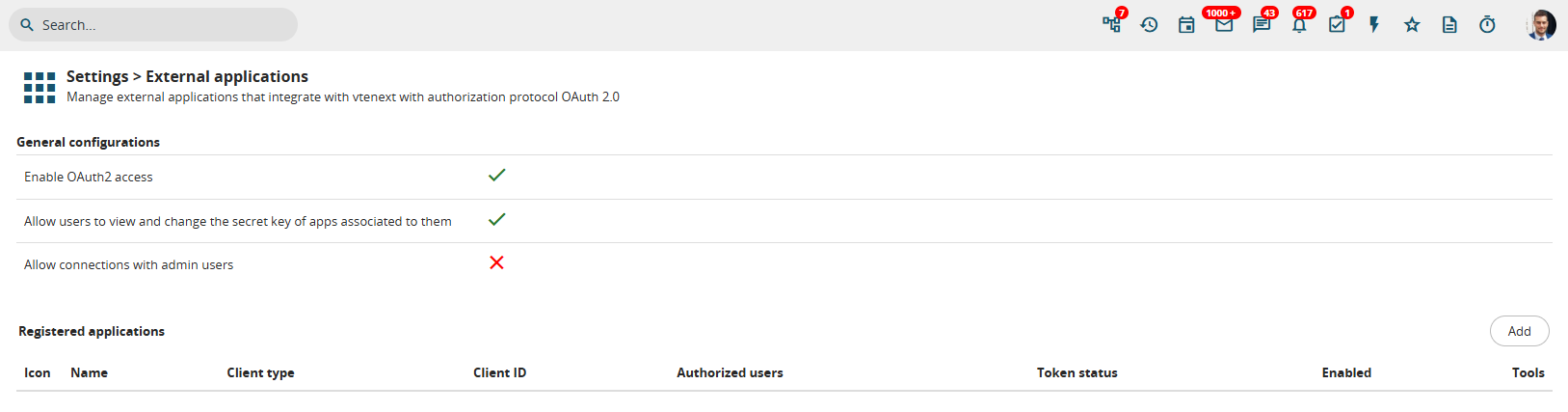
Configuration screenpage for External Applicationsapplications
So howHow does it workwork? exactly?External services, here called External Applications, connect to vtenext via REST API, passing a access_token to authenticate. This token is provided by vte via the OAuth2 providesprotocol, authorizationusing flowsone that allow external applications to accessof the CRM2 usingavaialble tokens.flows. TheseLet's tokens enable applications to send requests so that the CRM provides the requested data and sends it back to the requesting application. Below issee an explanatory image:example:

This depicted flow is called Client Credentials.Credentials Thereand there are three3 parties involved:parties:
Application (
e.g.,foraexampleManagementanSystem)Authorization
Server (often equivalent to point 3)
Data Server (in ourcase case,of vtenext)
In practice,Briefly, the Application (whicheg: couldERP bereading aInvoices), Management System that needs to read invoices from vtenext) requests an access key (Client ID and Secret Key) fromasks the Authorization Server tothe accessAccess Token, sending the Data Server. In our example, vtenext generates the key pair (Client ID andID, Secret Key) andto providesauthenticate themitself. If the credentials are correct, an Access Token is given to the application,Application, whichthat usescan thembe used to requestretrieve information from vtenext via REST API.
An example of REST API call with access fromtoken theis:
curl Server-X (whichPOST is'<VTE_URL>/restapi/v1/vtews/query' also\
  vtenext).-H The'Content-Type: Authorizationapplication/json' Server\
  then-H grants'Authorization: theBearer Application<ACCESS_TOKEN>' a\
  Token,-d allowing'{"query":"SELECT it* toFROM read invoices directly from the CRM.Invoice;"}'
The advantage of access tokens is that thethey access Token hashave a limited duration,time canvalidity be(usually revoked1 server-side,hour) and enablesit's controlledrevokable server side, so it's possible to allow access to applications.external Mostapps importantly,in systema passwordscontrolled areway, notwithout disclosedproviding or shared. Naturally, whenthem the Tokenmain expires,password. After the token expiration it's necessary to obtain a new one must be generated byone, repeating the above-mentioned procedure.
This flow is recommended for communication between 2 servers, without human intervention after the initial configuration
OAuth2 Authorization Code Flow
The second type of flow is called OAuth2 Authorization Code.Code Thisand flowit involves an additional element,party, which we will identify ascalled the User.

ExampleIn Scenario:
Let'sexample, assumethe Application that the application connecting to vtenext this time is Facebook, which needs to read Leads stored in vtenext. However, Facebook is linked to a User who is the requester of this data. This means the user is actually asking Facebookwants to connect to vtenext is, for example, Facebook, that needs to retrievereads the user's Leads.
InThe difference is that it's not Facebook directly that requires this case,data, but the Useruser alsodelegates hasFacebook anto accountaccess his own data present in vtenext. The goalobjective is forthen to provide Facebook with this data, without giving it the Useruser's full credentials (password) to grantthe system. So Facebook permissionwill ask the user to readobtain Leadsan fromauthorization vtenext.code, This requires authentication from the User on vtenext, which willexchanged then respond toby Facebook with an OAuth2access Authorizationtoken, Code.used then to retrieve the data. The access token can be used once only, or renewed automatically (if the user granted this type of access).
So, even though Facebook willgot use this Auth Codeaccess to requestLeads ain temporary Access Token from the Authorization Server, finally allowingvte, it tonever read the datauser frompassword and after the CRM.expiration of the access token, it won't have access anymore.
This flow is recommended when the application needs to ask user's permission to access the data.
KeyGeneral Benefits:configuration
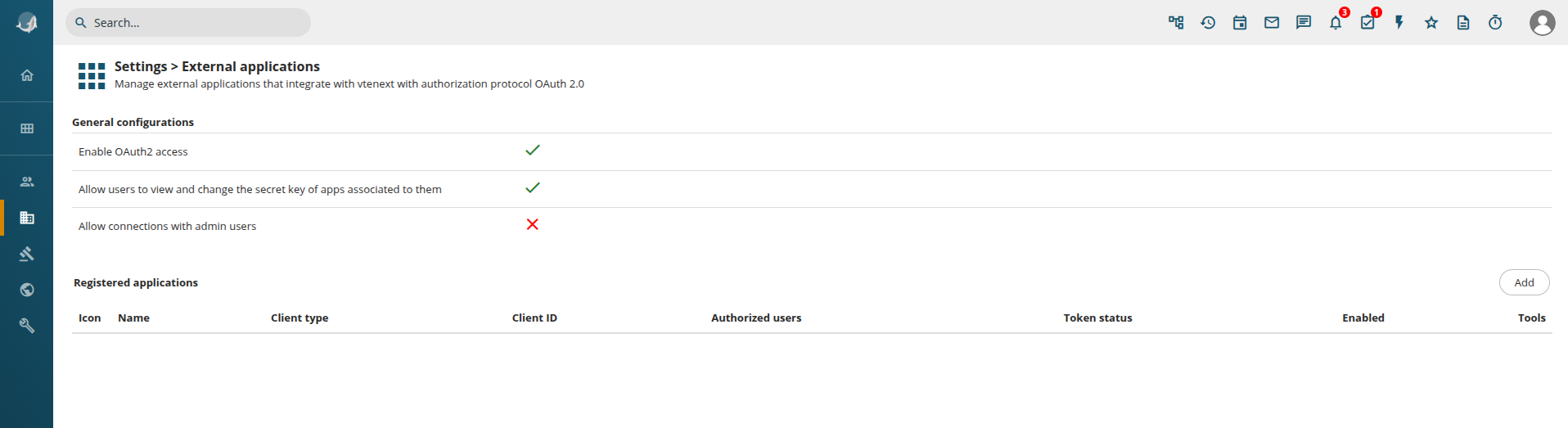
At the beginning of the page, there are some general settings::
- Enable
FacebookOAuth2gainsaccess: enable or disable globally the use of OAuth2 protocol. If disabled, no external app can use the REST API with an access token (standard authentication via access key is allowed)
Afterconnections approximatelywith oneadmin hour,users: theif accessenabled, expires,external keepingapps sensitivecan dataconnect secure.
Service Account Configuration
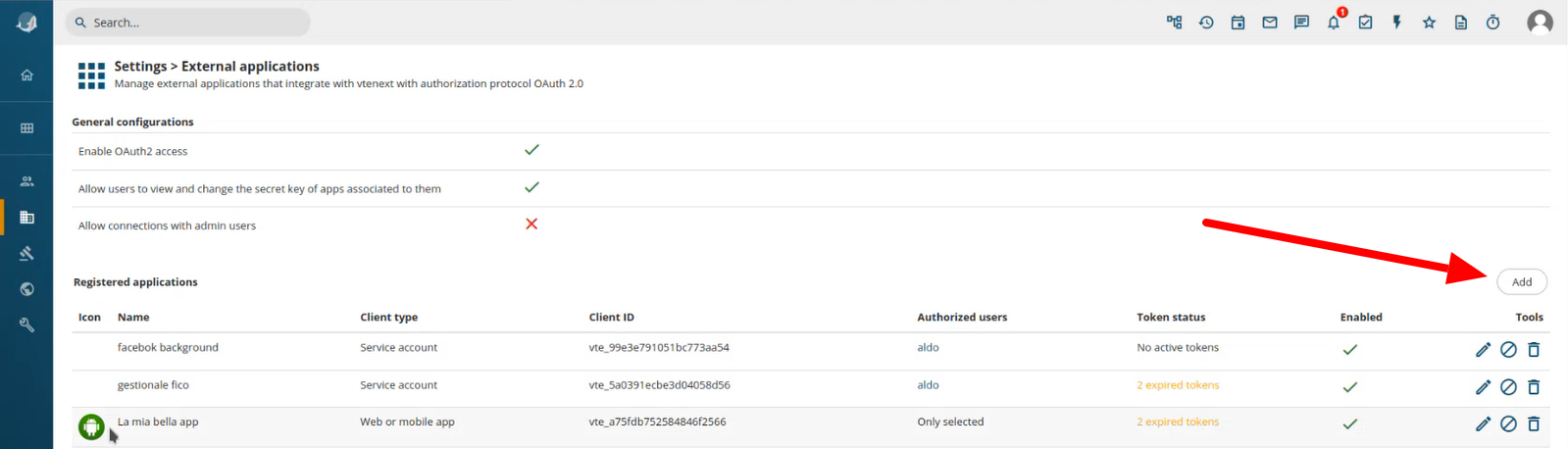
Click on the button ADD on the right
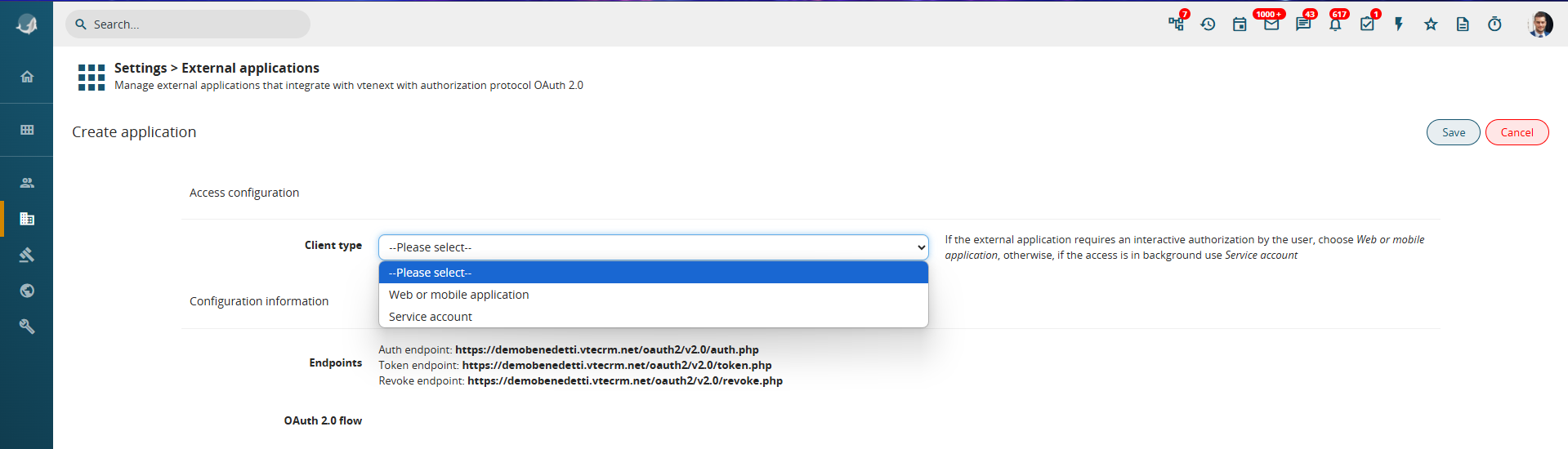
Steps to configure a Service Account:
-
Click on the ADD button on the right.
-
A wizard screen appears to guide the configuration process.
-
Select the Client Type, choosing between:
-
Web or Mobile Application (if access requires user login)
-
Service Account (if access occurs in the background between two servers)
-
To configure a Client Credentials flow, select:
-
Key Type = Service Account
-
Secret Type = Secret Key
Additional configuration fields will then appear:
Configuration details:
-
Name: Assign a descriptive name to the configuration (e.g., connection to a management system).
-
Client ID & Secret Key: These are auto-generated.
-
Scope: Define the level of
dataAPI access (read-only, write-only, or read/write). -
User Association:
IfAllread/writeoperationsaccessdoneisinchosen, only data belonging to the selected uservte will beaccessibleexecuted(basedasonthistheuser.user’sOfpermissions).course,Ifvisibilityfullrulesaccessapplyisaccordingneeded,toanroleAdminanduserprofileshould be selected.configuration.
By providing the Endpoints, Client ID, and Secret Key to the external system’s technician, the connection can be finalized.
For JWT signed authentication, the Secret Key is not a simple string, but a cryptographic key in PEM or JWK format, generated only after saving the configuration.
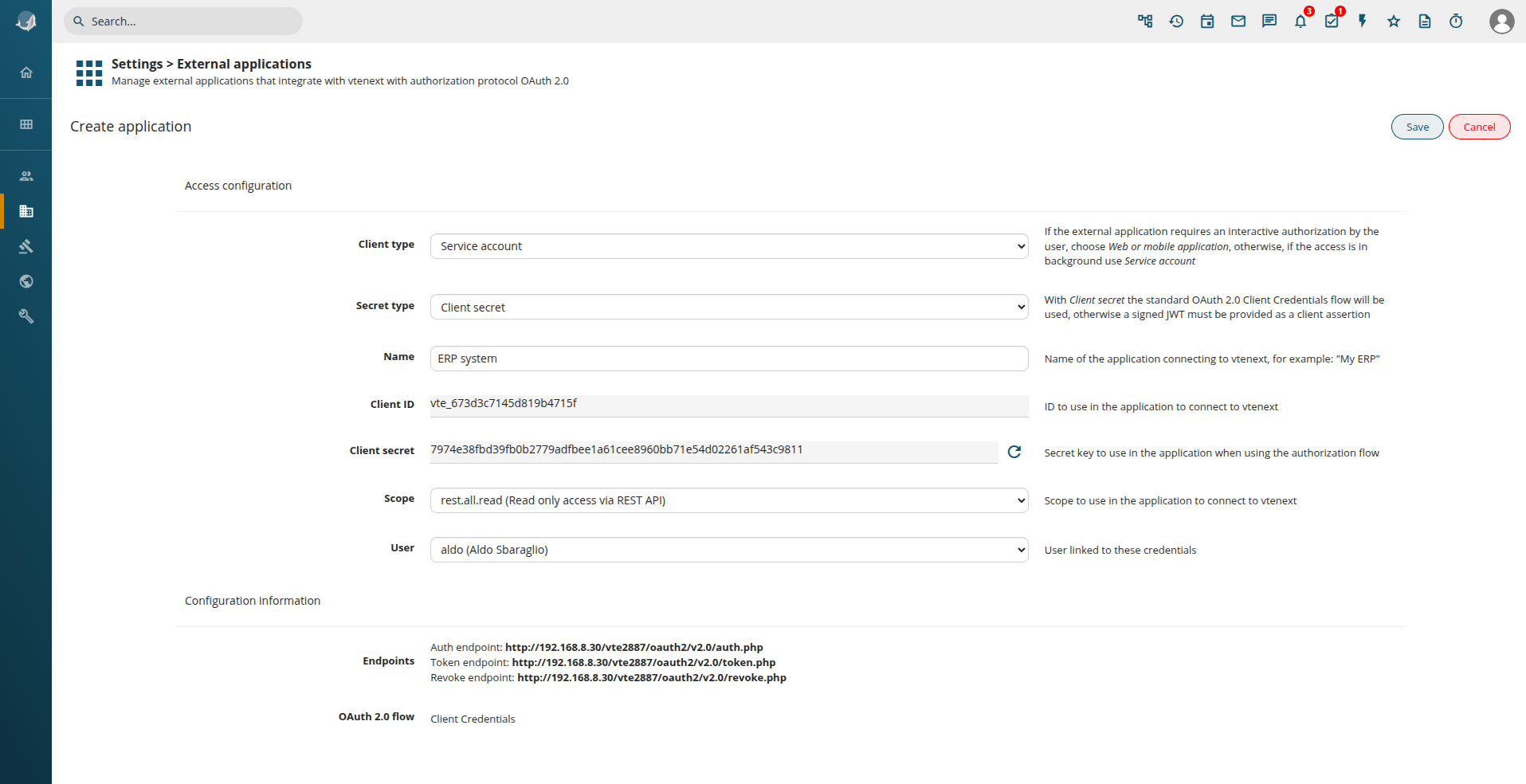
Web or Mobile Application Configuration
Steps to configure Web or Mobile Application:
Click on the ADDbutton buttonADD, on the right.right
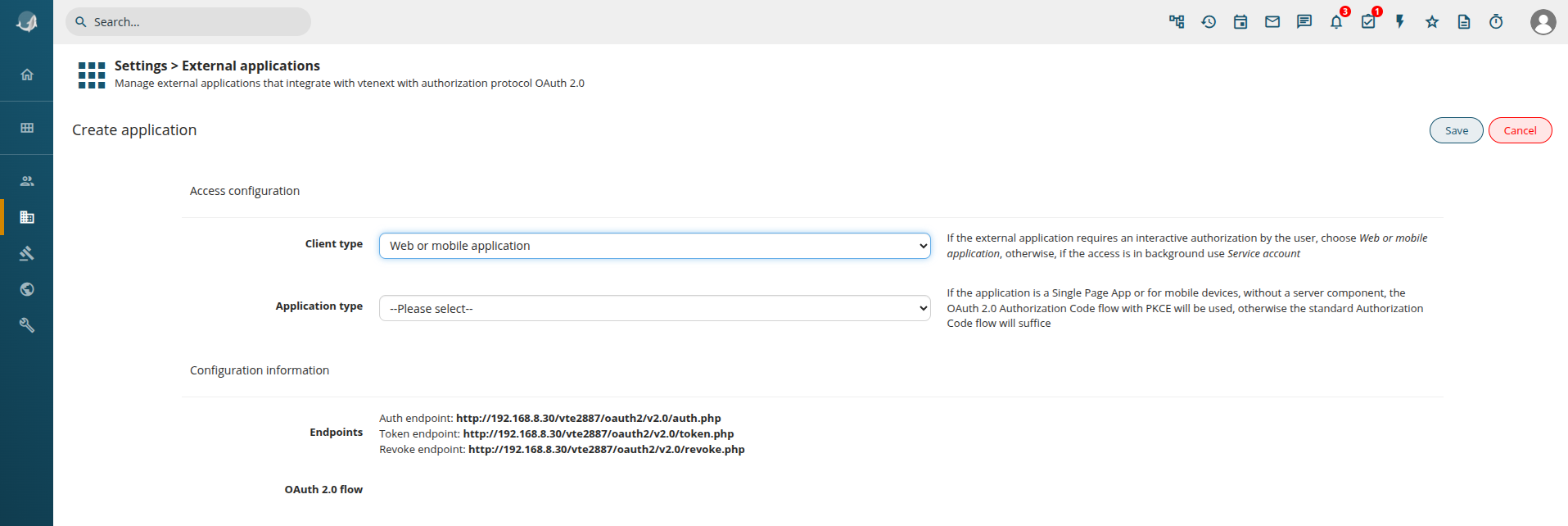
TheYou wizardare screenpresented appearswith again.
Selectbut this time choose Web or Mobilemobile Applicationapplication. asSo we get the application type.following:
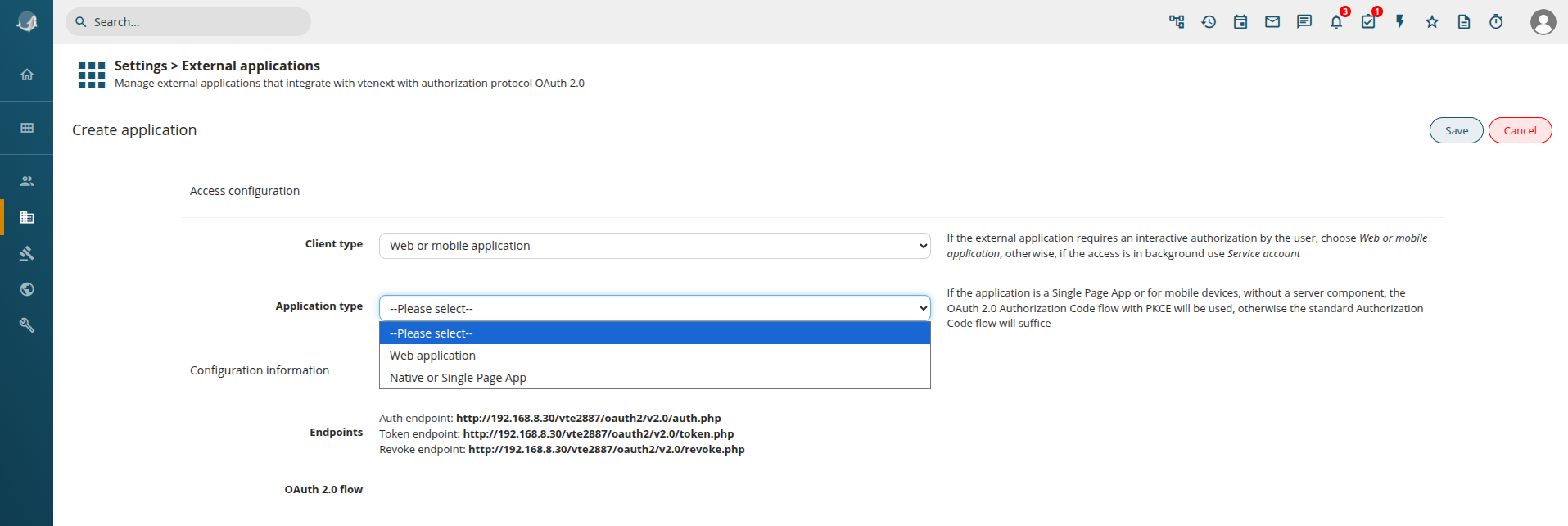
Application Type Options:
-
Web Application: For browser-based applications.
-
Native or Single Page App: For mobile or native
apps.apps (same as Web Application, but the OAuth2 flow requires PKCE).
For a Web Application, the configuration follows a similar process to the Service Account setup:
-
Client ID & Secret Key are generated.
-
Define the Scope (read-only, write-only, or read/write).
Offline Access:
By enabling Offline Access, insteadtogether of expiring after a set duration,with the Tokenaccess remains valid indefinitely. The server will issuetoken, a refresh token, allowingis thereturned, applicationthat can be used to renewautomatically obtain a new access token after its access without requiring user re-authentication.expiration.
Redirect URL Configuration:
-
After logging into vtenext, the User is redirected back to the requesting application (e.g., Facebook).
-
Access control settings allow restricting access to All Users or Selected Users/Groups.
ManagingFrom Registeredthe Applications
Frompage, Settings > External Applications, allit's possible to see the list of registered applications areand listed.deactivate them or revoke all the active tokens:
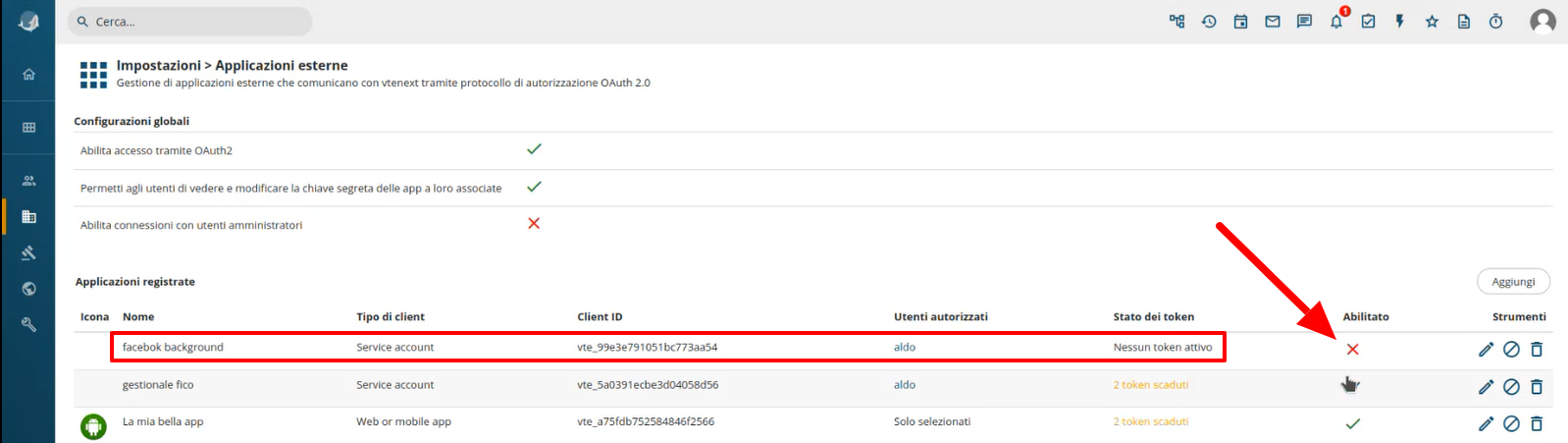
In this list it's possible to see ManagingExpired Applicationtokens. Access:In case of expired tokens the user will have to re-authenticate to obtain new ones. On the right some tools are present:
-
Revoke
Access:If, for example, Facebook no longer needs access to vtenext, you can disable access by clickingedit thegreen checkmark in the list.configuration -
Token
Expiry:revokeExpiredallor inactiveaccess tokensappear in the list. Users must log in again to renew them.
Available Actions:
Edit Configuration
Revoke
Allremove Tokens
Delete Configurationconfiguration
Linked Applications in User Preferences

In User Preferences, under Linked Applications, users can view all applications associated with their account.
-
View Configuration Details: Users can see (but not modify) the configuration unless they are Admins.
-
Disable or Revoke Tokens: Users can manually revoke
applicationaccessaccess.tokens.