
12.6 SDK fieldAction: vte_json_string
This SDK function allows you to convert a string into JSON format by managing compatibility with special characters, so as to format them correctly and avoid conflicts with it.
It is mainly used to format strings in order to perform REST Web Service calls (always configurable by process via the dedicated standard action "Call External Web Service") without encountering syntax errors on the JSON.
Specifically, if the string contains special characters used in JSON syntax such as double quotes ("), slash (/) and backslash (\), the function will automatically insert additional backslashes to prevent the JSON from generating an error.
As the only parameter, therefore, we pass the content of any field (as long as it is a string) or a simple static value.
EXAMPLE OF USE
To better understand how it works, below is an example of using the SDK function vte_json_string() to format the "Description" field containing the following string:
And \ at that point / I told him: "Goodbye!" (Figure 1)

Figure 1
Within an Action Task we proceed with the configuration of an Update Entity action involving the "Description" field.
Specifically, we go to call the interested SDK function through the "Option Selection" picklist and accessing the "SDK Functions" section (Figure 2)
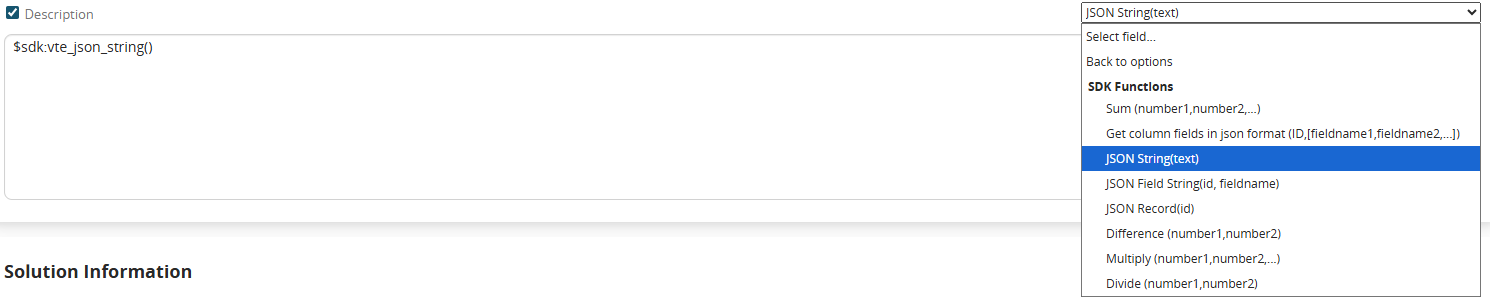
Figure 2 (click on the image for a higher graphic resolution)
Finally we pass as the only parameter the content of the field to be formatted (Figure 3)
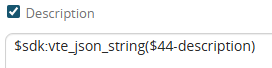
Figure 3
The result generated by the function will be as shown in Figure 4

Figure 4