2.1 Start Event e Timer Start Event
START EVENT
It represents the unique point from which each individual process begins. This means that only one can be present in each process, as the flow starts from a single point.
Note: It must always be followed by a control task, as this represents the task where the conditions are entered that, if met, will trigger the process.

Timer Start Event

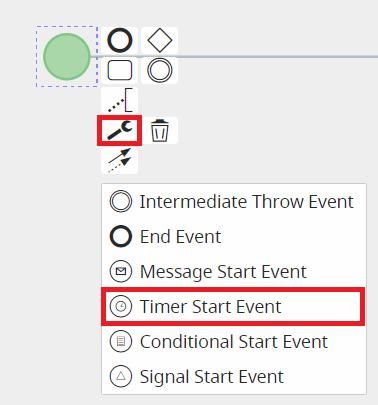
A particular type of timer is the "Timer Start Event", which is applied to the Start Event to allow a specific process to begin at a predefined time interval.
It can be selected in diagram editing mode by first clicking on the Start Event, then on the wrench icon that appears among the selectable options, and finally choosing the "Timer Start Event" option.
Note: This type of start event must be followed by an action task, as it only allows actions to be executed.
Other types of Start Events are currently not implemented.
IMPORTANT NOTE: As of version 24.08, they have been completely removed.