
Nuova pagina12.13 SDK fieldAction: vte_formula
This SDK function allows you to replicate the functionality of formula fields.
Consequently, you can use all algebraic operators within the formulas: plus (+), minus (-), divided by (/), and multiplied by (*).
EXAMPLE 1
To better understand how it works, an example of using the `vte_formula()` SDK function is provided below. This example calculates the content of the "Delta Budget Invoiced Open Order Value" field by applying the following formula:
"Budget" - ( "Current Year Invoiced" + "Open Order Value" ) (Figure 1)
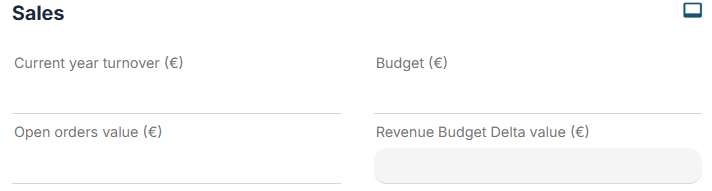
Figure 1
Within an Action Task, we proceed to configure an "Update Entity" action involving the field "Delta Budget Invoiced Open Order Value."
Specifically, we call the relevant SDK function via the "Option Selection" picklist by accessing the "Date Functions" section (Figure 2).
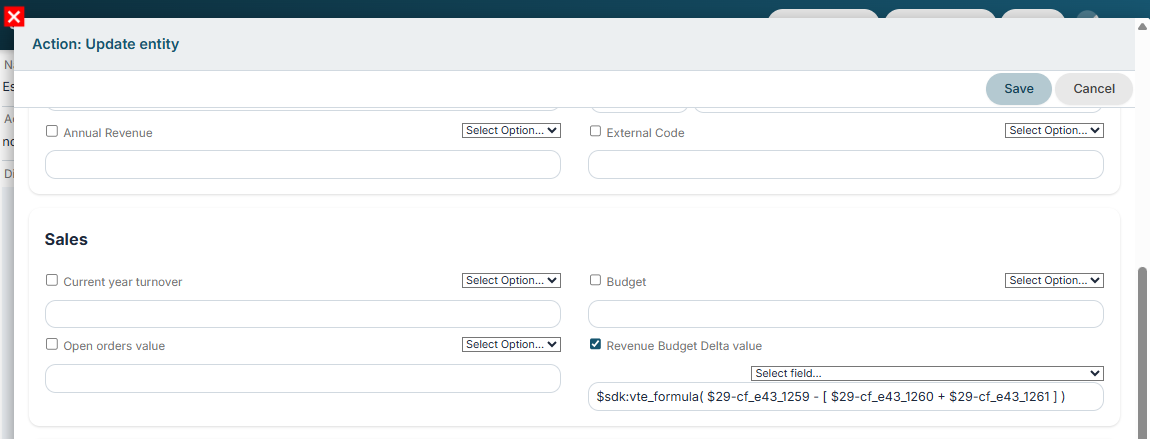
Figure 2
The result will be like the one shown in Figure 3.

Figure 3
It is also possible to configure If/Else controls using the following structure:
if condition then true_case else false_case end (in this case, >, <, and == operators can be used; the != operator is not permitted).
EXAMPLE 2
To better understand how it works, an example is provided below showing the use of the SDK function `vte_formula()` to insert the value "Mr." into the "Salutation Formula" field if the "Gender" field is set to "Male," or the value "Ms." otherwise. (Figure 4)

Figure 4
Within an Action Task, we proceed to configure an "Update Entity" action involving the "Salutation Formula" field.
Specifically, we select the relevant SDK function via the "Option Selection" picklist by accessing the "Date Functions" section (Figure 5).
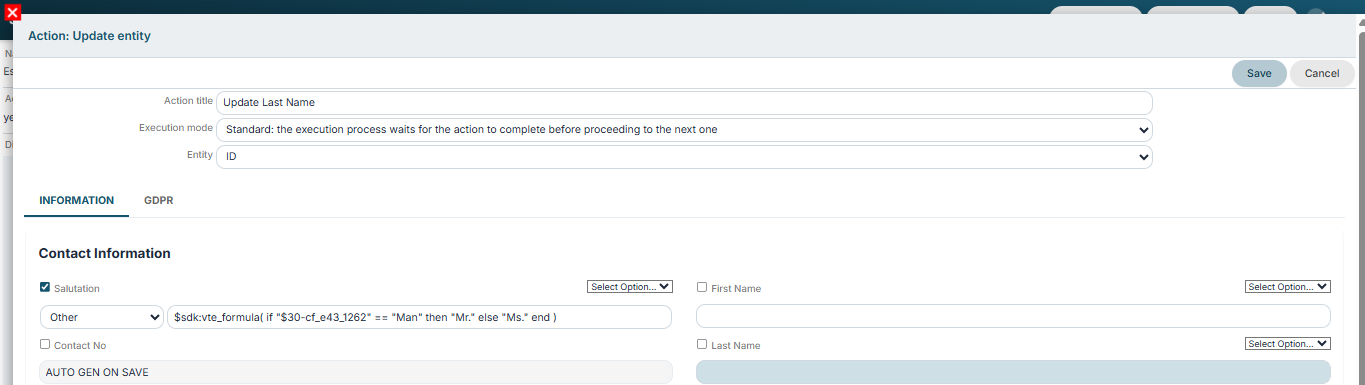 Figure 5
Selecting Gender = Male when adding a contact will result in the display shown in Figure 6.

Figure 6
It is also possible to perform operations using date-type fields; specifically, there are two operators:
time_diffdays: returns the difference in days between two dates
time_diff: returns the difference in seconds between two dates.
Note: If only a single parameter is entered for the time_diff and time_diffdays functions, the value returned in the formula field is the difference between the current date and the date provided as the parameter.